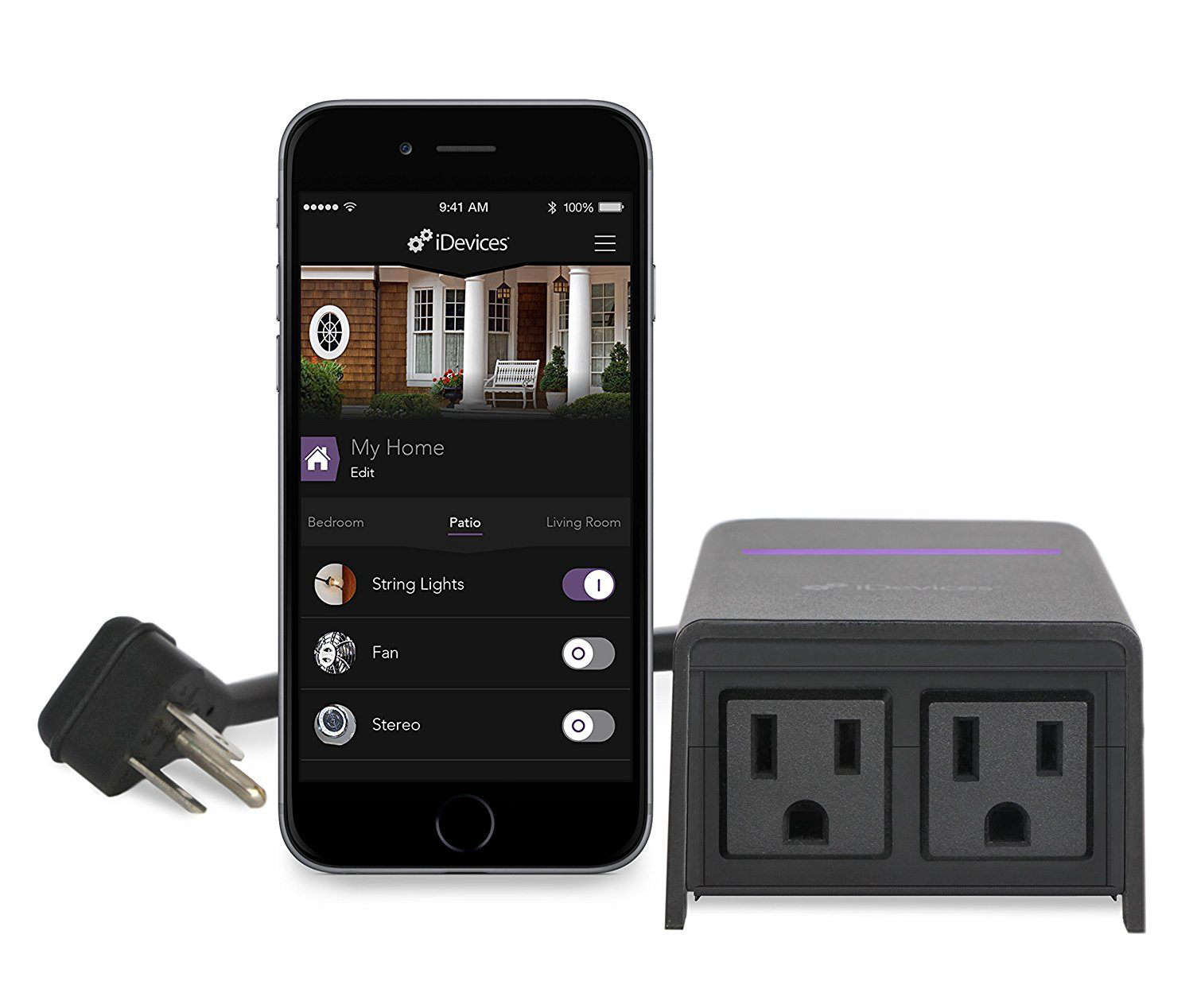
The iDevices Outdoor Switch belongs to an earlier, more adventurous chapter of the smart-home storyback when adding Siri control to patio lights felt like inviting a tiny wizard to live near the barbecue. Yet the product still has a practical idea at its core: take ordinary plug-in outdoor equipment and give it schedules, remote control, voice commands, and energy monitoring without replacing the equipment itself.
It suits holiday lights, patio string lights, fountains, floodlights, and other simple equipment that resumes operation when power returns. It is less convincing for high-draw appliances or buyers expecting Matter and independent outlet control.
What Is the iDevices Outdoor Switch?
The iDevices Outdoor Switch is a Wi-Fi smart plug designed for outdoor installations. Its weather-resistant housing connects to a grounded 125-volt outlet through a short, heavy-duty cord, while two receptacles on the bottom provide switched power for connected accessories.
Both receptacles operate as one zone. When the switch turns on, both outlets turn on; when it turns off, both go dark together. This arrangement is convenient for two sets of holiday lights but less useful when one device needs a different schedule.
The published manual rates the unit for 1,200 watts or 10 amps at 125 volts and specifies 2.4 GHz 802.11 b/g/n Wi-Fi. The housing is rated for rain-tight operation only when mounted correctly, with the body upright and the receptacles facing downward. The documented operating-temperature range is -4°F to 122°F.
Core Features at a Glance
- Two outdoor receptacles controlled together
- Remote on/off control through the iDevices Connected app
- Scheduling, scenes, notifications, and energy reporting
- Voice-control integrations for Siri, Alexa, and Google Assistant
- IFTTT support through the iDevices platform
- No separate smart-home hub required for basic app operation
- A physical side button for manual control and resetting
Design: Rugged, Useful, and Definitely Not Petite
No one will mistake the iDevices Outdoor Switch for a minimalist travel adapter. The main enclosure is chunky because it must hold the Wi-Fi electronics, relay, status lighting, and weather-protected outlet assembly.
A short power cord keeps that bulk from hanging directly on the wall receptacle, which is good for the outlet but means the switch needs a nearby mounting point. The included screw supports the device through a rear hanging tab.
Correct mounting is not decorative busywork. The body should remain vertical, the cord should not carry its weight, and the two receptacles should face downward. That orientation helps rain run away rather than collect around the sockets. Independent reviewers also noted that the unit can be awkward near low porch outlets because the short, stiff cord limits positioning options.
A large side button provides immediate on/off control, so guests do not need a six-minute app seminar. The status LED also communicates pairing, network, identification, and reset states.
Smart-Home Compatibility and Everyday Control
Broad ecosystem support was one of the switch’s strongest selling points. iDevices advertised Apple HomeKit and Siri, Alexa, Google Assistant, and IFTTT. The Connected app remains listed in Apple’s App Store and Google Play, where its description still mentions remote control, schedules, energy reporting, scenes, notifications, and voice integrations.
Apple Home and Siri
The Outdoor Switch was built during the HomeKit era and uses an eight-digit setup code. Once added, owners can assign it to a room, name it something natural such as “Patio Lights,” include it in scenes, and operate it through Siri.
Current Apple Home features allow compatible accessories to participate in schedules, scenes, and automations. Remote Apple Home control generally requires a HomePod or Apple TV configured as a home hub.
Alexa and Google Assistant
Alexa and Google Assistant support can make outdoor lighting feel pleasantly effortless. “Turn on the backyard lights” beats wandering into a dark yard while waving a phone like a confused airport marshal.
However, independent testing found that enabling voice assistants could be less intuitive than basic app setup, partly because the integrations had to be activated through the iDevices app rather than discovered through the most obvious setup process.
No Matter Advertising
The product’s published documentation predates Matter and does not advertise Matter compatibility. That does not automatically make the switch useless, but it does make it a legacy choice.
A buyer building a new smart home may prefer a current outdoor smart plug with Matter support, longer expected software life, simpler onboarding, and outlets that can be controlled independently.
How to Set Up the iDevices Outdoor Switch
Basic installation follows a familiar smart-plug routine:
- Mount the switch upright near a grounded outdoor receptacle.
- Make sure the phone is connected to the intended 2.4 GHz Wi-Fi network.
- Open the iDevices Connected app and place the switch in pairing mode.
- Select the accessory, confirm the network, and assign a useful name and room.
- Enter the eight-digit code printed on the unit or its original documentation.
- Test manual, app, and voice control before arranging cords permanently.
Why the 2.4 GHz Requirement Matters
The 2.4 GHz requirement is the most common speed bump. Modern routers frequently combine 2.4 and 5 GHz bands under one network name. That convenience can occasionally confuse the onboarding process used by older smart-home products.
Temporarily moving closer to the router, confirming that 2.4 GHz is enabled, disabling aggressive band steering, or using a dedicated 2.4 GHz guest or IoT network can help. Avoid permanently weakening router security simply to connect one aging accessory.
Resetting the Switch
If pairing mode expires, the manual instructs users to hold the side button for about five seconds until the blue light blinks faster. A factory reset requires holding the button for roughly ten seconds until the LED flashes red, after which the unit restarts its pairing sequence.
Performance and Reliability
Reviewers generally found the iDevices Outdoor Switch effective for uncomplicated outdoor loads. TechGearLab reported quick app response and straightforward setup, although reconnection after an outage could be slower when the switch had been off. MacRumors described reliable operation but criticized the bulky enclosure and short cord.
Outdoor reliability depends heavily on signal strength. Exterior walls, foil-backed insulation, masonry, metal siding, and distance can weaken Wi-Fi before it reaches the patio.
Smart plugs use little bandwidth, but they still require a stable connection. Test the intended location with a phone connected to 2.4 GHz Wi-Fi. When a simple webpage struggles to load there, the switch may also spend its evenings pretending it has never met your router.
Schedules can run patio lights near sunset, limit holiday displays to evening hours, or stop a fountain overnight. Energy reporting estimates combined consumption, but it cannot separate the two outlets because they share one controlled circuit.
Best Uses for the iDevices Outdoor Switch
Holiday and Seasonal Lighting
This is the switch’s natural habitat. Two lighting runs can share one evening schedule, eliminating nightly trips to a cold outlet. It works best when the entire display follows one timetable.
Patio String Lights
String lights usually restart automatically when power is applied. Add them to a “Patio Dinner” scene, and one command can set the mood without interpretive dance near the extension cord.
Small Fountains and Landscape Features
The manual lists many fountains as suitable examples, provided they remain within the electrical rating. Because pump startup demand can exceed running wattage, check the equipment label and manufacturer guidance.
Security and Occupancy Lighting
Scheduled exterior lights can reduce dark entrances and support an occupied appearance during travel. A smart plug is not a security system, but it can complement a broader lighting routine.
Important Limitations
The Outlets Are Not Independent
Two receptacles may look like two controllable channels, but they function as a single switch. You cannot run a fountain during the day and string lights at night unless both devices share the same schedule or one has its own downstream control.
The Load Ceiling Is Modest
The official rating is 10 amps or 1,200 watts. The safe-use guide specifically recommends against using the unit with air conditioners. High-draw heaters, large pumps, compressors, and similar appliances should not be assumed compatible merely because their plugs fit.
Rain-Tight Does Not Mean Submersible
Proper vertical mounting is part of the weather protection. Do not leave the body lying in standing water, bury connections in snow, or aim a hose at it.
Outdoor electrical connections should use suitable weather protection and a GFCI-protected receptacle. Electrical-safety guidance recommends GFCI protection wherever water may contact electrical products, including outdoor locations.
It Is an Aging Platform
As of July 2026, Hubbell’s current iDevices page highlights wall switches, dimmers, wall outlets, and thermostats but does not feature the Outdoor Switch. Retail pages and manuals remain accessible, and the Connected app is still listed, but the missing product from the current lineup suggests buyers should treat it as legacy hardware rather than a future-proof purchase.
This is an inference from the current official catalog, not a formal discontinuation announcement.
Outdoor Electrical Safety Tips
A smart plug does not increase the capacity of an electrical circuit. Add the wattage or amperage of everything connected to both outlets and keep the total below the manufacturer’s limit.
- Use a grounded, GFCI-protected outdoor receptacle.
- Inspect the switch, cord, and plug for cracks or damaged insulation.
- Mount the enclosure upright with the outlets facing down.
- Use outdoor-rated extension cords only when necessary.
- Keep plug connections elevated and away from standing water.
- Do not connect appliances that exceed the 10-amp rating.
- Do not open or modify the enclosure.
When there is uncertainty about a pump, heater, motor, or other demanding load, consult the equipment manufacturer or a qualified electrician. Electricity is famously resistant to optimistic guessing.
Troubleshooting Common Problems
The Switch Will Not Join Wi-Fi
Confirm that the router’s 2.4 GHz band is active and that the phone is connected to the same network. Move the switch closer to the access point during setup and temporarily disable VPN services or mobile-data switching that may interrupt local discovery.
The App Shows the Switch as Unavailable
Check whether other devices can reach the same Wi-Fi access point. Restart the router and power-cycle the switch. If the status light indicates a lost network connection, allow a few minutes for reconnection before resetting the device.
Voice Commands Do Not Work
Make sure the correct iDevices integration is enabled in the selected ecosystem. Use a simple accessory name that is not duplicated elsewhere in the home. “Patio Lights” is generally easier for a voice assistant than “Back Exterior Decorative Illumination Zone Number Two.”
The Schedule Does Not Run Correctly
Check the home location, time zone, account status, and any home-hub requirements associated with the automation. Delete and recreate the schedule when an old automation appears corrupted or linked to a previous accessory name.
The Device Still Will Not Respond
Record the setup code before performing a factory reset. Hold the side button until the documented reset indication appears, then add the switch again as a new accessory.
Should You Buy an iDevices Outdoor Switch Today?
Owners need not replace a working unit solely because it is old. If it remains reliable and stays within its load rating, it can continue handling patio or seasonal lighting well.
For used or old stock, confirm that the setup code is readable, the housing and cord are undamaged, the app can still onboard the unit, and the router supports its 2.4 GHz requirements. Compare its price with current plugs offering Matter, separate outlet control, and clearer support.
The iDevices model may still make sense when Apple Home compatibility is essential, both connected loads should always run together, energy monitoring is useful, and the price is low enough to justify the software-support risk.
It makes less sense as the foundation of a brand-new smart-home installation. A bargain is only a bargain when setup does not require reconstructing a Wi-Fi network from the archaeological record.
Experience-Based Scenario: Living With the iDevices Outdoor Switch
The following owner-style scenario synthesizes recurring observations from manuals, independent testing, and user reports. It is not presented as a personal hands-on test.
The most satisfying moment arrives shortly after setup: a patio that once required a trip outside suddenly obeys a tap. The improvement sounds minor until it is raining, dinner is on the table, and the old alternative involves shoes, keys, and a suspiciously cold doorknob. Naming the accessory “Backyard Lights” makes voice control natural, and a basic evening schedule quickly becomes the feature used most often.
Installation is physically easy but reveals the product’s age. The enclosure feels sturdy, yet it is large enough to demand planning. A low outlet can leave too little room to hang the body properly, while the short cord resists elegant placement. Once a mounting screw is installed at the correct height and the receptacles point down, the arrangement looks purposefulstill industrial, but no longer like a robotic potato dangling from the siding.
The first pairing attempt may work immediately, particularly on a straightforward 2.4 GHz network. On a modern mesh router using one name for both bands, setup can become a small networking puzzle. Moving closer to an access point and confirming that the phone is using 2.4 GHz often solves it. The status light is useful once its colors are understood, although few people naturally interpret a slow orange blink as “your Wi-Fi relationship needs counseling.”
Daily operation is pleasantly boring when signal strength is good. Commands trigger quickly, schedules eliminate repetitive work, and the physical button remains available when a phone is charging indoors. Holiday lighting is an especially good match: two strings can share the outlets and follow one schedule, with no need to crawl behind decorations. Energy reports add curiosity and can reveal how much a display consumes over a season.
The synchronized outlets eventually create the most obvious frustration. Two plugs suggest flexibility, but they behave like a two-headed extension cord attached to one relay. Pairing string lights with a fountain works only when both should run together. Anyone expecting separate schedules will discover the limitation immediately and probably say something unpublishable near the hydrangeas.
Weather resistance inspires confidence only when installation follows the instructions. The switch feels suited to ordinary rain exposure, but sensible owners still keep connections elevated, use suitable outdoor covers, and avoid standing water. A GFCI outlet adds essential protection. The product should control outdoor equipment, not audition for a submarine movie.
Over time, the larger concern shifts from hardware to software. A mature smart plug can remain useful for years, but app availability, cloud services, voice integrations, and router compatibility are not guaranteed forever. That uncertainty encourages a practical strategy: retain the setup code, save the manual, avoid paying collector-level prices for used hardware, and have a replacement plan.
The overall experience is therefore mixed in a very understandable way. As a tool, the iDevices Outdoor Switch solves a real problem and can make seasonal lighting wonderfully automatic. As a purchase in 2026, it carries the baggage of a legacy ecosystem. Existing owners may continue to enjoy it; new buyers should choose it only with open eyes, a strong 2.4 GHz signal, and no dreams of controlling the two outlets separately.
Final Verdict
The iDevices Outdoor Switch is a capable early-generation outdoor smart plug with durable construction, two synchronized receptacles, useful scheduling, energy monitoring, and broad smart-home integration for its era. Its best role is controlling simple lighting and decorative loads that should turn on and off together.
Its weaknesses are equally clear: bulky placement, 2.4 GHz-only networking, a 10-amp limit, no independent outlet control, no advertised Matter support, and uncertain long-term relevance as a legacy product.
Existing units can still be genuinely useful. New shoppers, however, should compare current alternatives before committingbecause smart outdoor lighting should simplify the evening, not become the evening’s main event.