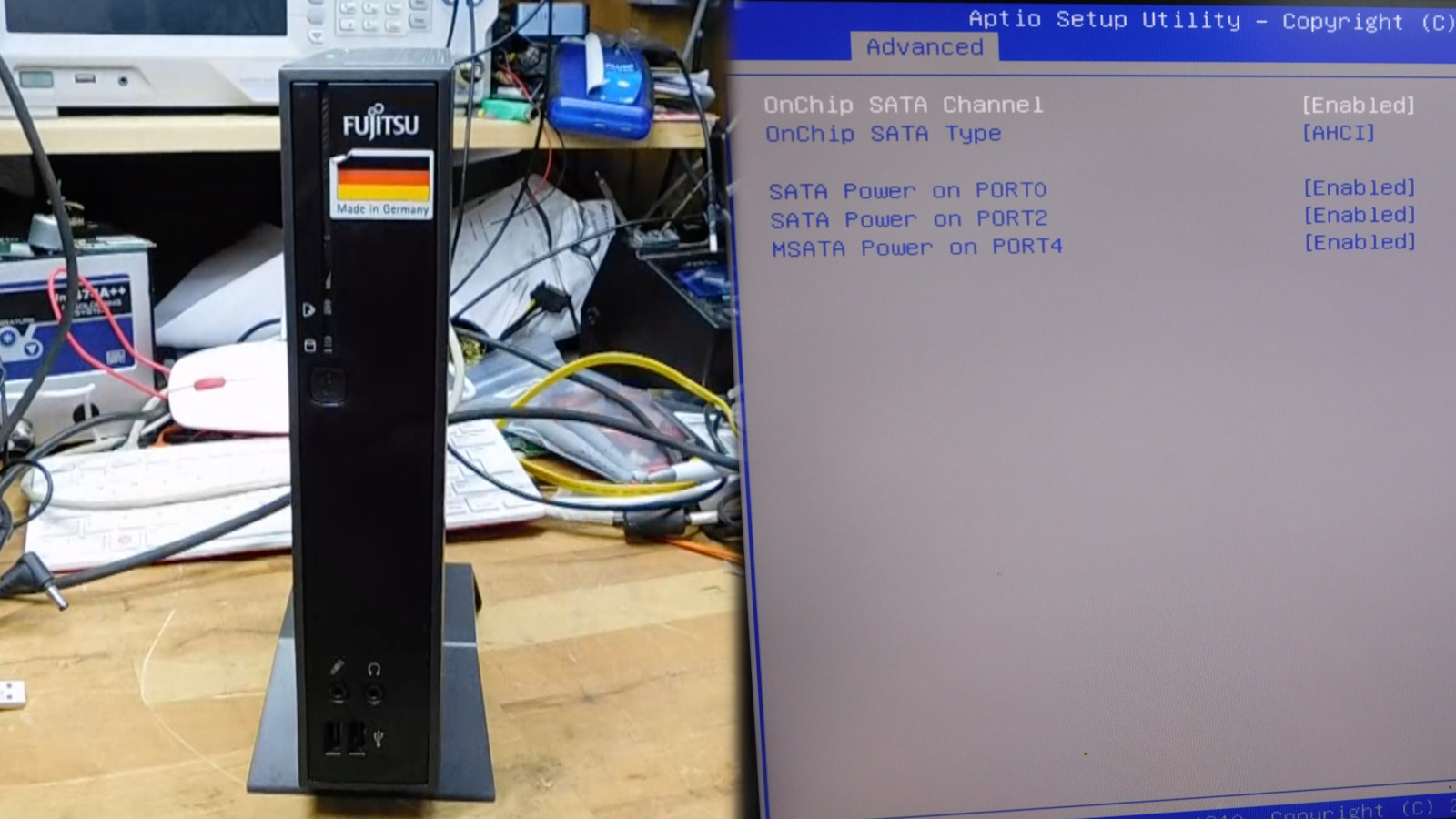
There is a certain kind of computer that inspires equal parts thrift, curiosity, and mild solder-fume poetry: the thin client. These tiny boxes were built to sit politely on a desk, connect to a bigger system somewhere else, and generally avoid drama. Years later, many of them are cheap on the used market, surprisingly durable, and just weird enough inside to make hardware tinkerers grin like raccoons near an open trash can. That is exactly why the idea of hacking an extra SATA port into a thin client has so much appeal.
On the surface, this sounds like a niche project for people who own too many spudgers and not enough restraint. In reality, it is a clever way to turn a forgotten low-power box into something genuinely useful: a compact NAS, a backup node, a home lab appliance, or a quiet file server that does not sound like a hair dryer auditioning for a metal band.
The trick is understanding one very important truth: in many thin clients, an “extra SATA port” is not really being invented from thin air. More often, the motherboard already has some of the needed capability. The real challenge is unlocking it safely. Sometimes that means adding missing connectors. Sometimes it means tracing power delivery. And sometimes, because hardware likes to be dramatic, it means convincing the firmware to stop pretending the port does not exist.
Why Thin Clients Make Great Modding Targets
Thin clients are beloved in the DIY storage world for three simple reasons: they are small, efficient, and cheap. Many were designed for business environments where low power draw, reliability, and easy deployment mattered more than flashy specs. That gives them a second life as compact servers long after their original office career ends.
Unlike a lot of ultra-mini consumer devices, business thin clients often have surprisingly respectable internal layouts. You may find an mSATA slot, an M.2 SATA slot, an internal header, an unpopulated connector footprint, or even a PCIe option depending on the model. The motherboard may look stripped down, but it is often more “not fully populated” than “fundamentally incapable.” That distinction is where the fun begins.
It also explains why these machines attract homelab builders. A thin client can handle light file serving, network utilities, Pi-hole-style duties, backup tasks, Home Assistant, or a small Linux box role without turning your electric bill into performance art. When paired with SSDs instead of spinning disks, the results are often quiet, cool, and pleasantly boring in the best possible way.
The Real Story Behind the “Extra SATA Port” Hack
The headline idea comes from a particularly satisfying example involving a Fujitsu Futro S900. In that case, the motherboard already included footprints for multiple SATA jacks even though only one port was populated from the factory. That is the sort of discovery that makes hardware hackers lean closer and whisper, “Oh, you were trying to hide something.”
Simply soldering in another connector, however, did not immediately solve the problem. The hardware pads were there, and the data path looked promising, but the BIOS would not recognize the extra port. In other words, the board had the physical potential, yet the firmware still acted like an overprotective landlord: “No additional storage for you.”
The breakthrough came from using firmware from a related board variant in the same motherboard family. After reflashing, the added port appeared and worked. That is the real lesson of this mod: storage hacks on thin clients are rarely just about the connector. They are about the whole stack, including board design, controller support, BIOS settings, and storage topology.
There was a quirk, of course, because no good hardware hack leaves without one last smirk. After the BIOS transplant, the machine reportedly became confused about the number of LAN interfaces it thought it had. That did not kill the project, but it is a perfect reminder that firmware swaps are not casual arts-and-crafts. You are not adding glitter to a greeting card. You are editing a machine’s understanding of its own existence.
What You Need to Check Before Trying This Yourself
1. Board-Level Evidence
Start with the motherboard, not your optimism. Look for unpopulated SATA connectors, missing capacitors, silk-screen labels such as SATA1 or SATA2, nearby power headers, or service-manual references to storage options that your specific unit does not happen to include. If the board was shared across several product variants, your odds get better.
2. SATA vs. M.2 vs. mSATA
This is where many projects wander into the weeds. M.2 is a form factor, not a promise. An M.2 slot may carry SATA, NVMe, USB, or other signals depending on the design. Likewise, mSATA is not the same as M.2 just because both are compact and annoying to explain to relatives. Before you buy adapters, cables, or drives, confirm what the slot actually supports. A SATA-only M.2 slot will not magically become NVMe because you bought an adapter with confidence.
3. Firmware Support
If the physical traces exist but the BIOS ignores the port, you may need a board-compatible firmware update, a modified image, or a different approach entirely. This is also where risk rises fast. A bad flash can brick the system. Even a successful flash can scramble board-specific data such as MAC addresses, UUID information, or other configuration blocks if you overwrite more than you intended.
4. Power Delivery
Data is only half the story. Drives need power, and small thin clients were not designed with your future storage ambitions in mind. A 2.5-inch SATA SSD is usually the easiest companion because it runs on 5V and draws far less power than a 3.5-inch hard drive. That matters in tiny enclosures where every watt becomes heat and every extra cable becomes a negotiation.
5. Space, Cooling, and Mounting
Never forget the tiny-box reality. Even if the controller and firmware cooperate, you still need somewhere to put the drive and route the cable. Internal space is often laughably tight. Cable bends, airflow, and strain relief all matter. A hack that works on the bench can become a rattling, heat-soaked gremlin once the lid goes back on.
Why SATA Still Makes Sense in This Kind of Build
It is easy to get distracted by NVMe hype, but for a thin-client storage mod, SATA often hits the sweet spot. SATA 6Gb/s is mature, widely supported, and fast enough for many home NAS and utility-server jobs. In practice, most SATA SSDs top out around the mid-500 MB/s range, which is plenty for 1GbE networking and still respectable even when the machine is doing more than one light-duty task.
More importantly, SATA storage is often easier to integrate into oddball business hardware. Many thin clients were designed around SATA-based flash modules, SATA M.2 storage, or board-level SATA routing long before NVMe became the universal answer to every storage question. In a box built for efficiency and compatibility rather than speed records, stable SATA support can be more valuable than theoretical PCIe bragging rights.
That does not mean NVMe is irrelevant. On some newer thin clients, NVMe can be a great option for the boot device while a SATA SSD handles bulk storage. But if your entire project is based on unlocking a hidden SATA path, trying to force it into a different storage philosophy usually adds cost and confusion faster than it adds value.
Best Use Cases After the Mod
Low-Power NAS
This is the obvious one. Two internal SATA SSDs can support mirrored storage, backups, or a compact file-share setup without taking over your desk or your power strip. It is not enterprise hardware, but it can absolutely become a dependable home storage node.
Backup Appliance
Thin clients shine when assigned one boring job and told to do it forever. Add an extra drive, install a lightweight Linux distribution, and you have a tidy backup box for documents, photos, and workstation images.
Homelab Utility Server
Need a little box for containers, logs, local package mirrors, or a media metadata stack? This kind of mod makes thin clients more flexible without turning them into full tower projects that require a support group.
DIY Edge System
Because these machines are compact and low-draw, they also make sense at the edge of a network: branch storage, lightweight monitoring, offsite sync, or a quiet service node tucked into a cabinet where a larger server would be pure overkill.
Practical Advice for a Successful SATA Port Hack
First, back up the original firmware before touching anything. That is not paranoia. That is adulthood. If you need an external programmer or a recovery plan, arrange it before the flash, not after the screen stays black and you begin bargaining with the universe.
Second, inspect the board carefully for missing support components. The Futro example was not just about adding a jack; it also involved the supporting data-line components. A connector footprint by itself is not a guarantee that the rest of the circuit is populated. Sometimes the board is “mostly there.” Sometimes it is “there in spirit.” Those are not the same thing.
Third, favor SSDs over hard drives unless you have a very good reason not to. SSDs simplify power, heat, vibration, and space. In a tiny enclosure, that matters more than nostalgia for spinning rust. A thin client with two SATA SSDs is elegant. A thin client with a dangling 3.5-inch drive and a questionable external power arrangement is a cry for help.
Fourth, be gentle with connectors and practice sane anti-static handling. Thin-client boards are compact, densely packed, and not especially forgiving of impatient hands. One lifted pad or cracked header can turn an exciting weekend mod into an expensive lesson in humility.
Finally, test the system outside the case before doing your final assembly. Confirm that the drive enumerates in firmware, appears correctly in the operating system, survives a reboot, and behaves properly under load. “It posts once” is not the same as “it is ready for my family photo archive.”
Common Pitfalls That Can Ruin the Party
- Assuming every M.2 slot is NVMe: it is not.
- Ignoring power limits: the board may detect the drive but fail under sustained load.
- Cross-flashing without a backup: bold move, terrible memoir.
- Forgetting board-specific data: MAC addresses and identifiers can get clobbered.
- Overheating the board during soldering: tiny pads do not appreciate heroics.
- Building around a cable mess: cramped airflow can turn success into thermal nonsense.
Is It Worth It?
Yes, with one important condition: you should want the project, not just the result. If all you need is easy storage expansion, buying a purpose-built mini PC or used small-form-factor desktop may be simpler. But if you enjoy wringing extra life out of overlooked hardware, this mod hits a very specific sweet spot.
You get a machine with character, lower idle power than many old desktops, and more flexibility than the original product manager ever intended. You also get the satisfaction of uncovering hidden capability that was sitting on the board the whole time like buried treasure with better trace routing.
That is the charm of hacking an extra SATA port into a thin client. It is not just about adding storage. It is about seeing a modest little business box and recognizing that underneath the polite plastic shell is a motherboard that still has one more trick to give.
Real-World Experiences With Hacking An Extra SATA Port Into A Thin Client
In real-world tinkering, this kind of project usually begins with optimism and a screwdriver, then quickly develops into a relationship with magnification tools, datasheets, and the phrase “Well, that is interesting.” People who try a SATA-port mod on a thin client often report the same emotional arc: excitement at seeing unused board footprints, confidence while ordering connectors, confusion when the first boot ignores the new hardware, and then a burst of joy when the right firmware or cabling finally makes the drive appear.
One of the most common experiences is discovering that the hardware side is easier to understand than the firmware side. Soldering a connector feels concrete. A pad is there or it is not. A capacitor is present or missing. Firmware, on the other hand, feels like arguing with a machine that refuses to admit what its own motherboard can do. That is why many modders say the biggest lesson is not “learn to solder better,” but “never underestimate BIOS weirdness.”
Another frequent experience is how much nicer SSD-based builds feel compared with hard-drive experiments. When people try to push spinning drives into tiny thin-client projects, they run into awkward power questions, extra cables, vibration, heat, and the classic “where exactly is this drive supposed to live?” moment. With SATA SSDs, the mood improves immediately. The machine stays quieter, cooler, and far more civilized. Suddenly the project feels like a compact appliance instead of a cyberpunk nest of compromises.
There is also a strong “bench success versus daily-use success” divide. Plenty of hardware mods work beautifully with the case open, one temporary cable, and a drive balanced like a nervous pigeon on the workbench. The real test comes after closing the case, routing wires cleanly, rebooting multiple times, checking SMART data, transferring large files, and making sure the system still behaves normally after a few days. Experienced builders usually say the moment a mod becomes real is not first detection. It is the third boring reboot.
People also tend to underestimate how satisfying these projects are once complete. A thin client that used to boot a minimal corporate image can become a tiny mirrored NAS, a backup target, or a quiet Linux server tucked behind a monitor. That transformation feels disproportionately rewarding because the hardware began life looking so limited. Turning “office leftovers” into “actually useful infrastructure” scratches a very specific maker itch.
And yes, the process regularly includes a little comedy. A cable that is 2 inches too short. A screw that vanishes into the multiverse. A BIOS menu that hides the one setting you need. A drive that works perfectly only after you reseat it for the third time and apologize to it. That is normal. In fact, those minor frustrations are part of the experience. They are also the reason successful thin-client storage mods become great stories in forums and workshops: not because they were easy, but because they were just difficult enough to be memorable.
Conclusion
Hacking an extra SATA port into a thin client is the kind of project that rewards patience, attention to detail, and a healthy respect for firmware. Done right, it can turn a cheap, low-power box into a surprisingly capable storage machine. Done carelessly, it can turn into a long evening of recovery tools and self-reflection. The difference comes down to research, power planning, careful soldering, and realistic expectations.
Still, for hardware tinkerers, that balance is exactly what makes the project fun. You are not merely adding a connector. You are uncovering dormant capability, learning how business hardware is segmented, and giving old tech a second act that is far more interesting than its first. That is a pretty good deal for one extra SATA port.