Retrocomputing used to sound like a hobby reserved for two kinds of people: engineers with soldering irons permanently attached to their hands, and collectors who treat beige plastic like sacred treasure. Today, the scene is much more welcoming. You can boot classic operating systems, load original cartridges, swap virtual floppy disks, and even use fresh storage and cleaner video output without turning your desk into a museum of dead hard drives and mystery cables.
That is the magic of retrocomputing with modern hardware, no emulation required. Or, to be more precise, no software emulation required in many cases. You can now enjoy classic computing through real vintage machines upgraded with modern components, or through hardware-accurate platforms built specifically to run old software, accessories, and media in a way that feels startlingly close to the original experience. The result is not fake nostalgia in a shiny wrapper. It is a practical, playable, usable version of old computing that does not demand old pain.
And that is important, because old pain was a major feature of old computers. Floppy disks failed. Hard drives clicked ominously like tiny haunted maracas. CRTs took up half the room. Connectors were designed by people who clearly hated fingers. Retrocomputing still celebrates history, but modern hardware lets you keep the charm while quietly escorting many of the headaches out the back door.
Why Retrocomputing Feels So Alive Again
Part of the appeal is obvious: old machines have personality. They beep, clack, hum, and boot with dramatic flair. A DOS prompt feels more intentional than a modern app launcher. A Commodore or Macintosh keyboard has the kind of physical presence that makes some current laptops feel like they were designed by a committee of apologetic waffles.
But the revival is not just about aesthetics. Retrocomputing is also about control. Older systems are easier to understand at a human scale. Their limits are visible. Their software is small enough to explore. Their hardware is straightforward enough that replacing a storage device or adding a modern adapter can feel like genuine collaboration rather than negotiation with a sealed black box.
That is why this hobby now attracts everyone from preservationists and programmers to gamers, tinkerers, musicians, and people who simply want their computers to stop asking whether they would like to “finish setting up” after every update. With modern support hardware, the barrier to entry is lower, the reliability is better, and the experience is far less likely to end in tears over a dying spindle motor.
What “No Emulation Required” Really Means
The phrase sounds absolute, but there are actually three different paths hiding inside it.
1. Original vintage hardware with modern upgrades
This is the purest route for many enthusiasts. You use an actual old machine, but replace the parts that age badly. Storage is the biggest example. Instead of relying on a thirty-year-old hard drive that sounds like it is filing a complaint, you can install modern replacements that behave like the old device from the computer’s point of view.
For vintage Macs and other SCSI-era systems, devices such as BlueSCSI let an SD card stand in for hard drives, removable media, and more. On old PCs, CompactFlash-to-IDE, SD-to-IDE, or IDE-to-SSD style solutions can make data transfer easier and booting more reliable. Floppy emulators such as Gotek-style solutions replace fragile disks with USB-based images while preserving the workflow that many retro machines still expect. That means the machine feels old in the fun ways, not in the “please wait while I chew this disk to death” ways.
2. FPGA-based hardware recreations
This is where things get gloriously nerdy. FPGA platforms do not run old systems the same way a software emulator on a laptop does. Instead, they use programmable logic to recreate the behavior of classic hardware at a low level. That is why platforms like MiSTer and products from Analogue have become such a big deal. They aim for hardware-accurate timing, low latency, and support for original controllers, cartridges, accessories, and display styles.
For someone who wants the feel of original hardware but with HDMI, easier setup, and fewer repair bills, FPGA is often the sweet spot. It is not identical to owning the original machine, and serious purists will debate that over coffee for hours, but it lands much closer to the real experience than casual software emulation on a random modern device.
3. New old-stock ideas in new machines
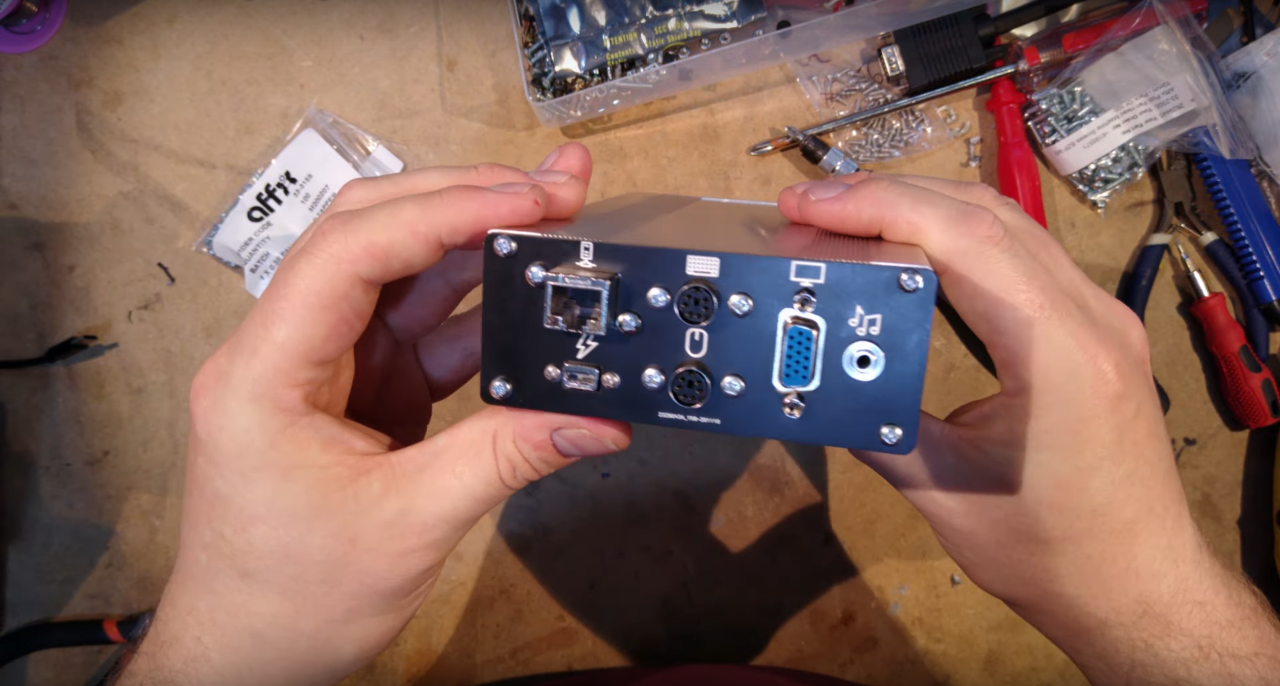
There is now a small but fascinating market for newly built computers that boot classic software natively. These are not just themed gadgets with retro wallpaper slapped on top. Some systems are designed around older x86-compatible hardware or industrial chips that can run DOS and era-appropriate software directly. That makes them especially appealing for people who want real DOS behavior, real ports, and real timing, but do not want to gamble on a yellowing tower rescued from a basement.
This matters more than nostalgia. Some old software, especially low-level DOS tools and 16-bit utilities, behaves badly or not at all on modern Windows systems. Modern 64-bit Windows versions do not support 16-bit x86 code the way older x86 environments did. In other words, if you are hoping your shiny modern PC will lovingly boot that ancient business app from a pile of floppies, it may instead laugh softly and close the door.
The Best Modern Hardware Upgrades for Retrocomputing
Solid-state storage is the real hero
If retrocomputing had an unsung champion, it would be storage adapters. They are not glamorous. Nobody hangs a poster of an SD bridge over the bed. But they are the reason so many vintage systems remain usable.
On SCSI machines, a modern board and SD card can replace rare mechanical drives without changing the day-to-day experience very much. On older IDE systems, flash-based storage can make file transfers easier, reduce heat, and eliminate the anxiety of listening to an aging hard drive decide whether today is the day it enters the afterlife. If you have ever copied files onto a CompactFlash card with a modern reader, then moved it back into a retro machine, you know that this feels like cheating in the best possible way.
Floppy emulators deserve their own standing ovation. They let you keep the charm of disk-based workflows while skipping media rot, alignment issues, and that old ritual where you discover the only working installation disk is labeled in handwriting that looks like a small earthquake.
Displays are easier now, even when the past disagrees
Video is where retro dreams often go to fight modern reality. Original systems were built for CRTs, analog timings, and display assumptions that flat panels do not always appreciate. Some old machines look weird, soft, stretched, or simply invisible on modern screens.
Modern retro hardware solves this in several ways. FPGA systems often include HDMI output and well-tuned scaling. Some offer display modes that recreate the feel of CRTs without forcing you to move a 70-pound monitor into your living room. Other setups use external scalers or converter chains that let original hardware play nicely with newer displays.
That said, there is still a split in the community. Some people want razor-sharp output. Others want scanlines, bloom, and phosphor glow because that is how the machine was meant to be seen. Neither side is wrong. One side just has more shelf space.
Modern power and connectivity make old systems practical
Reliable power supplies, replacement capacitors, fresh batteries, and cleaner networking options have made a huge difference. A retro machine that powers on every time is much more fun than one that requires a prayer circle and a gentle slap.
Modern transfer tools also help bridge eras. Some storage systems let you move files between a vintage computer and a modern one with far less drama. Networking can be simplified with contemporary adapters, proxy tools, or removable media workflows that do not require you to build a shrine to obsolete cables. The point is not to make an old machine behave like a new one. The point is to remove the unnecessary friction so you can enjoy what made the old machine special in the first place.
Real-World Retrocomputing Setups That Actually Make Sense
The vintage Macintosh setup
A classic compact Mac with a modern SCSI replacement is one of the friendliest entry points into the hobby. You get the original keyboard, original case, original boot ritual, and original software feel, but with silent storage and easier image management. Add a smart file-transfer workflow and you can preserve the vintage personality without becoming a full-time disk whisperer.
The DOS desk
A native DOS or early Windows setup built from real late-1990s or early-2000s compatible hardware can be deeply satisfying. You get ISA-era attitude, real ports, and excellent compatibility for period software. Pair that with flash storage and a practical monitor solution, and suddenly you have a machine that boots fast, stays stable, and still delivers that glorious sense that every megabyte matters.
This route also makes sense for people dealing with legacy software, industrial tools, MIDI gear, or older games that prefer real hardware behavior. It is one of the clearest cases where “no emulation required” is not a slogan. It is a workflow.
The cartridge-and-controller route
If your interests lean toward console-era retrocomputing and game-adjacent hardware, modern FPGA systems are almost suspiciously convenient. You can plug in original controllers, insert original cartridges on some platforms, output to modern displays, and avoid a whole circus of failing capacitors and noisy video paths. It is the kind of experience that makes you think, “Oh, this is what my childhood memory looked like,” even if your actual childhood memory was blurrier and smelled faintly of dust.
The Honest Limitations
Retrocomputing with modern hardware is wonderful, but it is not magic. Some old software depends on quirks that are hard to reproduce perfectly. Some copy protection schemes are annoyingly specific. Some expansion cards, timing tricks, and monitor modes remain stubbornly period-correct in the most inconvenient way possible.
There is also a philosophical question at the center of the hobby. If you replace the storage, power, display path, networking, and half the internals, is it still the same experience? For most people, the answer is yes, because the soul of retrocomputing is not suffering. It is interaction. It is the keyboard, the software, the timing, the constraints, the ritual, and the delight of making an old system do something real again.
Preservation matters, but usability matters too. A silent SD card standing in for a dead drive is not betrayal. It is often the reason the machine is still alive at all.
Why This Approach Is the Future of the Past
Retrocomputing no longer has to mean choosing between authenticity and sanity. Modern hardware has created a middle path where original software, original media, original accessories, and original workflows can survive in systems that are more reliable, more approachable, and easier to integrate into everyday life.
That is why this part of the hobby keeps growing. It is preservation without paralysis. It is history with better storage. It is respect for the original machine without romanticizing every broken part. And perhaps most importantly, it lets more people join in without needing a basement full of donor boards and the patience of a medieval monk.
If you want to write in WordPerfect, boot System 6, load a stack of Game Boy cartridges, or hear a DOS game bark through era-correct hardware, you can do that now with far less compromise. No software emulation required. Just smart hardware, a little curiosity, and a willingness to accept that yes, beige can be beautiful.
Hands-On Experiences With Retrocomputing on Modern Hardware
The first thing that surprises most people is how quickly the experience stops feeling like a tech project and starts feeling like a time machine. You sit down expecting to “test a setup,” and twenty minutes later you are reorganizing CONFIG.SYS files with the seriousness of a person preparing a lunar launch. Retrocomputing has that effect. Modern hardware just gets you to the fun part faster.
One of the most satisfying experiences is hearing an old machine behave normally while knowing the fragile parts have been quietly retired. A compact Mac booting from a solid-state SCSI replacement still gives you the familiar startup mood, but there is no mechanical drama, no grinding, and no suspenseful pause where you wonder whether the hard drive just entered witness protection. It feels authentic, yet calmer. Like the same old friend, but now with better knees.
DOS systems create a different kind of joy. When a native machine boots directly to a command prompt on hardware that truly understands the software, everything feels wonderfully immediate. Old utilities launch without protest. Games that can be fussy under modern workarounds suddenly behave. Sound, timing, and keyboard response all feel right in a way that is hard to explain until you experience it. It is not just about compatibility. It is about texture. The machine responds with the confidence of something speaking its first language.
There is also a weirdly pleasant sense of scale. Modern computing is often invisible, abstract, and buried under layers. Retrocomputing with modern hardware brings back a more tangible relationship with the machine. Swapping a disk image, moving files to a card, or changing a boot option feels mechanical and understandable. You can trace what is happening. That makes even small successes feel bigger. Getting an old app to launch can feel more rewarding than installing ten modern apps in a row, mostly because the old one does not reward you by demanding a cloud login.
FPGA-based systems add another flavor of experience. They are often the easiest way to show retro hardware to someone who did not grow up with it. Hand them original media or an original controller, output it to a modern display, and suddenly the conversation changes from “Why does this look weird?” to “Wait, this feels amazing.” That matters. A good modern recreation can bridge generations without flattening the character that made the original hardware memorable.
Perhaps the best experience of all is the removal of fear. Vintage hardware can make every session feel like a risk assessment. Will the drive spin? Will the caps hold? Will the display sync? Modern replacements reduce that constant anxiety. You stop treating the machine like a relic and start treating it like a computer again. And that is the whole point. These systems were built to be used, explored, and enjoyed, not just admired from a safe emotional distance.
So yes, retrocomputing with modern hardware feels a little like cheating. But it is the good kind of cheating, the kind that lets you keep the soul, lose the nonsense, and spend more time actually computing. Honestly, the original engineers probably would have approved. If they could have replaced failing drives with silent solid-state storage in 1989, they absolutely would have done it before lunch.
Conclusion
Retrocomputing with modern hardware is not a compromise. It is a practical evolution of the hobby. By combining original workflows and software with reliable storage, improved video options, modern power solutions, and hardware-accurate recreations, you get the best part of vintage computing without volunteering for every historical inconvenience. That is a trade worth making.
Whether you choose a restored original machine, a fresh native retro PC, or an FPGA-based recreation, the goal stays the same: preserve the feel, respect the limitations that matter, and remove the failures that do not. That is how retrocomputing stops being a fragile performance and becomes a living, usable craft again.