Changing your phone number on WeChat may not sound like a big life event, but anyone who has ever been locked out of a messaging app knows the truth: your phone number is basically the front door key to your digital life. On WeChat, that number can help you log in, receive verification codes, recover your account, and prove that you are still the same person who sent twelve stickers in a row during a group chat at midnight.
The good news is that changing your WeChat phone number on Android is usually simple when you still have access to your account and can receive SMS verification. The path is inside WeChat’s account security settings, and the process is mostly a matter of entering your new mobile number, confirming the verification code, and making sure your account remains protected afterward.
This guide walks you through the process in 10 clear steps, explains what to check before you begin, covers common verification problems, and shares practical experience-based advice for avoiding account headaches. Whether you are switching carriers, moving countries, replacing an old SIM card, or finally retiring a number that has been following you since flip-phone days, here is how to update your WeChat mobile number on Android without turning it into a tiny technological soap opera.
Before You Change Your WeChat Phone Number
Before tapping buttons, make sure you are ready. WeChat uses your mobile number as an important account-security tool, so changing it should be done carefully. The most important rule is simple: do not cancel your old number before updating your account. If your old SIM card is already gone and you cannot receive codes, recovery may become more complicated.
You should also confirm that your new number is active, can receive SMS messages, and is not already linked to another WeChat account. A mobile number may be restricted if it has been used too recently, associated with another account, or flagged during verification. For best results, use a real mobile number from a reliable carrier rather than a temporary, virtual, or disposable number.
Finally, update the WeChat app from the Google Play Store or your trusted Android app store. App menus can shift slightly between versions, but the core path is typically found under Me, Settings, Account Security, and Phone Number. Think of it like finding the sock drawer: the house layout may change, but socks usually live somewhere predictable.
How to Change Your Phone Number on WeChat on Android: 10 Steps
Step 1: Open WeChat on Your Android Phone
Unlock your Android device and open the WeChat app. Make sure you are signed in to the account whose phone number you want to change. If you are not logged in, try signing in using your existing phone number, WeChat ID, email, or another available login method.
It is best to do this while connected to a stable internet connection. Wi-Fi is fine, but if you are having trouble receiving SMS codes, switching to mobile data can sometimes help because it confirms that your SIM card is active and connected to the carrier network.
Step 2: Tap “Me” in the Bottom Menu
Once WeChat opens, look at the bottom-right corner of the screen and tap Me. This section contains your profile, settings, wallet-related options where available, favorites, stickers, and other personal account tools.
If your WeChat interface is in another language, the icon placement can help. The “Me” tab is generally the last tab on the bottom navigation bar. It is the digital equivalent of saying, “Yes, this part is about me, my account, and my settings.”
Step 3: Open “Settings”
Inside the Me tab, tap Settings. This is where WeChat keeps many account controls, including privacy, notifications, general app settings, and security options.
Do not confuse profile editing with account security. Your profile name, photo, and status are separate from your linked phone number. Changing your nickname may help your friends recognize you, but it will not update the mobile number used for login or verification.
Step 4: Tap “Account Security”
In Settings, select Account Security. This section is designed for sensitive account details such as WeChat ID, phone number, password, linked accounts, and security protections.
If you are changing your number because you are switching phones, moving abroad, or losing access to an old SIM, this is one of the most important screens in the app. A few minutes here can save you from a future login problem that feels like trying to open a locked suitcase with a banana.
Step 5: Select “Phone Number”
Inside Account Security, tap Phone Number. You should see the mobile number currently connected to your WeChat account, often partly hidden for privacy.
Check the displayed number carefully. If it is already your current number, you may not need to change anything. If it is your old number, a travel SIM, or a number you are about to cancel, continue with the next step.
Step 6: Tap “Change Mobile” or “Change Phone Number”
Tap the option labeled Change Mobile, Change Phone Number, or similar wording. The exact label may vary depending on your WeChat version, language setting, and region.
WeChat may show reminders about account security before allowing the change. Read these carefully. They are not there for decoration; they explain how the new number will be used and may warn you if the update affects login or verification.
Step 7: Enter Your New Phone Number
Choose the correct country or region code, then enter your new mobile number. Double-check every digit before continuing. One wrong number can send your verification code into the void, where it will live peacefully beside lost socks, missing chargers, and passwords written on sticky notes that somehow vanished.
Use the number in its normal local format after selecting the country code. For example, if the app has already selected the country code, you usually do not need to type it again in the phone-number field.
Step 8: Request the SMS Verification Code
After entering the new number, tap the button to request a verification code. WeChat should send an SMS code to your new mobile number. Wait a minute or two before requesting another one.
If the code does not arrive immediately, do not panic-tap the resend button twenty times. Too many attempts can trigger temporary limits. Instead, check your signal, confirm the number, disable SMS-blocking apps, and make sure your phone can receive international or app-based verification messages if relevant.
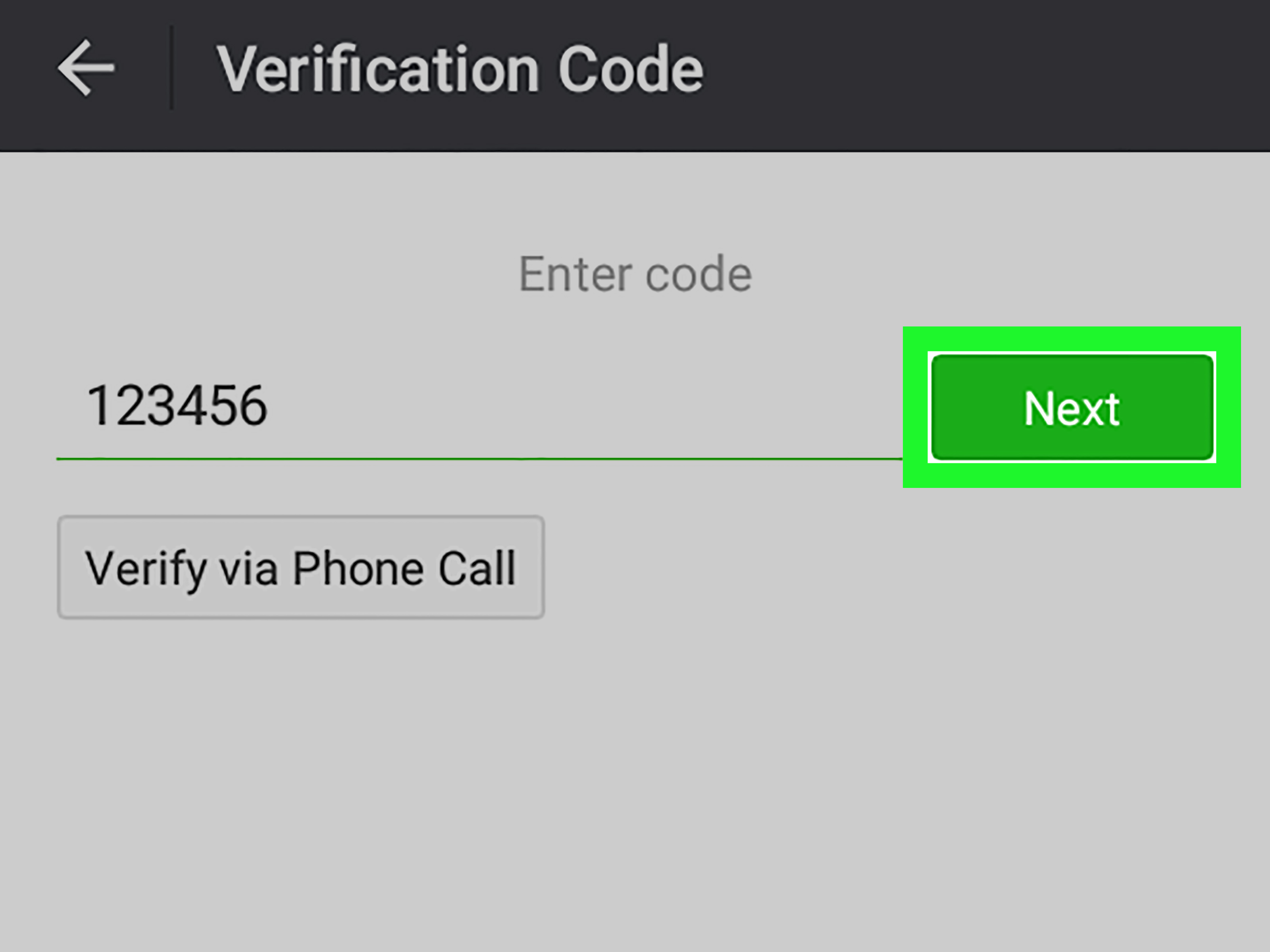
Step 9: Enter the Verification Code
When the SMS code arrives, enter it into WeChat exactly as shown. Verification codes usually expire after a short time, so use the newest code if you requested more than one.
If WeChat asks for additional verification, follow the on-screen instructions. Depending on your account situation, this may involve confirming your password, using a trusted device, or completing another security check.
Step 10: Confirm the Change and Review Account Security
Once the code is accepted, confirm the change. Your WeChat account should now be linked to the new phone number. Afterward, return to Account Security and review your settings.
This is a smart time to confirm your password, check whether an email address or other recovery method is linked, and remove anything outdated. Account security is like brushing your teeth: not exciting, but future-you will be grateful.
What Happens After You Change Your WeChat Phone Number?
Changing your linked phone number does not normally delete your WeChat contacts, chats, groups, Moments, or profile information. You are updating the mobile number associated with the same account, not creating a new WeChat identity.
Your friends usually do not need to add you again. Your WeChat ID, nickname, and existing conversations should remain connected to your account. However, your new number may be used for future login verification, password recovery, and security checks.
If you also use WeChat Pay or region-specific wallet features, review those settings separately. Payment features can have their own verification requirements, and changing a phone number may require extra confirmation depending on your location, identity verification status, and linked payment methods.
Common Problems When Changing a WeChat Number on Android
You Cannot Receive the SMS Code
This is the most common issue. First, confirm that your new number is typed correctly and that the country code is right. Then check whether your phone has signal and can receive regular text messages.
If you use spam filters, SMS organizer apps, carrier security tools, or Android permission restrictions, check whether the message was blocked. Restarting the phone can also help refresh the network connection. If you are roaming internationally, make sure your plan allows incoming SMS messages.
Your New Number Is Already Linked to Another WeChat Account
If WeChat says the number is already in use, that usually means the number is connected to another WeChat account or was recently recycled by a mobile carrier. This can happen when carriers reissue old numbers to new customers.
In that case, follow the instructions shown inside WeChat. You may need to unlink the number from the previous account, use another number, or complete additional verification. Avoid guessing your way through random screens; account-security systems are not known for appreciating improvisational jazz.
You No Longer Have Access to the Old Number
If you can still log in to WeChat on your Android phone, try changing the number from inside the app. If WeChat asks for a code from the old number and you cannot receive it, look for options such as Can’t receive verification code? or account recovery prompts.
Recovery may require proving ownership through other linked information, a trusted device, a password, or WeChat support. This is why it is always better to update your number before canceling the old SIM card.
The App Says Your Account Is at Risk
WeChat may show extra security checks if it detects unusual behavior, such as logging in from a new device, using unstable networks, changing numbers too frequently, or attempting verification many times in a short period.
When this happens, slow down. Use your regular phone, avoid suspicious network changes, turn off unnecessary VPN connections during verification if they cause risk warnings, and follow the official prompts inside the app.
Important Safety Tips Before Canceling Your Old Number
Before giving up an old phone number, update it across important accounts. That includes WeChat, banking apps, email recovery settings, shopping platforms, cloud storage, social media accounts, and payment services. A phone number can eventually be recycled and assigned to another person, so leaving old accounts attached to it can create avoidable security risks.
For WeChat specifically, make the switch while you still control both the old and new numbers if possible. Keep the old SIM active until the update is complete and you have successfully logged in again using the new number.
Also, avoid sharing verification codes with anyone. No legitimate friend, stranger, “support helper,” or mysterious online wizard needs your SMS code. A verification code is a key. Treat it like one.
Should You Back Up WeChat Before Changing Your Number?
Changing your phone number should not erase your chats by itself, but backing up important conversations is still wise. WeChat chat history is often stored locally on your device, which means changing phones, reinstalling the app, or clearing data can affect what you see.
On Android, look in WeChat settings for chat backup, migration, or chat history transfer options. Menu names can vary, but the goal is to move or preserve important conversations before making big account changes.
If you have business conversations, travel bookings, payment confirmations, school or work details, or sentimental chats you actually care about, do not rely on hope as your backup strategy. Hope is not a file format.
Can You Change Your WeChat Phone Number Without Logging In?
Usually, the easiest way to change your WeChat phone number is from inside a logged-in account. If you cannot log in, you may need to use WeChat’s account recovery options. Recovery can be more complicated because WeChat has to confirm that you are the real owner of the account.
You may be asked for your WeChat ID, phone number, password, linked email, device information, or help from trusted contacts depending on the situation. The exact recovery route depends on your account history and the security checks shown in the app.
If you are planning to switch numbers soon, do not wait until after the old number is dead. Update your WeChat number while everything still works. It is much easier to change the lock while you still have the key.
Best Practices for Keeping Your WeChat Account Secure
After changing your phone number, spend a few minutes tightening your account security. Use a strong password that is not reused across other apps. Keep your Android system and WeChat app updated. Avoid unofficial APK files unless you fully understand the risk, because modified apps can compromise account safety.
Review app permissions as well. WeChat includes messaging, calls, Moments, location sharing, payments in some regions, mini programs, and file sharing. Only grant permissions that make sense for how you use the app.
Be careful with public Wi-Fi, unknown QR codes, suspicious links, and anyone asking for verification codes. WeChat is powerful because it connects many parts of communication and daily life, but that also means your account deserves careful protection.
Experience Notes: What It Feels Like to Change a WeChat Number on Android
From a practical user-experience perspective, changing your phone number on WeChat is not difficult, but it can feel stressful because the app is tied to so many things. For many users, WeChat is not just a chat app. It may be where they talk to family, manage work groups, receive travel updates, contact suppliers, join community chats, use mini programs, or access payment features. That makes the phone-number change feel more serious than updating a profile picture.
The smoothest experience usually happens when the user prepares first. The best-case scenario is simple: the old number is still active, the new number can receive SMS, the user is logged in on the same Android phone, and the app is updated. In that situation, the change can take only a few minutes. You open WeChat, go to Account Security, choose Phone Number, enter the new number, receive the code, confirm it, and move on with your day like a responsible adult who definitely did not postpone this task for six months.
The stressful experience usually starts when the old number has already been canceled. Maybe the user moved to another country, switched carriers, lost a SIM card, or assumed the number did not matter anymore. Then, during login or verification, WeChat asks for confirmation tied to the old number. That is when the mood changes from “quick settings update” to “why is my phone personally attacking me?”
Another common experience is delayed SMS verification. Sometimes the code arrives instantly. Other times, it shows up five minutes later after the user has already requested another code, restarted the phone, questioned their life choices, and stared at the signal bars like they are reading tea leaves. When this happens, patience helps. Repeated requests can trigger temporary limits, so it is better to wait, check the number, confirm network access, and try again calmly.
Users who travel between countries may also notice that phone-number changes are more sensitive when switching from one region to another. A number with a different country code can still work, but verification may involve more checks depending on account history, device trust, and network behavior. If WeChat sees a new phone, new number, new country, and unusual login pattern all at once, it may ask for extra proof. Annoying? Yes. Understandable? Also yes.
A helpful habit is to treat your WeChat number like part of your digital passport. When you change mobile numbers, add WeChat to your checklist along with email, banking apps, cloud accounts, shopping platforms, and social media. Do it before the old SIM disappears. Also, keep your password current and avoid relying on one recovery method only.
For Android users, the app experience is generally straightforward once you know where to look. The biggest challenge is not the button path; it is timing. Update your number early, verify it carefully, and check account security afterward. The process is less dramatic when you handle it before there is a problem. In other words, do not wait until your old number belongs to a stranger named Gary who suddenly receives your login codes and wonders why everyone keeps sending him dumpling stickers.
Conclusion
Changing your phone number on WeChat on Android is a manageable process when you approach it in the right order. Open WeChat, go to Me, open Settings, select Account Security, tap Phone Number, choose the change option, enter your new number, verify the SMS code, and confirm the update.
The most important advice is to change your number before canceling your old SIM, use a real number that can receive SMS, avoid too many repeated verification attempts, and review your account security after the update. A few careful minutes can prevent a lot of login trouble later.
WeChat is more than a simple messaging app for many people, so your linked phone number matters. Keep it current, protect your verification codes, and make sure your recovery options are not stuck in the past. Your future self, your group chats, and possibly your sticker collection will thank you.