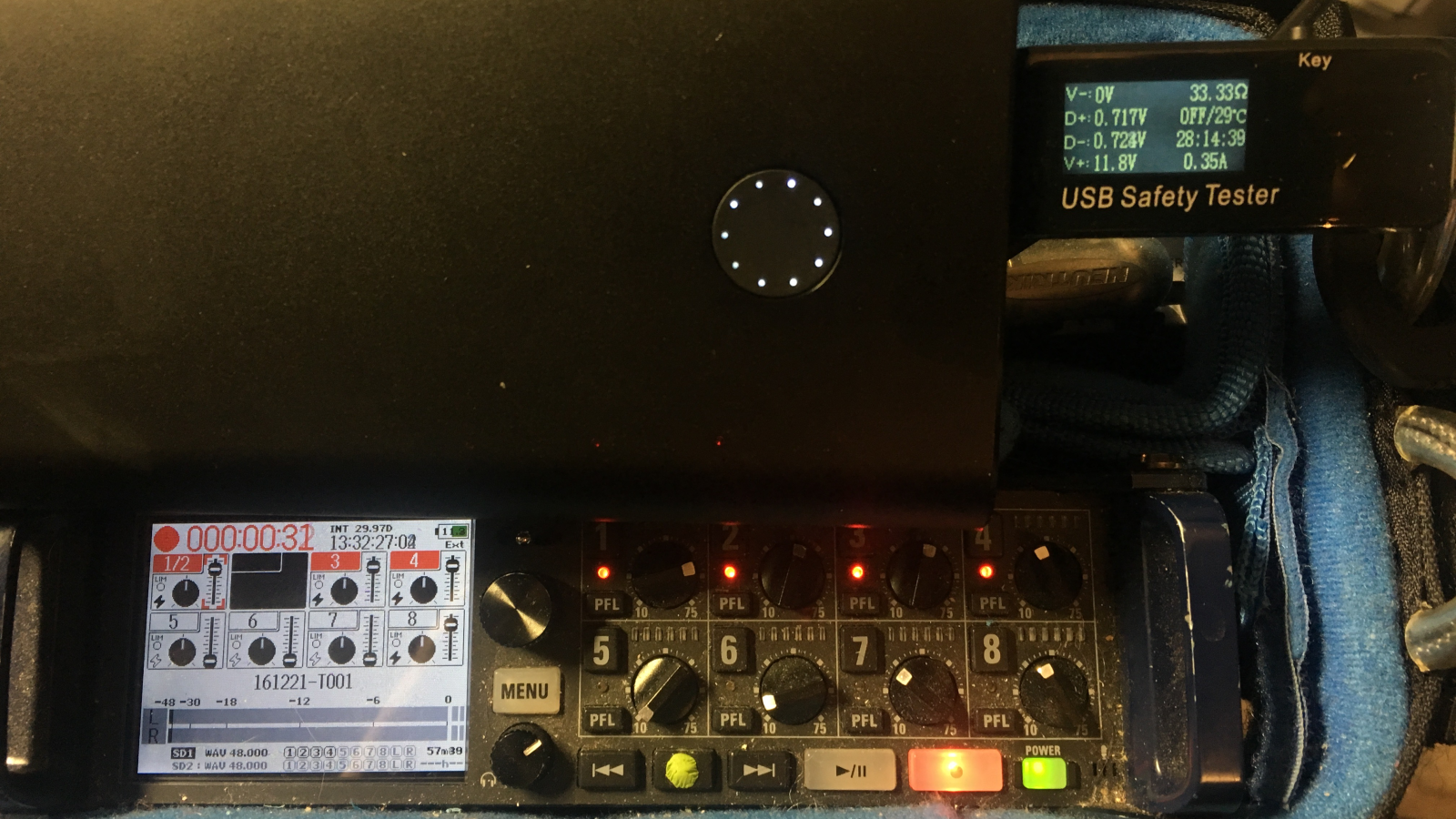
There is something wonderfully suspicious about a tiny USB power bank that says it can output 5V, 9V, and 12V. For years, USB meant one boring number: 5 volts. It powered phones, flash drives, small fans, and the occasional desk gadget that looked cooler online than it did in real life. Then fast charging arrived, and suddenly that same little rectangle in your backpack became a negotiation expert, politely asking connected devices, “Would you like more voltage with that?”
That is the magic behind unlocking 12V Quick Charge on a USB power bank. You are not creating extra energy from nowhere, and you are definitely not convincing physics to take the afternoon off. Instead, you are using a fast-charging protocolmost commonly Qualcomm Quick Charge or USB-C Power Deliveryto request a higher voltage output from a power bank that already supports it.
For hobbyists, field technicians, photographers, router tinkerers, LED-strip fans, and anyone who has ever muttered “I just need 12 volts for this thing,” the idea is extremely useful. A compatible power bank can run small 12V devices without hauling around a sealed lead-acid battery, a bulky adapter, or a cable mess that looks like it escaped from a robot’s junk drawer.
The catch? You need to understand what your power bank supports, how voltage negotiation works, and why guessing with USB power is a great way to make a tiny electronic barbecue. This guide explains the concept in plain English, with practical examples, safety notes, and real-world experience from using 12V Quick Charge setups.
What Does “Unlocking 12V Quick Charge” Actually Mean?
Unlocking 12V Quick Charge means making a compatible power bank output 12 volts instead of the default 5 volts. Most USB power banks start at 5V because that is the safe baseline for traditional USB devices. Your old USB lamp, Bluetooth speaker, or microcontroller board expects 5V. If a power bank blasted 12V into every cable by default, the electronics world would smell like toasted plastic.
Fast-charging systems solve this by using negotiation. A compatible device tells the charger or power bank what voltage it can accept. If both sides agree, the power bank raises the voltage. In Quick Charge 2.0 and 3.0 systems, this communication typically happens over the USB data pins. In USB-C Power Delivery, the negotiation happens through the USB-C configuration channel system, often handled by a PD controller chip.
In everyday terms, the power bank is like a hotel elevator. It starts in the lobby at 5V. A normal USB device only goes to the lobby. A Quick Charge or USB-C PD trigger board presses the button for the 12V floor. If the elevator has that floor available, up it goes.
Why 12V From a USB Power Bank Is So Useful
Twelve volts is a sweet spot in electronics. It is common enough to show up everywhere, but low enough to be portable and manageable when used correctly. Many small devices are designed around 12V DC input, including LED strips, mini routers, modems, portable monitors, small amplifiers, battery chargers, fans, camera accessories, and test equipment.
Using a 12V-capable power bank can simplify a mobile setup. Instead of carrying a wall adapter and hoping for an outlet, you can run a project in the field. Instead of building a custom lithium battery pack from cells, you can use a commercially designed power bank with built-in battery management, charging protection, and a case that does not look like a science fair volcano.
The main advantage is convenience. A single power bank can charge your phone, power a USB-C laptop for a short time, and run a 12V accessory if the bank supports the required output profile. For makers, that flexibility is gold. For travelers, it is the difference between “my setup works anywhere” and “I need three adapters, a prayer, and a wall socket behind a vending machine.”
Quick Charge vs. USB-C Power Delivery
Qualcomm Quick Charge
Qualcomm Quick Charge is a fast-charging technology that allows compatible chargers and devices to negotiate higher voltages over USB. Many older power banks with USB-A fast-charge ports support Quick Charge 2.0 or 3.0. These often advertise outputs such as 5V, 9V, and 12V.
Quick Charge became popular because it could work with familiar USB-A connectors and common cables. For unlocking 12V, a Quick Charge trigger module can act like a compatible device and request the 12V mode from the power bank. Once negotiation succeeds, the module outputs 12V DC for your project.
The important phrase is “compatible power bank.” A regular 5V-only power bank cannot magically become a 12V source just because you ask nicely. If the internal boost converter and controller do not support 12V output, there is nothing to unlock.
USB-C Power Delivery
USB-C Power Delivery, usually shortened to USB-C PD, is a broader standard used by phones, tablets, laptops, monitors, docks, and many modern power banks. USB-C PD can support multiple voltage levels depending on the device, cable, and power source. Common fixed profiles include 5V, 9V, 15V, and 20V, while some products also support additional modes or programmable voltage ranges.
Here is where things get a little spicy: not every USB-C PD power bank offers a fixed 12V output. Some do. Some do not. A USB-C PD trigger board may request 12V, but if the power bank only advertises 5V, 9V, 15V, and 20V, the request may fail or fall back to another available voltage. That is why reading the printed output label or product specifications matters.
For modern projects, USB-C PD trigger boards are often cleaner and more flexible than old USB-A Quick Charge triggers. They are widely available, easy to configure, and designed specifically to handle negotiation. But again, the source must support the voltage you want.
What Hardware Do You Need?
The safest and simplest setup usually includes three things: a power bank that clearly supports 12V output, a trigger board or decoy module that requests 12V, and a cable or connector rated for the current your device needs.
A Quick Charge trigger board is typically used with USB-A QC outputs. A USB-C PD trigger board is used with USB-C PD outputs. Some modules include switches or solder jumpers for selecting 5V, 9V, 12V, 15V, or 20V. Others have small displays and buttons. The fancy ones look like tiny power negotiation command centers, because apparently even electrons deserve a dashboard.
You will also want a multimeter. Before connecting your expensive device, check the output voltage. This step is boring in the same way seatbelts are boring: boring right up until they save the day.
How the 12V Negotiation Works
At startup, a USB power bank typically provides 5V. That keeps normal USB devices safe. The trigger board then communicates with the power bank and requests a higher voltage. If the power bank recognizes the request and supports the target voltage, it changes its output.
In Quick Charge systems, the request is associated with signaling on the USB data lines. In USB-C PD systems, a dedicated controller handles the power contract. The trigger board does the talking, so your project does not need to understand the entire charging protocol.
This is the key reason trigger boards are popular. They turn a complicated negotiation protocol into a simple DC output. From your device’s perspective, it is just receiving 12V. From the power bank’s perspective, it is powering a compatible sink device. Everybody is happy, and nobody had to write firmware at midnight while eating cereal from a coffee mug.
Important Safety Rules Before You Try It
First, do not open, puncture, bypass, or modify the lithium-ion battery cells inside a power bank. Commercial power banks include battery management circuits for charging, discharge protection, temperature control, and short-circuit protection. Defeating those protections is unsafe and unnecessary for this kind of project.
Second, confirm the required voltage and polarity of the device you want to power. Many barrel-jack devices are center-positive, but not all. Reversed polarity can damage electronics instantly. It does not ask for forgiveness. It simply leaves.
Third, check current and wattage. A device that needs 12V at 2A requires 24 watts. If your power bank’s 12V mode is rated for only 1.5A, you are asking for more than it can provide. The result may be shutdown, voltage sag, overheating, or unreliable operation.
Fourth, use proper connectors and insulated wiring. A loose wire on a bench is not a power system; it is a tiny audition for chaos. Use secure screw terminals, proper solder joints, heat shrink, strain relief, and a fuse when appropriate.
Finally, test with a dummy load or inexpensive device first. Do not make your first test the most expensive gadget in the room. Electronics can sense confidence and punish it.
Common Devices You Can Power With 12V Quick Charge
LED Strips
Short 12V LED strips are one of the most common uses. They are useful for camping lights, photography fill lights, workshop lighting, and display projects. Pay attention to current draw, especially with bright white strips or long RGB runs. LED strips can consume more current than expected.
Mini Routers and Modems
Many compact routers use 12V DC adapters. With the correct barrel connector and polarity, a 12V power bank setup can provide backup internet during short outages. This is especially useful for remote work, small offices, or anyone who becomes emotionally unstable when Wi-Fi disappears for nine minutes.
Camera and Video Accessories
Some field monitors, wireless video transmitters, and camera accessories accept 12V input. A power bank plus trigger board can create a lightweight mobile power solution. Just confirm whether the accessory accepts a range such as 7–12V or requires a strict regulated 12V.
Small Fans and Pumps
Portable fans, air pumps, and small DC motors may run from 12V, but motors can draw high startup current. A power bank that handles a steady load may still shut down when a motor starts. If your fan twitches once and quits, the power bank may be protecting itself from an inrush current spike.
Quick Charge Trigger Board or Boost Converter?
There are two common ways to get 12V from portable USB power: negotiate 12V from a fast-charge power bank, or boost 5V up to 12V with a DC-DC converter.
A trigger board is usually more efficient when the power bank already supports 12V output. The power bank’s internal electronics are designed to produce that higher voltage. You are simply requesting it.
A boost converter takes 5V and steps it up to 12V. This can work with ordinary 5V power banks, but there is a tradeoff. Power is power. If your 12V device needs 1A, that is 12 watts before losses. At 5V input, the converter may need more than 2.5A from the power bank after efficiency losses. Many small power banks cannot supply that reliably.
In simple terms, if your power bank supports 12V Quick Charge or USB-C PD, use a proper trigger board. If it only supports 5V, a boost converter may work for light loads, but it is less elegant and more likely to hit current limits.
How to Choose the Right Power Bank
Look closely at the output label. A useful power bank for this purpose should list something like 12V output under Quick Charge, USB-C PD, or a specific fast-charge protocol. If it only says “5V,” it is not a 12V power bank.
Check wattage, not just voltage. A 12V 1.5A output equals 18W. A 12V 3A output equals 36W. If your project needs 25W and your power bank tops out at 18W, the math is not being dramaticit simply says no.
Also consider capacity in watt-hours, not only milliamp-hours. Power bank marketing often uses mAh based on the internal cell voltage, usually around 3.6V or 3.7V. A 20,000mAh power bank does not deliver 20,000mAh at 12V. After voltage conversion and efficiency losses, the usable runtime will be lower than the sticker suggests.
Runtime Example: What to Expect
Suppose you have a 20,000mAh power bank rated around 74Wh. Your 12V device draws 1A, which equals 12W. In a perfect fantasy world with 100% efficiency, the setup might run for about six hours. In the real world, conversion losses, cutoff limits, heat, cable resistance, and power-bank behavior reduce that number.
A more realistic estimate might be four to five hours, depending on the power bank and load. If the device draws 2A at 12V, that is 24W, and runtime may drop closer to two to three hours. This is why testing matters. Product labels give you the map; real-world loads tell you where the potholes are.
Troubleshooting: Why 12V Does Not Appear
If your trigger board does not output 12V, first confirm that the power bank actually supports 12V on that port. Some power banks support 12V on USB-A Quick Charge but not on USB-C. Others support high wattage on USB-C but skip the 12V profile.
Next, check the cable. Damaged or charge-only cables can cause problems. For USB-C PD, the cable and connector quality matter even more as wattage rises.
Also check load behavior. Some power banks shut off if the load is too small. A tiny sensor circuit may not draw enough current to keep the bank awake. Other banks shut down if the startup load is too high. Motors, pumps, and large capacitors can trigger protection circuits.
If the output briefly rises and then drops, the power bank may be detecting an overload or failed negotiation. Try a known-good trigger board, a different cable, and a smaller test load. Do not keep retrying with a hot, swelling, damaged, or recalled power bank. That is not troubleshooting; that is flirting with smoke.
Best Practices for a Clean 12V Portable Setup
For a reliable build, mount the trigger board in a small enclosure. Label the output clearly as 12V. Use a connector that cannot be mistaken for ordinary 5V USB output. This prevents someone from plugging in a 5V gadget and discovering the exciting smell of regret.
Add a fuse or resettable protection device if your load is meaningful. Keep wiring short and appropriately sized. Use a multimeter before every major change. If your device is sensitive, consider adding additional regulation, filtering, or a DC-DC module designed for the exact input range.
For field work, carry a short checklist: power bank charged, correct trigger voltage selected, polarity verified, output tested, cable secure, load rating confirmed. It may sound excessive, but it beats debugging a silent device in the dark while mosquitoes treat you like a buffet.
When You Should Not Use 12V Quick Charge
Do not use this method for devices that demand high surge current unless you have verified the power bank can handle it. Do not use it for medical, safety-critical, or unattended systems without proper engineering review. Do not use questionable no-name power banks that run hot, smell odd, bulge, rattle, or have mystery specifications printed in microscopic silver ink.
Also avoid using 12V Quick Charge as a permanent replacement for a proper power supply in fixed installations. Power banks are portable energy sources, not industrial power systems. They are fantastic for field use, backup, testing, and temporary setups. For permanent use, choose a certified DC power supply designed for continuous operation.
Real-World Experiences With Unlocking 12V Quick Charge
The first thing you learn when using 12V from a USB power bank is that labels matter more than optimism. Two power banks can look almost identical, both with glossy cases and confident marketing, yet behave completely differently. One may provide 12V from its USB-A Quick Charge port all day. Another may offer 9V and 15V over USB-C PD but refuse 12V like it has a personal grudge against round numbers.
In practice, the smoothest experience usually comes from using a dedicated trigger board with a visible voltage display. The display is not mandatory, but it is comforting. When the screen says 12.0V before you connect the load, your blood pressure stays at a more reasonable level. Without a display, a multimeter becomes your best friend. Not your casual friend. Your “do not plug that in until I say so” friend.
LED lighting is one of the most satisfying examples. A short 12V LED strip connected through a trigger board can turn a power bank into a portable work light. It is clean, quiet, and easy to pack. But long LED strips expose the limits quickly. A five-meter strip at high brightness can demand far more current than a small power bank wants to provide. The result is flickering, shutdown, or a power bank that gets warm and silently judges your choices.
Routers are another excellent use case. During a short power outage, a 12V-capable power bank can keep a small router alive. The setup feels almost magical the first time it works: the lights go out, the room groans, and your Wi-Fi keeps blinking like a tiny lighthouse of civilization. The important detail is connector polarity. Many routers use center-positive barrel jacks, but guessing is not a strategy. Check the label on the original adapter.
Motors are trickier. Small fans may work perfectly, while pumps or gear motors may cause the power bank to shut down during startup. This is not always a failure. It is often the power bank’s protection circuit doing its job. Motors can draw several times their running current when they start. If your project includes a motor, test it carefully and expect some trial and error.
The biggest lesson is that 12V Quick Charge is best treated as a portable power tool, not a magic cable. When the power bank, trigger board, cable, and load are matched correctly, the setup is elegant. When one part is mismatched, it becomes confusing fast. Good documentation, clear labels, and careful testing turn the project from “why is nothing working?” into “why didn’t I build this sooner?”
Final Thoughts
Unlocking 12V Quick Charge on a USB power bank is one of those electronics tricks that feels like a cheat code, even though it is really just standards-based voltage negotiation. With the right power bank and a proper trigger board, you can power many 12V devices from a compact battery pack that fits in a bag.
The smart approach is simple: verify the power bank’s supported output modes, use a quality trigger module, measure the voltage before connecting your device, respect wattage limits, and never bypass the safety systems inside lithium-ion packs. Do that, and a humble USB power bank becomes a surprisingly capable 12V portable power source.
Note: This article is for educational electronics content and safe consumer-device usage. Do not open, puncture, bypass, or modify lithium-ion power banks. Use certified products, verify voltage and polarity, and stop using any power bank that overheats, swells, smells unusual, or has been recalled.