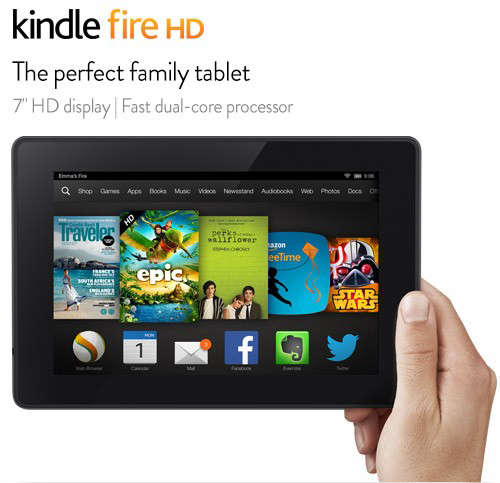
The phrase “Kindle Fire 7 in. HD Tablet” sounds straightforward, but Amazon’s naming history has created a small digital identity crisis. The current compact model is generally called the Amazon Fire 7, while older products were sold as the Kindle Fire HD 7 or Fire HD 7. These are not identical tablets, and the difference matters when comparing specifications, buying accessories, or shopping for a refurbished device.
The modern Fire 7 is an inexpensive, lightweight tablet built primarily for reading, video streaming, casual games, web browsing, Alexa, and Amazon services. It is not designed to replace an iPad, a laptop, or even a reasonably powerful Android phone. Instead, it aims to be the tablet equivalent of a dependable economy car: not glamorous, not especially fast, but affordable enough that you will not need emotional counseling if it gets scratched.
Note: Always check the model year and generation before purchasing. A listing described only as a “Kindle Fire 7-inch HD tablet” may refer to an older discontinued model rather than the newer Fire 7 discussed throughout most of this guide.
Is the Fire 7 Actually an HD Tablet?
The latest widely available Fire 7 model, released in 2022 as the 12th-generation version, has a 7-inch IPS screen with a resolution of 1024 by 600 pixels. Amazon’s official developer specifications classify it as a standard-resolution Fire tablet and explicitly state that it does not support an HD-resolution display.
That does not prevent the tablet from playing many HD video files or receiving high-resolution streams. It simply means the physical screen cannot display a full 1280-by-720 image pixel for pixel. Video is scaled to the screen’s native resolution.
Older Kindle Fire HD 7 models from 2012, 2013, and 2014 used 1280-by-800 displays with approximately 216 pixels per inch. Those models earned the “HD” name honestly, although their processors, software support, batteries, and app compatibility are now significantly outdated. The 2014 Fire HD 7, for example, combined a 7-inch 1280-by-800 IPS display with 1GB of RAM and 8GB or 16GB of internal storage.
Fire 7 Specifications at a Glance
| Feature | Fire 7, 12th Generation |
|---|---|
| Display | 7-inch IPS touchscreen |
| Resolution | 1024 x 600 pixels |
| Processor | 2GHz quad-core MediaTek processor |
| Memory | 2GB RAM |
| Internal storage | 16GB or 32GB |
| Expandable storage | microSD card support up to 1TB |
| Cameras | 2MP front and 2MP rear |
| Battery claim | Up to 10 hours of mixed use |
| Charging port | USB-C |
| Wireless connectivity | Dual-band Wi-Fi and Bluetooth 5.0 LE |
| Operating system | Fire OS 8, based on Android 11 |
Amazon upgraded this generation with a 2GHz quad-core processor, 2GB of RAM, USB-C charging, and an advertised mixed-use battery life of up to 10 hours. Compared with the 2019 Fire 7, it has twice the memory, a faster processor, newer wireless connectivity, and support for larger microSD cards.
Design and Portability
The Fire 7 is refreshingly small. Measuring roughly 7.11 by 4.63 by 0.38 inches and weighing about 9.9 ounces, it fits easily into a purse, small backpack, seat-back pocket, or large jacket pocket. It can be held in one hand for reading without making your wrist feel as though it has joined a gym against its will.
The body is plastic rather than aluminum, and the bezels are noticeably thicker than those on premium tablets. Neither decision is surprising at this price. The plastic shell feels practical, while the wider borders give users somewhere to rest their fingers without constantly touching the screen.
USB-C charging is a meaningful improvement over the micro-USB connector used by earlier Fire 7 generations. The tablet also retains a 3.5mm headphone jack, which is useful for children, airline travel, older speakers, and anyone who does not enjoy keeping a committee of Bluetooth accessories charged.
Display Quality: Functional Rather Than Fabulous
The 7-inch IPS screen works well enough for Kindle books, websites, cartoons, casual videos, recipes, and simple games. Text is readable at ordinary sizes, and colors are acceptable when the tablet is viewed directly from the front.
However, the modest 1024-by-600 resolution is the Fire 7’s most visible compromise. Fine text can appear softer than it does on a Kindle Paperwhite, modern smartphone, Fire HD 8, or iPad. High-resolution photography lacks crisp detail, while movies with elaborate scenery lose some of their visual impact.
Independent testing has also found limited color range and weaker off-angle clarity, even though center-screen brightness can be respectable. The display is therefore best described as adequate for inexpensive indoor entertainment, not ideal for professional creative work, outdoor viewing, or a ceremonial rewatch of a visually spectacular blockbuster.
Performance and Everyday Speed
The processor and 2GB of RAM can handle one modest task at a time. Reading an ebook, checking email, browsing a lightweight website, streaming a show, or playing a simple puzzle game is usually manageable. Problems appear when users expect rapid multitasking, demanding 3D games, complex websites, video editing, or desktop-style productivity.
Applications may take several seconds to launch. Returning to a resource-heavy app after switching away can force it to reload. Games such as basic puzzle, card, educational, and arcade titles are generally better suited to the hardware than visually demanding racing or multiplayer games.
Reviewers have consistently praised the improved performance relative to the previous generation while warning that the tablet remains slow by contemporary standards. The best approach is to treat it as a dedicated media device rather than a miniature workstation.
Ways to Keep the Fire 7 Running Smoothly
Performance improves when users avoid filling the internal storage, close unnecessary browser tabs, remove unused applications, restart the tablet periodically, and store downloaded videos or music on a microSD card. Disabling excessive notifications and limiting background activity can also make the interface feel less crowded.
Fire OS and the Amazon Ecosystem
Fire OS is built from the Android Open Source Project but uses Amazon’s interface, services, and application store. The home screen emphasizes Kindle books, Prime Video, Audible, Amazon Music, Alexa, shopping, and personalized recommendations. For households already invested in Amazon, that integration can be convenient.
The major limitation is the absence of the Google Play Store and Google Mobile Services on a standard factory setup. Applications that depend heavily on Google frameworks may be unavailable or may not work as expected. Users can technically sideload software, but compatibility and security are not guaranteed.
The Amazon Appstore contains major entertainment services and plenty of games, but its selection is narrower than Google Play or Apple’s App Store. Before buying the tablet for one particular application, verify that the app is officially available. A bargain tablet becomes less charming when the one program you need treats it like an uninvited party guest.
Reading Books on the Fire 7
The Fire 7 provides full access to the Kindle ecosystem, including purchased ebooks, Kindle Unlimited titles, library books delivered through compatible services, bookmarks, highlights, dictionaries, adjustable fonts, and synchronized reading progress.
Its color LCD makes it more versatile than a traditional Kindle for comics, magazines, illustrated children’s books, cookbooks, and documents containing graphics. At the same time, an LCD screen is more reflective, produces more light, and generally causes more eye fatigue during long reading sessions than an E Ink Kindle.
Choose the Fire 7 when you want books plus video, apps, games, and web browsing. Choose a Kindle Paperwhite or another E Ink reader when comfortable long-form reading is the priority.
Streaming Video, Music, and Audio
Prime Video is naturally well integrated, and many other popular streaming applications are available through the Amazon Appstore. The Fire 7 is especially useful as a personal screen in bed, at the kitchen counter, on a train, or during a flight.
The screen is small enough that subtitles may require a larger text setting. Its built-in speaker is acceptable for spoken content in a quiet room but lacks the spacious sound of tablets with strong stereo speakers. Wired headphones, Bluetooth headphones, or a small external speaker produce a better entertainment experience.
Downloaded video can consume storage quickly, so a quality microSD card is one of the most practical accessories. The tablet supports cards up to 1TB, although a 128GB or 256GB card is usually enough for a substantial offline library.
Battery Life and Charging
Amazon advertises up to 10 hours of mixed reading, browsing, video, and music use. Actual endurance depends on screen brightness, Wi-Fi activity, gaming, background downloads, Bluetooth use, and the age of the battery.
Light reading and downloaded video can stretch battery life across much of a day. Gaming and continuous streaming at high brightness drain it faster. Charging with the included basic adapter can take approximately four hours, so the Fire 7 is better suited to overnight charging than emergency five-minute refueling.
Cameras and Video Calls
The 2MP front and rear cameras are intended for basic video calls, QR codes, document snapshots, and occasional casual photos. They are not serious photography tools. Images tend to lose detail in dim lighting, and the fixed-focus design limits flexibility.
The landscape-positioned front camera is convenient when the tablet is placed in a stand for calls. For family conversations or a child checking in with grandparents, it can be sufficient. For professional meetings, product photography, or recording your independent film debut, use another device.
Is the Fire 7 Good for Children?
The standard Fire 7 supports child profiles, content restrictions, time limits, educational goals, filtered web access, and parental controls. Its low replacement cost and compact size make it attractive for younger users.
Amazon has also sold a Fire 7 Kids version that bundles similar core hardware with a thick protective case, a limited-term Amazon Kids+ subscription, enhanced parental features, and a longer damage-replacement guarantee. Families should compare the full bundle price rather than assuming that the Kids version has a faster processor or sharper display.
For older children who watch a lot of video, complete school assignments, or use several apps at once, the Fire HD 8 or Fire HD 10 offers a larger, sharper screen and more comfortable performance.
Advertisements and Storage Choices
Some Fire tablets are sold at a lower price with sponsored content displayed on the lock screen. Ads generally do not appear in the middle of books or videos, but they can make the device feel more promotional. Buyers can select an ad-free configuration or pay to remove eligible lock-screen ads later.
The 16GB version is workable for streaming and light app use, but the operating system occupies part of that capacity. The 32GB model offers more breathing room. Because expandable storage is inexpensive, the base model plus a microSD card may provide better value for downloaded entertainment, provided the applications involved allow their content to be stored externally.
Who Should Buy the Kindle Fire 7-Inch Tablet?
The Fire 7 Makes Sense For:
- Prime members seeking an inexpensive media screen
- Readers who also want color comics, video, and apps
- Families needing a basic tablet for a child
- Travelers who want a compact offline entertainment device
- Users who need a secondary tablet for recipes or smart-home controls
- Budget shoppers who understand its performance limitations
Consider a Different Tablet If:
- You require Google Play and Google applications
- You expect fast multitasking or advanced gaming
- You want a sharp HD or Full HD display
- You plan to edit documents, photos, or videos regularly
- You need a high-quality camera
- You already own a large, powerful smartphone that handles the same tasks better
Buying an Older Kindle Fire HD 7
Used Kindle Fire HD 7 tablets can look tempting because their original 1280-by-800 screens are technically sharper than the current Fire 7 display. However, screen resolution tells only part of the story.
Older units may have degraded batteries, outdated security software, limited app support, aging Wi-Fi hardware, smaller storage capacities, and obsolete charging connectors. Amazon has also ended or restricted some Kindle Store functions on especially old Kindle and Kindle Fire devices, making generation identification essential before purchase.
Before buying a refurbished unit, confirm the exact model number, Fire OS version, battery condition, charging-port condition, account-registration status, and availability of required apps. Unless the price is extremely low and the intended use is narrow, a newer Fire 7 or Fire HD 8 is usually the safer purchase.
Real-World Experiences With the Kindle Fire 7 in. HD Tablet
Experience One: The Commuter Entertainment Screen
On a bus or train, the Fire 7’s compact design becomes more important than its modest specifications. It can be held comfortably without occupying the elbow territory of two neighboring passengers. Downloading a few Prime Video episodes and an audiobook before leaving home creates an inexpensive entertainment library that does not depend on unreliable public Wi-Fi.
The screen is large enough to feel more relaxed than watching on a phone, although subtitles should be enlarged. Wired earbuds work particularly well because they avoid Bluetooth pairing and battery concerns. The occasional pause while opening an app is noticeable, but once a video begins, the tablet usually settles into the job.
Experience Two: A Kitchen Companion
Placed in an inexpensive stand, the Fire 7 works nicely for recipes, cooking videos, timers, shopping lists, and background music. Alexa can set multiple timers when your hands are covered in flour and optimism. The small footprint leaves counter space for actual ingredients, which is more than can be said for a 12-inch tablet behaving like it pays rent.
A screen protector and washable case are sensible because kitchens contain water, oil, heat, and at least one spoon that will somehow land exactly where it should not. The display is perfectly adequate indoors, though users may need to increase brightness near a sunny window.
Experience Three: A Child’s Road-Trip Tablet
For a long drive, the Fire 7 can become the difference between a peaceful back seat and a live-action documentary about collapsing civilization. Parents can download videos, books, and simple games, then restrict purchases and set time limits through a child profile.
The limited internal storage fills quickly, so a microSD card is almost essential for multiple movies. A sturdy case matters even more. The tablet is affordable, but nobody enjoys watching electronics perform an unscheduled gravity test at a highway rest stop.
Performance is generally sufficient for preschool games, drawing apps, ebooks, and downloaded cartoons. Older children may become frustrated by slow loading, the small display, or the absence of a particular Google Play application.
Experience Four: Reading Before Bed
The Fire 7 is light enough for one-handed reading and provides easy access to Kindle books, dictionaries, highlights, and adjustable type. Darker themes and reduced brightness make nighttime reading more comfortable.
After an hour, however, the difference between LCD and E Ink becomes clear. The illuminated screen can feel harsher on the eyes than a Kindle Paperwhite, and battery life is measured in hours rather than weeks. For a mixed evening of reading, browsing, and watching a short video, the Fire 7 is versatile. For reading a 700-page novel with heroic dedication, E Ink wins.
Experience Five: The Backup Travel Tablet
Travelers may appreciate carrying a low-cost tablet that contains downloaded maps, books, hotel confirmations, entertainment, and copies of important documents. Losing it would still be unpleasant, but less financially dramatic than losing a premium tablet.
The Fire 7 should not be the only device storing critical information, and users should protect it with a PIN, install updates, and avoid accessing sensitive accounts through unknown Wi-Fi networks. Within those limits, it is a practical secondary screen for flights, hotel rooms, and quiet evenings away from home.
Final Verdict
The Kindle Fire 7 in. HD Tablet is best understood as a family of similarly named devices rather than one universal model. The older Kindle Fire HD 7 offered a true 1280-by-800 display, while the newer Fire 7 uses a lower-resolution 1024-by-600 screen but provides newer software, USB-C charging, longer practical support, expandable storage, and improved efficiency.
The current Fire 7 succeeds because it does not pretend to be a premium productivity machine. It is a small, affordable portal to books, streaming services, music, Alexa, children’s content, and basic web browsing. Its screen is soft, its cameras are weak, and its processor occasionally behaves as though it needs a motivational speech. Yet for simple entertainment at a very low cost, it remains useful.
Buy it for focused, lightweight tasks and it can be an excellent value. Buy it expecting iPad performance for pocket-change money, and both you and the tablet are headed toward a difficult relationship.