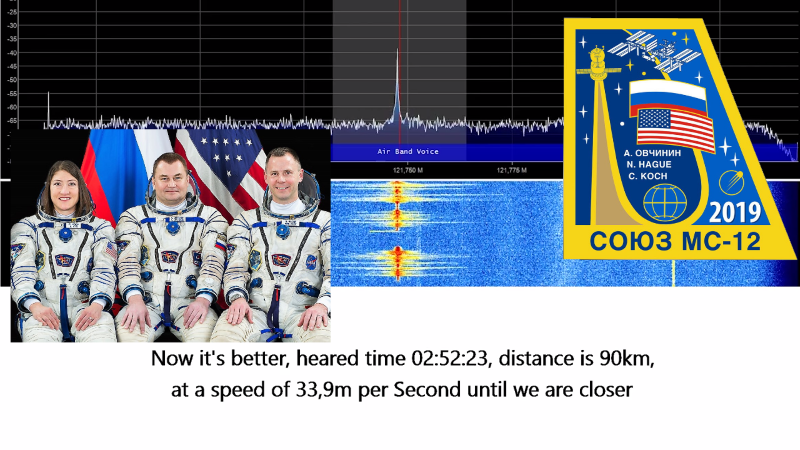
The phrase “eavesdropping on cosmonauts” sounds like something whispered in a Cold War basement while a reel-to-reel tape recorder spins dramatically in the corner. In reality, the modern version is usually much friendlier, nerdier, and legal when done responsibly: using a software-defined radio, or SDR, to listen for public amateur-radio signals from the International Space Station. No trench coat required. A laptop, a small USB receiver, a decent antenna, and a little patience will do.
SDR has turned radio listening into a hobby that feels part science experiment, part treasure hunt. Instead of buying a separate physical radio for every band, you plug in a receiver, open software, and watch radio signals appear on a waterfall display. Somewhere in that moving rainbow of static may be an ISS repeater pass, a packet signal, a scheduled school contact, or a slow-scan TV transmission sent from orbit. The thrill is not that you are hacking anything. The thrill is that a signal traveled hundreds of miles from a spacecraft moving faster than your excuses on Monday morningand your little antenna caught it.
What Does “Eavesdropping” Mean Here?
Let’s clear the airwaves first. In this article, “eavesdropping” means casually monitoring public, non-encrypted, receive-only radio transmissions that are intended for amateur-radio or educational use. It does not mean intercepting private communications, transmitting without a license, interfering with spacecraft operations, or pretending you are mission control because you bought a dongle online after midnight.
The International Space Station has long supported amateur-radio activity through ARISS, Amateur Radio on the International Space Station. Astronauts and cosmonauts have participated in educational contacts, voice operations, packet radio, repeater use, and special events. Many of these activities are designed to inspire students and radio hobbyists. That is the wholesome magic of it: the ISS is not only a laboratory in orbit, but sometimes also the world’s coolest ham shack.
What Is an SDR?
A software-defined radio is a radio system where much of the tuning, filtering, demodulation, and signal processing is handled by software instead of fixed hardware circuits. For beginners, the most common entry point is an RTL-SDR USB dongle. It looks like an oversized flash drive, costs far less than traditional radio gear, and can receive a wide range of signals depending on the model, antenna, and setup.
With SDR software such as SDR#, SDR++, CubicSDR, Gqrx, or similar applications, you can tune to a frequency, choose a mode like narrow FM, adjust gain, record audio, and visually inspect signals. The waterfall display is especially useful for satellites because you can see the signal drift slightly due to Doppler shift as the spacecraft approaches, passes overhead, and moves away.
Why SDR Works So Well for Space Listening
Space radio signals are predictable but brief. The ISS moves across the sky quickly, and a useful pass may last only a few minutes. SDR helps because it lets you monitor a slice of spectrum rather than a single razor-thin channel. If the signal shifts, you can follow it. If you tuned slightly wrong, you may still see it. If you hear only static, at least you get a colorful waterfall to stare at while questioning your life choices.
What Can You Actually Hear From the ISS?
The answer changes depending on station configuration, crew schedule, equipment status, and active events. The ISS amateur-radio station has used several modes over the years, and current activity should always be checked before a listening session.
1. Voice Contacts
One of the most exciting catches is a scheduled ARISS school contact. During these events, students ask questions while an astronaut or cosmonaut answers from orbit. The downlink has commonly been associated with 145.800 MHz FM for many educational contacts and related activities. You may hear short, clear, human moments: questions about food in space, exercise, science experiments, or what Earth looks like from above.
2. Cross-Band Repeater Activity
The ISS has also supported an FM cross-band repeater. In this mode, licensed amateur-radio operators transmit up to the station on one band, and the station retransmits back down on another. For listeners using an SDR, the downlink is the interesting part. A commonly listed repeater downlink is 437.800 MHz FM, while the uplink has been listed as 145.990 MHz with a 67 Hz tone when that mode is active. The key phrase is “when active.” Space radio is not a vending machine; you do not always get a snack just because you pushed the button.
3. Packet Radio and APRS
The ISS has also been used for packet radio and APRS-style digital communication, often around 145.825 MHz when active. Instead of voice, you hear digital bursts that sound like a tiny robot sneezing into a modem. With the right software, those bursts can be decoded into packets. Even if you do not decode them at first, seeing and hearing the packet signal is a satisfying milestone.
4. SSTV Images
Slow-scan television, or SSTV, is one of the most beginner-friendly and rewarding ISS radio events. During special events, the station may transmit images that listeners can decode with software. The result may be a commemorative picture, a mission-themed graphic, or an image celebrating space history. It arrives line by line, like a fax machine that went to astronaut school.
Equipment You Need to Listen
You do not need a Hollywood command center. A simple receive-only setup can work surprisingly well, especially if your local radio noise is low and your view of the sky is decent.
Basic Beginner Setup
- RTL-SDR USB receiver: A popular, low-cost entry point for wideband listening.
- Computer or compatible mobile device: Used to run SDR software and record audio.
- SDR software: SDR#, SDR++, Gqrx, CubicSDR, or another receiver application.
- Antenna: A V-dipole, handheld Yagi, discone, turnstile, or other VHF/UHF-capable antenna.
- Pass prediction tool: NASA’s station-tracking resources, satellite apps, or orbital prediction software.
- Optional decoder software: Useful for SSTV or packet signals.
The Antenna Matters More Than the Dongle
Beginners often obsess over the SDR receiver and forget the antenna. That is like buying premium coffee beans and brewing them through a sock. For VHF signals around 145 MHz, a simple V-dipole cut near the right length can work well. For UHF signals around 437 MHz, the antenna dimensions are smaller, but Doppler shift becomes more noticeable. A handheld Yagi can dramatically improve reception, though it requires manually pointing it at the moving station. Yes, you may look slightly dramatic in the backyard. That is part of the brand.
How to Plan an ISS Listening Session
The ISS circles Earth many times per day, but not every pass is equally useful. A low pass near the horizon may be blocked by buildings, trees, terrain, or your neighbor’s suspiciously tall garage. A higher pass gives a stronger signal and more listening time.
Step 1: Check Current Radio Status
Before touching your radio, check whether the ISS amateur station is active and what mode is currently listed. Frequencies and modes can change. The repeater may be on, off, or replaced by another activity. A school contact may be scheduled. SSTV may be announced for a special event. The smartest radio operator is not the one with the fanciest antenna; it is the one who checks the schedule before blaming the universe.
Step 2: Find a Good Pass
Use a pass prediction tool to find when the ISS will rise, reach maximum elevation, and set from your location. Look for passes above 30 degrees elevation when possible. Higher is better. A pass directly overhead can be excellent, though tracking it manually can feel like trying to follow a caffeinated firefly.
Step 3: Set the Frequency and Mode
For voice and repeater downlinks, narrow FM is commonly used. Set an appropriate bandwidth, often around 12 to 15 kHz for standard FM voice. Keep squelch low or off so you do not miss weak signals at the start and end of the pass. Adjust gain carefully. Too little gain and you miss the signal; too much and your receiver overloads, which is radio’s way of saying, “Please stop shouting.”
Step 4: Watch for Doppler Shift
Doppler shift happens because the ISS is moving rapidly relative to your receiver. As it approaches, the received frequency appears slightly higher; as it moves away, it appears lower. On VHF, the shift is modest. On UHF, such as around 437.800 MHz, it is more obvious and may require tuning several kilohertz during the pass. SDR makes this easier because you can see the signal drifting across the waterfall.
Step 5: Record Everything
Always record your session if your software allows it. The first time you hear a real signal, you may be too busy celebrating to understand what was said. A recording lets you replay the audio, decode digital signals, inspect timing, and prove to skeptical friends that you did not simply record your microwave.
Common Beginner Problems and Fixes
“I Heard Nothing But Static”
Welcome to radio. Static is the hobby’s unpaid intern. If you hear nothing, check the pass elevation, antenna placement, current ARISS status, frequency, mode, gain, and local noise. Also remember that the crew is not chatting constantly. Space radio is often silent until an event or active repeater session occurs.
“The Signal Was There, But Weak”
Move outside if possible. Put the antenna higher. Use shorter coax. Avoid metal window screens, concrete walls, LED noise sources, and USB interference. A cheap USB extension cable can help move the SDR away from computer noise. Small changes can produce surprisingly large improvements.
“The Signal Drifted Away”
That is likely Doppler shift. For UHF downlinks, start slightly above the listed frequency as the station approaches, tune closer to center during the highest part of the pass, and tune slightly below as it departs. Many satellite operators use stepped frequency memories, but SDR users can simply drag the tuning cursor or use tracking plugins.
“I Can Hear Other People, Not Cosmonauts”
If the repeater is active, you may hear licensed ham operators using the ISS as a relay. That is normal. Direct crew voice is less common and usually tied to scheduled events. Hearing any ISS-related downlink is still a win. Think of it as catching the station saying, “Not today, but nice antenna.”
Legal and Ethical Listening
Receive-only monitoring of public amateur-radio transmissions is generally part of the radio hobby, but laws vary by country and by communication type. In the United States, there are important restrictions against intercepting and divulging certain communications. The safe rule is simple: listen only to public, legal transmissions; do not decode or share private communications; do not transmit unless properly licensed; and never interfere with any radio service.
Transmitting to amateur satellites or the ISS repeater requires an amateur-radio license and proper operating practice. Listening with an SDR does not give you permission to talk back. The ISS is not customer support, and “Can you hear me now?” is not a space program.
Why This Hobby Feels So Addictive
Listening to space signals with an SDR is addictive because it combines simplicity with wonder. The equipment is small. The cost can be modest. The learning curve is friendly enough for beginners but deep enough to keep experts entertained. You learn about antennas, orbital mechanics, modulation, Doppler shift, signal-to-noise ratio, digital decoding, and radio regulations without needing to sit through a lecture that smells like dry-erase markers.
There is also something emotionally strange and wonderful about hearing a signal from orbit. It is not a polished documentary. It is not a cinematic soundtrack. It is a scratchy burst of reality arriving through the atmosphere. That makes it better. It reminds you that space is not only something on a screen; it is overhead, moving fast, and occasionally transmitting in FM.
Practical Example: A First ISS SDR Attempt
Imagine you are preparing for a high-elevation evening pass. You check the current station status and see that the FM repeater is active. You connect an RTL-SDR to your laptop, attach a VHF/UHF antenna, open SDR software, and tune to the downlink. A few minutes before acquisition of signal, you start recording. At first, nothing happens.
Then a faint line appears on the waterfall. You adjust the tuning slightly. Static turns into a clipped voice. The signal grows stronger as the ISS climbs. For two minutes, the audio is clear enough to hear call signs and short exchanges. Then the signal begins to slide. You follow it down a few kilohertz, lose it behind a burst of noise, catch it again, and finally watch it fade as the station drops toward the horizon.
Was it perfect? No. Was it thrilling? Absolutely. The first successful reception often sounds messy, but it proves the system works. After that, every improvement becomes a mini-project: better antenna, better pass planning, cleaner audio, smarter Doppler correction, digital decoding, and eventually the dangerous phrase every hobbyist knows too well: “I only need one more cable.”
Best Practices for Better Reception
- Choose high passes: Aim for passes with strong maximum elevation.
- Get outside: Buildings can block or weaken signals.
- Use the right antenna: Match your antenna to VHF or UHF activity.
- Record sessions: Reviewing audio teaches you faster than guessing.
- Manage gain: Avoid both weak sensitivity and overload.
- Track Doppler: Especially on UHF downlinks.
- Verify activity: Check current ISS amateur-radio status before each attempt.
Experiences Related to Eavesdropping On Cosmonauts With An SDR
The first experience many listeners have with ISS SDR monitoring is not a dramatic voice from space. It is confusion. You set up the dongle, open the software, stare at the waterfall, and wonder whether you are receiving the universe or just your laptop’s electrical indigestion. That is normal. The early stage of SDR listening is about learning what “normal noise” looks like, what local interference sounds like, and how a real satellite signal behaves differently.
A useful beginner habit is to practice before the ISS pass. Tune to a local FM broadcast station, NOAA weather radio if available in your area, or a nearby amateur repeater. This confirms that the SDR, drivers, software, and antenna are working. It also teaches basic controls such as gain, filter width, mode selection, and audio levels. Trying to learn all of that during a six-minute ISS pass is like learning to swim after being fired from a cannon into a lake.
Another memorable experience is discovering how much the environment matters. A setup that hears nothing from a basement may work beautifully from a balcony. A small antenna placed near a window may perform better when moved only a few feet. Trees, walls, metal roofs, power supplies, monitors, and cheap LED lights can all affect reception. Many SDR users eventually develop a strange new instinct: they walk into a room and mentally rate it for radio noise. This is how you know the hobby has politely taken over part of your brain.
The first successful ISS reception often comes in fragments. You may hear a half-second of voice, lose it, see a line on the waterfall, adjust frequency, and catch another burst. That can feel frustrating until you realize you are receiving a moving spacecraft with inexpensive equipment. The bar for “success” should be generous at first. Hearing any clear downlink, decoding even a partial SSTV image, or capturing a recognizable packet burst is progress.
One of the best experiences is comparing recordings from different passes. A low pass may be noisy and short. A high pass may sound dramatically better. A handheld directional antenna may outperform a simple indoor antenna, but only if aimed well. A fixed antenna may be less powerful but easier to use. These comparisons teach practical radio skills that no product description can fully explain.
There is also a social side. SDR and satellite-radio communities are full of people sharing pass reports, decoded images, antenna experiments, and troubleshooting advice. Someone may post that SSTV is active, another listener confirms the frequency, and suddenly half the hobby is outside with laptops, cables, and the expression of people trying to catch a ghost with a salad fork. It is wonderfully ridiculous and genuinely educational.
Over time, listening to the ISS with an SDR changes how you look at the sky. A bright moving point overhead is no longer just a pretty object. It becomes a radio source, a classroom, a repeater, a spacecraft, and a reminder that engineering can be both serious and playful. You start to understand that the magic is not only in hearing cosmonauts or astronauts. The magic is in building a small bridge between your desk and low Earth orbit.
Conclusion
Eavesdropping on cosmonauts with an SDR is less about secret listening and more about joining one of the most accessible space hobbies on Earth. With a low-cost receiver, a practical antenna, reliable pass predictions, and respect for radio laws, you can monitor public amateur-radio activity from the International Space Station and related space signals. You may hear voice, packet bursts, repeater traffic, or special event transmissions. You may also hear static, which is less glamorous but still educational.
The real reward is the learning process. Every pass teaches something: how antennas behave, how Doppler shift affects tuning, how software filters shape audio, and how much patience radio requires. When the signal finally rises out of the noise, it feels like catching a whisper from the edge of the sky. And yes, it is perfectly acceptable to grin like a kid when it happens.
Note: This article is written for lawful, receive-only monitoring of public amateur-radio and educational transmissions. Always check current ISS amateur-radio status, follow local laws, and never transmit without the proper amateur-radio license.