Ordinary Minecraft blocks are dependable. Break stone, get cobblestone. Break an oak log, get wood. Break a Lucky Block, however, and the game may reward you with diamonds, surround you with hostile mobs, build a structure over your head, or introduce you to an explosion at an extremely personal distance.
That glorious uncertainty is the entire appeal of the Lucky Block experience. The mod adds brightly marked blocks that trigger random events when opened. Some outcomes are helpful, some are harmlessly ridiculous, and others make a Creeper look like a responsible houseguest.
This guide explains how to play Lucky Blocks in Minecraft in eight practical steps, from choosing the correct edition and installing a compatible mod to organizing races, protecting your world, and surviving whatever comes flying out of the next yellow cube.
Step 1: Choose a Compatible Minecraft Version
Before downloading anything, decide which Minecraft version you want to play. This is the most important part of the setup because Minecraft mods are not universally compatible with every release.
For example, a Lucky Block file created for Minecraft 1.20.1 may not run on 1.21. A Forge mod will not automatically run on Fabric, and a Fabric version cannot be treated as a NeoForge mod merely through positive thinking.
Match These Four Components
- Your Minecraft game version
- The mod loader and its version
- The Lucky Block mod file
- Any required dependency mods
Read the file information on the mod’s download page rather than assuming the newest file is right for your installation. Some older Minecraft versions remain popular for Lucky Block race maps and classic add-ons, while newer releases may offer improved performance and modern features.
If you plan to join a server, ask which exact version and loader it uses. Every player usually needs the same compatible setup, and the server must run the required server-side files. Version mismatches are among the most common causes of crashes, missing blocks, and multiplayer connection errors.
Step 2: Back Up Your Worlds and Create a Separate Profile
Lucky Blocks can generate structures, release lava, summon dangerous creatures, or cause explosions. In other words, opening one beside your lovingly built castle is a bold way to discover how emotionally attached you are to the castle.
Create a backup before adding mods or experimenting in an important world. Copy the world folder to another location, or use your launcher’s backup and profile-management features when available.
Why a Separate Modded Profile Helps
A dedicated profile keeps Lucky Block files away from your normal vanilla installation. It also allows you to preserve separate settings, resource packs, worlds, and mod collections for different Minecraft versions.
Launcher-based managers such as the CurseForge app can create an isolated custom profile. You select a Minecraft version and compatible loader, add the mod, and launch that profile without manually mixing files in your main game directory.
Give the profile an obvious name, such as Lucky Blocks 1.20.1. This simple label prevents the classic mistake of opening a valuable world in the wrong version and then staring at the screen with the expression of someone who has just heard TNT ignite.
Step 3: Install the Correct Mod Loader
Minecraft: Java Edition needs a mod loader to recognize and run most mods. Common choices include Forge, Fabric, and NeoForge. The correct choice depends entirely on the Lucky Block file you intend to use.
The Easier Launcher Method
- Open your trusted mod-management application.
- Create a custom Minecraft profile.
- Select the required Minecraft version.
- Select the loader listed on the Lucky Block file page.
- Allow the application to install the compatible loader version.
The Manual Method
Advanced players can download the appropriate loader installer from its official website. For Forge or NeoForge, this generally involves running the installer, choosing the client installation option, and launching the newly created profile once. Fabric provides its own installer and installation instructions.
Do not download mod loaders from copied download pages, random file hosts, or websites decorated with six enormous buttons labeled “DOWNLOAD NOW.” Reputable project pages and official documentation are less likely to package unwanted software with your Minecraft adventure.
Step 4: Download and Add the Lucky Block Mod
Once the profile and loader are ready, download a Lucky Block file that matches them. The original concept has inspired multiple projects, ports, add-ons, and themed variants, so examine the project title, author, supported versions, dependencies, and update history carefully.
Installing Through a Mod Manager
Open your custom profile, choose the option to add content, and search for the desired Lucky Block project. A compatible launcher should filter out files that do not match your profile. Install the project and any dependencies it identifies.
Installing Manually
For a manual installation, place the downloaded mod file in the profile’s mods folder. Do not unzip a standard mod JAR unless the project’s instructions specifically tell you to do so.
Launch the game with the modded profile. On the title screen, open the Mods menu when one is available and confirm that the Lucky Block project appears. If Minecraft crashes, review the error message for one of these likely problems:
- The mod was built for a different Minecraft version.
- The file requires a different loader.
- A dependency is missing.
- Two installed mods conflict.
- The allocated memory is insufficient for a larger modpack.
Add one project at a time during troubleshooting. Installing 47 mods simultaneously and then asking which one caused the crash is the digital equivalent of releasing every animal from a zoo and investigating who knocked over the trash can.
Step 5: Create a Safe Lucky Block Test World
Do not begin inside your favorite long-term survival world. Create a new test world first so you can confirm that the mod loads correctly and learn how its events behave.
Creative mode is ideal for initial testing because you can search the inventory for Lucky Blocks, place several of them, and inspect any related weapons, tools, potions, or spawn items. Survival mode delivers more tension because every reward matters and every trap can end the run.
Build a Proper Opening Area
Choose a wide, open location at least a reasonable distance from villages, bases, redstone machines, livestock, and anything else you would prefer not to see launched into orbit.
A simple testing arena can include:
- A flat stone or dirt platform
- Storage chests placed far from the opening point
- A bed or nearby respawn location
- Water buckets for fire and lava
- Walls or lane markers for multiplayer challenges
- A spectator platform for cautious friends
Keep inventory rules, difficulty settings, and command permissions should be agreed upon before a challenge begins. Changing the rules halfway through because someone received enchanted gear is generally known as “being a sore loser with administrator privileges.”
Step 6: Find, Craft, or Place Lucky Blocks
The way you obtain Lucky Blocks depends on the project version and configuration. Some versions place them naturally in the world, some provide a crafting recipe, and others are intended mainly for Creative mode, custom maps, commands, or modpacks.
Recipes have changed across different Lucky Block releases and ports, so use an in-game recipe viewer or the documentation for your exact file instead of relying on an old screenshot. A recipe shown in a decade-old video may no longer apply to a modern release.
Understanding Luck Values
Certain versions allow a block’s luck rating to be changed by combining it with valuable or harmful items. Positive luck generally improves the probability of favorable outcomes, while negative luck increases the chance of unpleasant surprises.
However, “more likely” does not mean “guaranteed.” A highly lucky block may still create danger, and an unlucky block can occasionally produce something useful. Randomness is the star of the show; the luck system merely attempts to negotiate with it.
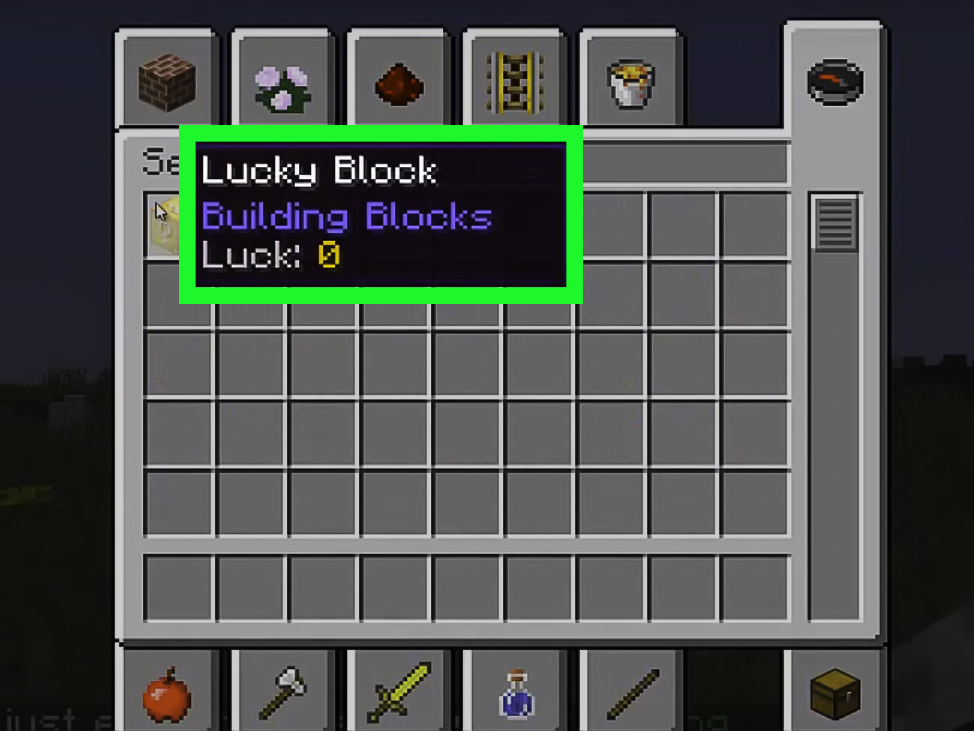
In Creative mode, hover over the item or inspect its description to see whether a luck value is displayed. For multiplayer competitions, make sure every participant receives blocks with the same settings.
Step 7: Open Lucky Blocks Without Immediately Regretting It
To activate a Lucky Block, place it and break it as you would break another block. The required tool varies by version, but many can be opened quickly by hand. The event normally triggers as soon as the block breaks.
A Practical Survival Routine
- Store valuable equipment before opening large batches.
- Stand in an open space with an escape route.
- Keep a shield, food, weapon, and water bucket ready.
- Open one block at a time.
- Pause to evaluate the result before approaching dropped items.
Do not assume that a pile of diamonds is completely safe. A second event may be unfolding nearby, a structure may appear above you, or a hostile mob may already be practicing its dramatic entrance.
Listen for TNT, hostile creatures, falling blocks, and other audio clues. Move sideways rather than standing directly over the opening point. If a dangerous structure appears, retreat first and investigate later. Minecraft rewards curiosity, but it rewards curiosity wearing armor even more.
Possible Types of Outcomes
Depending on the mod version, add-ons, and configuration, outcomes may include valuable resources, enchanted equipment, food, decorative structures, wells, villagers, animals, hostile mobs, traps, explosions, falling objects, or unusual scripted events.
The uncertainty makes Lucky Blocks excellent for challenge videos and party games. It also makes them a questionable choice for decorating the nursery in your survival base.
Step 8: Turn Lucky Blocks Into a Race or Multiplayer Challenge
After testing the basics, organize a Lucky Block race. Players move through separate lanes, breaking every block they encounter and using the rewards to reach the finish line or prepare for a final battle.
Simple Lucky Block Race Rules
- Give every player the same number and type of blocks.
- Require players to open blocks in order.
- Do not enter another player’s lane.
- Allow a limited recovery period after death.
- Decide whether players may skip dangerous structures.
- Set a time limit for collecting rewards.
- Finish with a PvP battle, boss fight, or scoring round.
A scoring format works well for players who dislike PvP. Award points for diamonds, emeralds, enchanted gear, rare items, surviving traps, reaching checkpoints, or completing the course. Deduct points for deaths, skipped blocks, or suspiciously convenient trips into Creative mode.
For online play, install the correct mods and dependencies on the server. Depending on the project, players may also need matching client files. A premade modpack can simplify distribution because everyone receives the same versions and configuration.
Helpful Strategies for Better Lucky Block Sessions
Open Blocks Away From Your Base
Create a dedicated “chaos field” several chunks from important builds. Roads, minecart lines, or Nether portals can make the site easy to reach without putting your storage room in the blast radius.
Use Checkpoints
Long races become frustrating if one unlucky event sends a player back to the beginning. Add beds, respawn anchors where appropriate, or command-based checkpoints at regular intervals.
Test Add-ons Separately
Themed Lucky Block add-ons can introduce new loot tables, textures, bosses, effects, and dependencies. Test each add-on in a clean profile before combining several of them. This helps identify incompatibilities and keeps performance problems manageable.
Balance Fun and Fairness
Perfect balance is impossible in a game mode built around randomness. You can still improve fairness by standardizing block counts, luck values, starting gear, lane design, and recovery rules.
Common Lucky Block Problems and Fixes
Minecraft Crashes During Startup
Confirm that the Minecraft version, loader, mod file, and dependencies match. Remove recently added files and test again. Read the crash report for the name of a missing library or incompatible project.
The Mod Does Not Appear
Make sure you launched the modded profile rather than the normal vanilla installation. Verify that the file is inside the correct profile’s mods folder.
Lucky Blocks Are Missing From the World
Search the Creative inventory first. Natural generation may be disabled, rare, limited to newly generated chunks, or unavailable in your chosen version. Review the project’s configuration and recipe information.
A Multiplayer Player Cannot Join
Compare the player’s full mod list with the server’s required list. Matching project names are not enough; file versions, loaders, Minecraft releases, and configurations may also matter.
The World Runs Poorly
Large structures, many entities, explosions, and numerous installed add-ons can reduce performance. Lower the number of simultaneous blocks, remove unnecessary mods, adjust graphics settings, and avoid opening a mountain of blocks at once.
Experiences From Playing Lucky Blocks: Lessons Learned Through Chaos
The first lesson Lucky Blocks teach is that confidence lasts exactly until the block breaks. You can approach an opening with enchanted armor, a shield, golden apples, and the calm expression of a veteran adventurer. Two seconds later, you may be running through a field while something explodes behind you and a group of newly spawned enemies debates which part of you looks most edible.
A good first session should be treated as an experiment, not a serious survival campaign. Start in Creative mode, place about ten blocks on an empty plain, and open them individually. This reveals the scale of the mod’s events. Some results occupy a single block of space, while others can transform the surrounding area or fill it with entities. Learning that difference in a disposable world is much more pleasant than learning it beside a wooden mansion.
One especially useful habit is to create distance immediately after breaking a block. New players often stand still because they want to grab the reward before it disappears. That instinct works when bread or iron lands on the ground, but it becomes less brilliant when the “reward” has a fuse. Breaking the block from one side and moving backward gives you time to recognize what is happening.
Storage discipline also changes the experience. Carrying every valuable item into a Lucky Block arena turns a funny death into a rescue mission. Keep spare armor, tools, food, and blocks in a protected checkpoint chest. Bring only the equipment needed for the current round. You will recover faster, and your friends will have less time to build a memorial shaped like your panicked face.
Multiplayer sessions become far better when the rules are written before the first block opens. Players should know whether they must fight spawned mobs, whether they can leave their lanes, how deaths are handled, and when PvP begins. Otherwise, every unexpected result becomes a courtroom argument conducted by people holding diamond swords.
Short races are usually more entertaining than enormous courses. A lane with 15 to 30 blocks creates enough randomness without allowing a badly trapped player to fall hopelessly behind. Add two or three checkpoints and a final preparation area where participants can organize whatever strange collection of gear they acquired.
The best ending is not always a direct fight. Sometimes one player receives extremely powerful weapons while another finishes with eight flowers, a fishing rod, and emotional damage. Alternative finales can include a boss battle, timed obstacle course, target challenge, building contest using collected materials, or point-based treasure evaluation.
Lucky Blocks are most enjoyable when players accept that unfair moments are part of the comedy. The goal is not to create a perfectly competitive esport. The goal is to watch Minecraft abandon its usual logic for a while and see who adapts. Celebrate absurd outcomes, save screenshots, and avoid taking defeat personally. The next block may give you everything you needor produce a crater where your optimism used to be.
Conclusion
Learning how to play Lucky Blocks in Minecraft is mostly a matter of preparing correctly for deliberate unpredictability. Match your Minecraft version and mod loader, install the project from a trusted source, create a separate profile, back up important worlds, and test everything in a safe location.
Once the technical setup works, the real fun begins. Open blocks in survival mode, build race lanes for friends, experiment with luck values, or combine compatible themed add-ons. Just remember that every yellow question-mark block is making a promise: something interesting will happen. It is making absolutely no promise that you will enjoy the next five seconds.