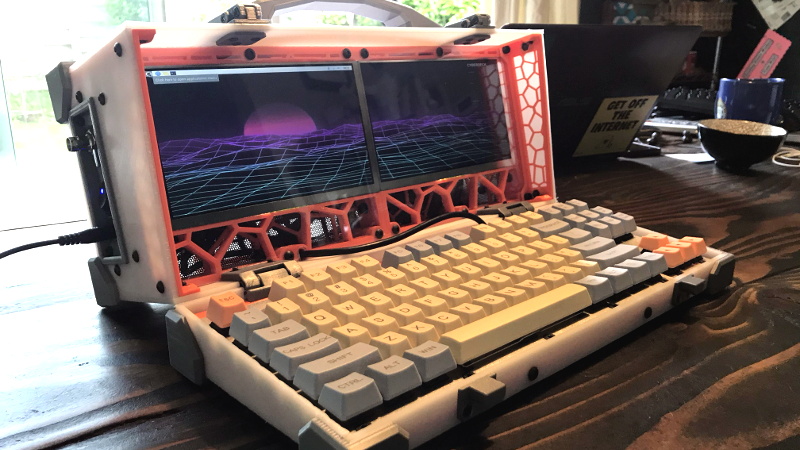
Some computers are designed to disappear into a backpack. Others arrive with a carrying handle, two glowing displays, a handmade mechanical keyboard, and enough radio equipment to make airport security politely request a longer conversation. A dual screen luggable with integrated RTL-SDR belongs proudly to the second category.
Built around the Raspberry Pi 4, this retro-futuristic machine combines two compact LCD panels, a custom enclosure, physical controls, and an RTL-SDR receiver in one portable workstation. The original project popularized by maker dapperrogue used a pair of 7-inch displays, a scratch-built mechanical keyboard, an externally accessible BNC antenna connector, and an RTL-SDR dongle previously used for receiving NOAA weather signals. The result looked like a lost computer from an alternate version of the 1980sone where software-defined radio had already escaped the laboratory.
Beyond its visual appeal, the machine demonstrates something important: a cyberdeck does not have to be decorative science fiction. With thoughtful power distribution, cooling, shielding, and software configuration, it can become a useful portable radio-analysis station.
What Is a Dual Screen Luggable?
A luggable computer is portable in the traditional sense that it can be carried by one determined human. It is not necessarily lightweight, slim, or interested in fitting beneath an airline seat without an argument.
Early machines such as the Compaq Portable and Kaypro established the basic formula: place a complete computer inside a transportable enclosure, add a handle, and accept that “portable” may involve both hands. Modern maker versions preserve the chunky charm while replacing monochrome CRTs and floppy drives with single-board computers, high-resolution LCDs, USB peripherals, and 3D-printed panels.
The dual-screen design makes this particular RTL-SDR cyberdeck more practical than many novelty builds. One display can show a live spectrum and waterfall, while the other presents decoded data, maps, terminal windows, documentation, or logging tools. Instead of constantly rearranging software windows on one tiny screen, the operator gets a miniature command center.
Why the Raspberry Pi 4 Fits the Design
The Raspberry Pi 4 is a natural foundation because it provides two micro-HDMI outputs, USB connectivity, networking, GPIO access, and enough processing power for common SDR applications. Official Raspberry Pi documentation confirms that the Pi 4 supports two displays and can drive two 4K screens at 30 Hz, although small 7-inch panels require far less graphics horsepower.
That matters because a software-defined radio interface can be visually busy. A waterfall display updates continuously, frequency controls must remain accessible, and decoded information may arrive in real time. The second screen is not merely decorativeit reduces window shuffling and makes the system feel like a purpose-built instrument rather than a desktop squeezed into a lunchbox.
The Core Hardware Architecture
The original dual screen luggable used several familiar maker components arranged into a much more ambitious whole:
- A Raspberry Pi 4 single-board computer
- Two approximately 7-inch LCD panels
- A custom mechanical keyboard sized for the enclosure
- An RTL-SDR receiver
- An external BNC antenna connector
- A powered or internally supplied USB hub
- A 12-volt-to-5-volt step-down converter
- Multiple cooling fans
- A multi-part 3D-printed enclosure
Individually, none of these parts is especially exotic. The engineering challenge comes from making all of them coexist without voltage drops, overheating, radio-frequency interference, cable strain, or a mysterious USB disconnect that appears only after the enclosure has been completely screwed together.
The Custom Mechanical Keyboard
A homemade keyboard is one of the project’s most distinctive features. Off-the-shelf compact keyboards often waste valuable enclosure space or place keys in awkward positions. Designing the keyboard around the exact internal dimensions allows the builder to control key spacing, switch type, layout, and mounting.
For radio use, physical input is valuable. Frequency changes, gain adjustments, recording commands, bookmarks, and decoder controls are faster when assigned to real keys or rotary encoders. A touchscreen may look modern, but during field use it can become a glossy collection of fingerprints with trust issues.
The External BNC Connector
Routing the RTL-SDR antenna input to a chassis-mounted BNC connector is a small decision with a large practical payoff. The operator can attach different antennas without opening the case or placing strain on the dongle’s original connector.
BNC is also mechanically secure. Unlike a loose push-fit connection, it locks with a twist and is well suited to equipment that will be carried, repositioned, or used outdoors. Adapters can connect it to SMA antennas, coaxial feed lines, filters, low-noise amplifiers, or band-specific antennas.
What the Integrated RTL-SDR Adds
Software-defined radio moves much of a traditional receiver’s signal processing into software. Instead of building separate hardware radios for FM, AM, aircraft signals, weather broadcasts, and numerous digital modes, the operator changes applications, settings, filters, and decoder pipelines.
The RTL-SDR family began with inexpensive USB television-tuner hardware based on the RTL2832U chipset. Developers discovered that compatible units could output raw in-phase and quadrature samples, turning them into remarkably affordable wideband receivers. The American Radio Relay League describes SDR as the use of digital signal processing to detect radio signals, which neatly summarizes why the platform is so flexible.
The original luggable reportedly incorporated an RTL-SDR Blog V3. That model supports reception across much of the VHF and UHF spectrum and offers direct-sampling access for portions of the HF range. Its software-controlled bias tee can supply power to compatible active antennas or low-noise amplifiers.
A modern rebuild could use the RTL-SDR Blog V4, whose published specifications list coverage from approximately 500 kHz to 1.766 GHz, stable bandwidth around 2.56 MHz, a 50-ohm input, and typical current draw of roughly 250 to 270 mA. The newer design improves HF reception, filtering, and sensitivity in several portions of the spectrum.
Why Two Screens Are Especially Useful for SDR
Software-defined radio creates information faster than one small screen can comfortably organize. A typical operating session may involve a spectrum display, a waterfall, audio controls, a decoder, a map, a terminal, and a logging application.
Screen One: Spectrum and Receiver Controls
The first display can run Gqrx, SDR++, or another general-purpose receiver. Gqrx is an open-source SDR application built with GNU Radio and Qt, and it supports RTL-SDR hardware along with several other receiver families. It can operate as an AM, FM, or SSB receiver and can also function as an FFT-based spectrum tool.
This screen becomes the tuning surface. It shows where signals are located, how wide they are, whether interference is present, and how gain or filtering changes reception.
Screen Two: Decoding, Mapping, and Logging
The second display can handle whatever the signal becomes after reception. Examples include:
- An aircraft map produced by an ADS-B decoder
- Weather-sensor data decoded with rtl_433
- A terminal displaying signal statistics
- A browser showing local documentation
- A logging database or spreadsheet
- A GNU Radio flowgraph under development
- System temperature, CPU load, and voltage monitoring
The rtl_433 project supports reception and decoding of many low-power devices operating around common ISM frequencies, including 315, 345, 433.92, 868, and 915 MHz. Depending on location and supported protocols, these may include weather stations, thermometers, utility sensors, tire-pressure monitors, and other short-range transmitters.
For aircraft reception, dump1090-compatible software can decode ADS-B transmissions near 1090 MHz. FlightAware’s PiAware system is specifically designed to integrate dump1090-based receivers running on Raspberry Pi hardware.
Signals a Portable RTL-SDR Station Can Explore
An RTL-SDR receiver is receive-only, but it can observe a surprisingly broad range of legal, unencrypted signals. Actual availability depends on location, antenna design, local regulations, terrain, and nearby transmitters.
NOAA Weather Radio
In the United States, NOAA Weather Radio broadcasts continuous weather information on seven frequencies between 162.400 and 162.550 MHz. A portable station can display the signal, demodulate the audio, record alerts, or serve as an experimental platform for automated monitoring.
Broadcast FM and Amateur Radio
Local FM stations make convenient test signals because they are usually strong and easy to identify. Amateur radio repeaters, beacons, and selected digital modes provide more advanced opportunities, provided the operator follows applicable regulations and respects private communications.
Aircraft ADS-B
With a suitable 1090 MHz antenna, the system can receive aircraft position broadcasts and plot nearby traffic. The second screen is ideal for the map while the first displays signal strength, decoder performance, or the surrounding spectrum.
Wireless Sensors
Many household and industrial sensors transmit short data bursts in unlicensed spectrum. Decoding one’s own weather station or temperature sensor can be an approachable introduction to digital radio. It is also a fine way to discover that the backyard thermometer talks more frequently than some relatives.
The Hardest Engineering Problems
Power Distribution
A Raspberry Pi, two displays, an SDR dongle, a keyboard controller, fans, and a USB hub can create a substantial combined load. The official recommendation for a Raspberry Pi 4 is a regulated 5-volt, 3-amp USB-C supply. A luggable must also provide separate or carefully managed power for its displays and accessories.
A 12-volt internal supply paired with a quality buck converter can work well, but the converter must deliver stable current without introducing excessive switching noise. Cheap converters may produce spurs that appear directly in the SDR waterfall. The computer then becomes impressively capable of receiving its own power supply.
A powered USB hub can prevent the Pi’s USB rail from carrying the entire peripheral load. Builders should measure actual current consumption instead of adding optimistic numbers from product listings and hoping electricity respects enthusiasm.
Radio-Frequency Interference
LCD controllers, HDMI cables, switching regulators, USB 3.0 devices, processors, and fan controllers can all generate unwanted RF energy. In a normal computer, that noise may be invisible. Inside an SDR receiver, it can become a forest of stationary lines and broadband interference.
Practical countermeasures include shielded cables, short internal cable runs, ferrite chokes, proper grounding, metal shielding around noisy modules, and physical separation between the SDR and display electronics. Moving the receiver closer to the antenna through a USB extension may sometimes reduce coaxial loss, although cable quality and USB noise still matter. RTL-SDR technical guides also recommend low-loss coax and sensible thermal management for demanding reception setups.
Cooling
Continuous FFT processing, dual-screen output, and decoding workloads can keep the Pi busy. The SDR dongle also generates heat, and temperature changes can affect receiver stability in less sophisticated hardware.
The original project used four fans, which suggests that cooling was treated as a system-level requirement rather than a decorative afterthought. Air should enter from a clean path, pass over hot components, and exit without immediately being inhaled by the neighboring fan.
More fans are not automatically better. Poorly positioned fans may create noise, vibration, and turbulent airflow without meaningfully lowering component temperatures. A temperature-controlled fan, proper heatsink, and planned air channel are usually preferable to turning the enclosure into a tiny wind tunnel.
Mechanical Serviceability
Large 3D-printed projects rarely emerge perfectly from the printer on the first attempt. Panel fit, screw alignment, hinge strength, cable clearance, and heat-set insert placement all require attention.
The enclosure should be modular enough that the SDR, Pi, power converter, or display controller can be replaced without dismantling the entire machine. Removable rear panels and labeled connectors save enormous amounts of frustration during troubleshooting.
A Practical Software Stack
A useful dual screen RTL-SDR luggable could run Raspberry Pi OS or another compatible Linux distribution with several complementary applications:
- Gqrx: General tuning, spectrum viewing, and AM/FM/SSB reception
- SDR++: A lightweight cross-platform SDR interface designed to remain relatively simple and responsive
- GNU Radio: Visual signal-processing development and custom receiver experimentation
- rtl_433: Decoding supported wireless sensors and telemetry devices
- dump1090 or readsb: Receiving and decoding aircraft ADS-B signals
- PiAware: Presenting and optionally sharing compatible ADS-B data
- System monitoring tools: Tracking CPU temperature, undervoltage warnings, storage use, and USB stability
GNU Radio is particularly valuable for education because it lets users assemble signal-processing blocks into working receivers and decoders. SDR++ offers a more streamlined everyday interface and supports several desktop operating systems.
How a Modern Version Could Be Improved
The original machine remains an appealing design, but several upgrades could make a current build more reliable.
Use an RTL-SDR V4
The newer receiver offers improved filtering and more convenient HF operation. Mount it away from display controllers and use a short, high-quality coaxial jumper between the dongle and the chassis connector.
Add Rotary Encoders
Dedicated knobs for tuning, gain, volume, zoom, and filter width make an SDR interface far easier to operate. Buttons beneath the encoders can switch frequency steps or modes.
Improve Power Monitoring
A small voltage-and-current display can reveal undervoltage conditions before they cause USB instability. A properly fused input, master power switch, and separate display power control would make the machine safer and easier to troubleshoot.
Use Swappable Antenna Connections
A patch panel could provide BNC or SMA connectors for separate HF, VHF/UHF, ADS-B, and GPS antennas. An internal RF switch may also be useful, provided it offers adequate isolation and does not become another noise source.
Consider Battery Operation Carefully
A battery transforms the system into a genuine field station, but it also introduces charging, protection, heat, and runtime considerations. A professionally designed power bank or battery-management system is safer than assembling an unprotected lithium pack and placing it beside warm electronics in a plastic enclosure.
Hands-On Experience: What Using a Dual Screen SDR Luggable Feels Like
A realistic operating experience begins before the radio software opens. The machine is placed on a table, the handle folds down, an antenna is attached, and several cables are checked because portable does not mean magically wireless. When the power switch is pressed, both displays illuminate, fans begin moving air, and the Raspberry Pi boots into a desktop stretched across two panels.
The first surprise is how quickly two small screens become indispensable. Gqrx or SDR++ fills the left display with a spectrum and waterfall. The right display holds a terminal, browser, decoder, or map. Within minutes, returning to a single screen feels like trying to repair a watch through a mail slot.
The second experience is usually a noise hunt. A mysterious vertical line appears at a fixed frequency. Changing antennas does nothing. Adjusting gain makes it more obvious. Eventually, the source turns out to be an LCD controller, HDMI cable, USB hub, or DC converter. Moving one wire by two inches may dramatically reduce the interference, which is both satisfying and mildly insulting.
Testing with a strong FM broadcast station confirms that the receiver works. NOAA Weather Radio provides another stable reference in the United States. After that, the operator may connect a 1090 MHz antenna and launch an ADS-B decoder. Aircraft begin appearing on the right-hand map while message rates and signal levels update in another window.
The integrated controls become increasingly important during longer sessions. A physical tuning knob is faster than dragging a tiny graphical control. A keyboard shortcut can start recording instantly. A dedicated button can switch between favorite bands without digging through menus.
Heat becomes noticeable after sustained operation. The displays warm the front panel, the processor works continuously, and the SDR enclosure may become hot to the touch. Well-designed airflow keeps temperatures stable without producing the sound of a drone preparing for takeoff. Poor airflow leads to throttling, instability, or the classic troubleshooting technique of removing the rear panel and pretending that was always part of the design.
Field use reveals the tradeoff behind the word “luggable.” The machine is easier to transport than a desktop computer, but it is not something most people carry casually for hours. Its strength is rapid deployment: set it down, connect an antenna, apply power, and a complete multi-display radio workstation is ready.
The custom enclosure also changes how people interact with it. A generic laptop connected to an SDR dongle looks temporary. An integrated luggable feels like an instrument. Controls have permanent positions, cables exit through planned connectors, and the software layout can be saved for repeatable use.
Over time, the machine encourages experimentation. One day it monitors weather broadcasts. Another day it maps aircraft, examines interference around a home electronic device, decodes personal wireless sensors, or runs a custom GNU Radio flowgraph. The hardware stays the same while the software continually changes its purpose.
That flexibility is the most rewarding part of the experience. The project is not merely a strange computer with two screens. It is a portable laboratory for learning how radio signals occupy spectrum, how antennas affect reception, how digital decoders extract information, and how ordinary electronics can interfere with sensitive receivers.
Conclusion
A dual screen luggable with integrated RTL-SDR succeeds because its dramatic appearance serves a practical design. The Raspberry Pi 4 provides native dual-display output, the two panels separate tuning from analysis, and the built-in SDR turns the computer into a flexible receiving station.
Its construction also teaches lessons that polished commercial devices tend to hide. Stable power matters. Cooling must be planned. USB devices can behave unpredictably. Display electronics generate radio noise. Antennas often matter more than software settings. And no enclosure is truly finished until it has been reopened at least six times.
For makers interested in Raspberry Pi systems, cyberdecks, radio monitoring, mechanical keyboards, or custom fabrication, this project offers an unusually rich combination of disciplines. It is part computer, part receiver, part portable laboratory, and part affectionate tribute to an era when carrying a computer counted as exercise.
Note: Use SDR equipment only to receive signals that may legally be monitored in your jurisdiction. Federal and state rules can restrict the interception, decoding, recording, use, or disclosure of certain communications, particularly private or encrypted transmissions.