Every electronics designer has a folder somewhere named something like final_board_v3_REAL_FINAL_fixed_again. Inside it lives a schematic that took three evenings, two cups of coffee, and one dramatic argument with a USB-C connector symbol. Then, six months later, the same designer starts a new project and redraws almost the same circuit from scratch. This is how engineering wisdom quietly leaks out of the universe.
That is exactly why the idea of an online repository for KiCad schematics feels so useful. KiCad has grown into one of the most important open-source tools for schematic capture and PCB design. It runs on major operating systems, supports professional design workflows, and gives hobbyists, students, startups, and experienced engineers a serious electronics CAD platform without locking their ideas behind a subscription gate. But while KiCad already has strong symbol, footprint, and 3D model libraries, there has long been a gap between a single component symbol and a full project repository.
An online KiCad schematic repository fills that missing middle. Instead of only sharing finished PCB projects, designers can share reusable circuit blocks: voltage regulators, sensor front ends, USB interfaces, microcontroller support circuits, level shifters, LED drivers, audio preamps, battery chargers, protection networks, and the tiny “glue” circuits that quietly make hardware behave itself. Think of it as a parts bin for proven schematic ideasexcept nobody has to dig through a drawer full of mystery modules labeled “maybe works.”
What Is an Online Repository for KiCad Schematics?
An online repository for KiCad schematics is a searchable web-based collection of KiCad-compatible circuit designs. Depending on the platform, it may host complete schematic files, reusable subcircuits, screenshots, metadata, licenses, descriptions, and sometimes interactive previews. The goal is simple: make useful KiCad circuits easier to discover, understand, reuse, and improve.
Traditional code developers have GitHub, package managers, snippets, examples, and documentation sites. Hardware designers have had some of that, but it is more fragmented. A KiCad user might search GitHub for a full open-source project, browse a manufacturer’s application note, download a symbol from a CAD library provider, or copy a reference circuit from a datasheet. All of those options help, but none of them is quite the same as finding a clean, reusable KiCad schematic block that can be copied into a project quickly.
The difference between components, projects, and schematic snippets
A component library gives you the symbol and footprint for a part. A full project repository gives you an entire board design, often tied to a specific mechanical layout, BOM, firmware, and manufacturing context. A schematic snippet sits between those two worlds. It might show how to connect an AMS1117 regulator with input and output capacitors, how to wire an I2C sensor with pull-up resistors, or how to design a protected power input stage.
This middle layer is where a lot of practical design time disappears. Designers rarely struggle because they cannot find a resistor symbol. They struggle because they want a sensible, readable, tested circuit pattern that does not require opening fifteen browser tabs and sacrificing a multimeter to the debugging gods.
Why KiCad Is a Natural Fit for Online Schematic Sharing
KiCad is especially well-suited for schematic repositories because modern KiCad files are readable, portable, and friendly to version control. KiCad schematic files use the .kicad_sch extension, and modern KiCad design files are based on S-expression text formats. In normal human language, that means the files are not mysterious binary blobs. They can be stored in Git, reviewed, parsed, searched, compared, and moved between systems more easily than many older proprietary formats.
That matters because sharing electronics designs is not just about displaying a pretty image. A useful schematic repository should preserve real design data. It should let users copy the circuit, inspect values, check symbols, understand nets, and adapt the block for their own board. A static PNG is helpful for learning, but a real KiCad schematic file is helpful for building.
KiCad also has an active community around official libraries, external tools, plugins, and open hardware workflows. The official library ecosystem includes schematic symbols, PCB footprints, 3D models, and templates. Community and commercial resources such as DigiKey libraries, SparkFun libraries, and SnapMagic/SnapEDA-style CAD downloads also help designers get parts into their projects faster. A schematic repository complements those resources by focusing less on individual parts and more on functional circuit patterns.
CircuitSnips and the Rise of Reusable KiCad Subcircuits
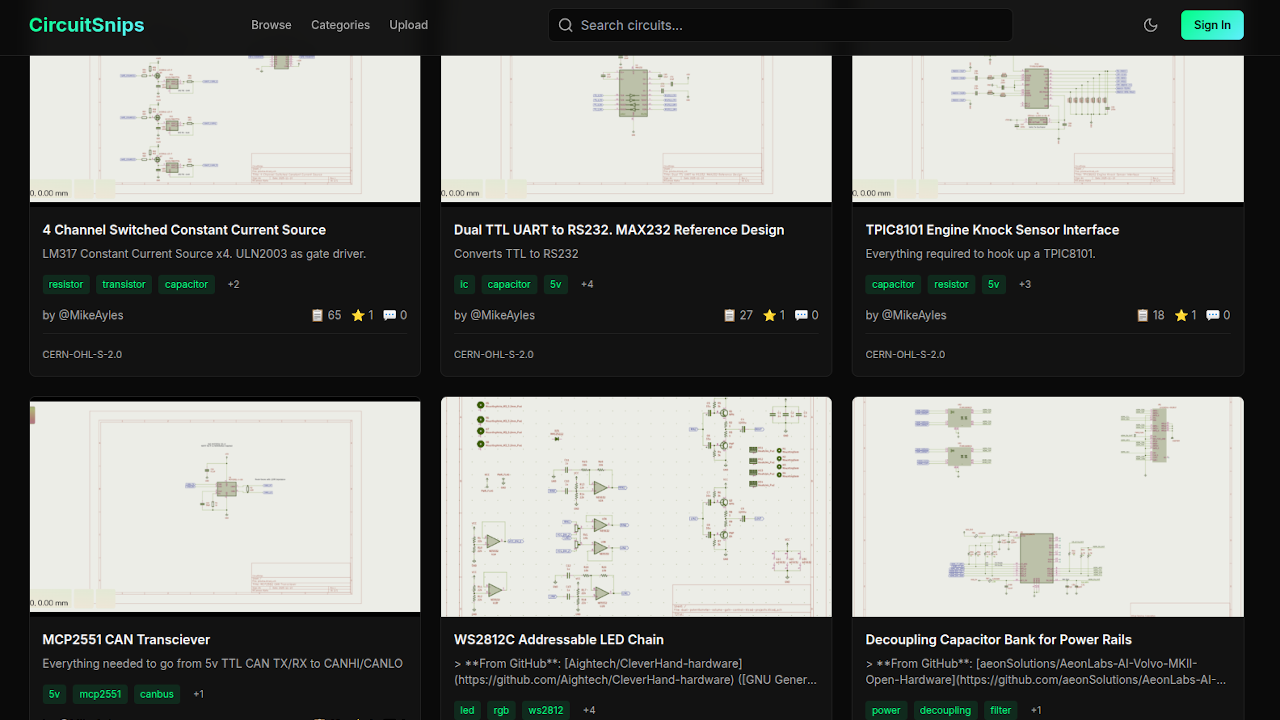
One of the most interesting examples in this space is CircuitSnips, a community-driven platform for sharing and discovering reusable KiCad schematic subcircuits. Its basic promise is wonderfully direct: copy a circuit from KiCad, upload it with a description and license, and make it searchable for other makers. That is the kind of workflow that sounds obvious only after somebody builds it.
The appeal is not that every uploaded circuit is instantly production-ready. No serious engineer should paste a random power supply into a medical device, automotive controller, or satellite and call it lunch. The appeal is acceleration. A reusable KiCad circuit block can give designers a better starting point, especially for common building blocks that show up again and again in prototypes and hobby projects.
Why subcircuits are more useful than screenshots
Many electronics tutorials show schematic images. That is fine for education, but images are dead ends for design reuse. You still have to redraw the circuit, choose symbols, set values, add footprints, and hope you did not miss a net label hiding in the corner. A KiCad schematic snippet is much closer to source code. You can inspect it, copy it, adapt it, version it, and improve it.
Interactive browser viewers make this even better. Tools such as KiCanvas can display KiCad schematics and boards in a web browser, making online inspection more natural. Instead of downloading an unknown project just to see whether it is relevant, users can preview the circuit first. That one feature can save a surprising amount of time and prevent the classic “I downloaded the entire repository and still have no idea what I’m looking at” experience.
What Makes a Good KiCad Schematic Repository?
A strong KiCad schematic repository is not just a digital junk drawer. It needs structure, quality signals, licensing clarity, and enough context to help users decide whether a circuit is trustworthy for their purpose.
1. Searchable categories
Good repositories organize circuits by function. Useful categories might include power supplies, microcontroller support, USB and communication interfaces, analog signal conditioning, sensors, motor control, RF basics, audio, battery management, connectors, protection circuits, and test fixtures. A designer looking for an I2C pull-up pattern should not have to browse through 400 LED blinkers and one mysterious board called “thingy.”
2. Clear descriptions
A reusable schematic should explain what it does, what voltage range it expects, which KiCad version it was created with, which parts are critical, and what assumptions were made. A short note like “5 V to 3.3 V regulator for low-current microcontroller projects” is far more useful than “power stuff.” Hardware is already hard enough. The description should not add fog.
3. Licensing information
Open hardware sharing works best when licensing is clear. Many hardware projects use licenses such as CERN Open Hardware Licence variants, MIT, Apache-2.0, Creative Commons licenses, or other open-source terms. The key is that users should know what they are allowed to do: study the circuit, modify it, manufacture it, redistribute it, use it commercially, or contribute improvements back. A schematic without a license is like a sandwich in the office fridge without a name on it: technically visible, socially dangerous.
4. Attribution and version history
Attribution matters because design knowledge often comes from experience. If someone shares a tested RS-485 interface or a battery input protection circuit, credit should travel with that work. Version history is equally valuable. When a circuit changes because a resistor value was corrected or a footprint was replaced, users need to know which version they copied.
5. Preview before download
A browser preview is a major usability win. Designers want to quickly answer practical questions: Is the schematic readable? Does it use common parts? Are the connectors labeled? Is the circuit complete enough to reuse? A repository that lets users inspect a schematic visually before importing it into KiCad will feel much smoother than a plain file dump.
How Designers Can Use an Online KiCad Schematic Repository
The best way to use a KiCad schematic repository is as a starting point, not a substitute for engineering judgment. Borrow the idea, inspect the implementation, check the datasheets, run electrical rule checks, and adapt the circuit to your exact board requirements.
Example: reusing a voltage regulator circuit
Suppose you are building a small sensor board and need to regulate 5 V down to 3.3 V. A repository may offer several KiCad-ready regulator blocks. One uses a classic linear regulator, another uses a switching regulator, and another includes reverse-polarity protection and input filtering. Instead of redrawing from zero, you can choose the block closest to your use case, paste it into your schematic, verify capacitor values against the regulator datasheet, assign footprints, and adjust the layout for thermal and noise requirements.
Example: copying a USB-C power input
USB-C looks simple until it begins asking philosophical questions about configuration channel resistors. A reusable KiCad snippet can show the basic resistor arrangement for a simple power sink, include ESD protection, label VBUS and ground clearly, and provide a connector symbol with a matching footprint. You still need to confirm current requirements and connector orientation, but the snippet reduces the chance of forgetting something obvious.
Example: building from known-good sensor patterns
Many sensor circuits repeat the same supporting elements: decoupling capacitors, pull-up resistors, address-select pins, interrupt lines, and sometimes level shifting. A repository of KiCad schematic blocks can make these patterns easier to reuse across projects. For educators, this is especially helpful because students can study practical circuit patterns instead of staring at a blank schematic sheet wondering why the microcontroller looks lonely.
The Benefits for Makers, Students, and Professionals
For makers, an online repository speeds up weekend projects. Instead of spending Saturday rebuilding a regulator circuit, you can spend it testing the robot, synth, weather station, or unnecessarily over-engineered plant monitor you actually wanted to make.
For students, schematic repositories provide real examples. Textbook circuits are useful, but KiCad-ready circuits show how theory becomes an actual design file. Students can learn naming conventions, decoupling habits, connector labeling, hierarchical organization, and the relationship between schematic symbols and PCB footprints.
For professionals, reusable internal repositories can reduce repeated work and improve consistency. A company may maintain approved KiCad blocks for power inputs, microcontroller sections, programming headers, test points, protection circuits, and compliance-related patterns. A public repository is useful, but a private curated repository can be even more powerful for teams that build families of related products.
The Risks: Why “Copy and Paste” Still Needs a Brain
A KiCad schematic repository is not magic. It cannot know your enclosure, current draw, EMC requirements, manufacturing process, available parts, thermal limits, regulatory constraints, or whether your cat stepped on the keyboard during routing. Reusable circuits must be reviewed.
The biggest risk is context mismatch. A regulator circuit that works beautifully for a 50 mA sensor may be wrong for a 900 mA wireless module. A pull-up resistor value that is fine on a short I2C bus may be weak on a longer one. A connector footprint may match one supplier’s part but not another. A protection circuit may be appropriate for a hobby board but insufficient for a harsh industrial environment.
That does not make repositories dangerous. It makes documentation important. A good repository should encourage responsible reuse by including design notes, limitations, license terms, KiCad version details, and warnings where needed. The best shared circuits do not say, “Trust me.” They say, “Here is what this is, here is what it was designed for, and here is what you should verify.”
Best Practices for Uploading KiCad Schematics
If you plan to contribute to an online KiCad schematic repository, treat your upload like a tiny open-source project. Clean it up before sharing. Rename nets clearly. Remove private notes, broken symbols, unused labels, and mystery values. Make sure the circuit opens correctly in KiCad. Run the electrical rules checker. Add a short explanation of what the circuit does and what it does not do.
It is also smart to include part numbers where they matter. Generic resistors and capacitors are easy enough, but connectors, regulators, protection diodes, sensors, and ICs should be identified clearly. If a footprint is critical, mention it. If the design depends on a specific package, say so. Future users will appreciate not having to become archaeologists.
A simple checklist before publishing
- Confirm the schematic opens in a current KiCad version.
- Use clear net labels and readable reference designators.
- Include a short use-case description.
- State voltage, current, and interface assumptions.
- Add a license that matches your sharing goals.
- Credit original sources if the design was adapted.
- Warn users about untested or prototype-only circuits.
How This Fits Into the Open Hardware Movement
Open hardware depends on more than inspiration. It needs source files, documentation, licenses, and practical reuse. A KiCad schematic repository supports that movement by making hardware design knowledge easier to share in its editable form. This is important because the preferred source format for hardware is not a screenshot, a marketing diagram, or a blurry photo of a PCB. It is the design file that lets someone study, modify, and build the thing.
That philosophy lines up with open-source hardware principles: public design access, permission to study and modify, and enough documentation for others to reproduce or improve the work. When KiCad schematics are shared with clear licenses and reusable formats, they become educational resources, prototyping accelerators, and community building blocks.
The Future of KiCad Schematic Repositories
The most exciting future is not just a big pile of files. It is a smarter ecosystem. Imagine repositories with verified circuit badges, KiCad version compatibility checks, automated symbol validation, BOM previews, ERC status, linked datasheets, dependency warnings, and community comments from people who actually built the circuit. Imagine being able to search “3.3 V regulator low noise KiCad” and compare multiple reusable blocks by input voltage, output current, package type, license, and test status.
AI-assisted search may eventually help designers find circuits by intent rather than exact keywords. Browser viewers may become more interactive. KiCad plugins may let users browse repositories directly inside the schematic editor. Teams may maintain private libraries of approved schematic blocks while contributing general-purpose blocks back to the public. The result could feel less like random copying and more like responsible design reuse.
The online repository for KiCad schematics is not here to replace engineering skill. It is here to remove repetitive friction. Nobody becomes less of an engineer because they reuse a clean voltage divider. They become more available for the parts of design that actually require judgment.
Experience Notes: What It Feels Like to Use a KiCad Schematic Repository in Real Projects
The first time you use a reusable KiCad schematic repository, the experience is a little like discovering that someone organized the garage while you were asleep. You still have to build the project yourself, but suddenly the obvious tools are where they should be. Instead of starting with an empty schematic sheet, you begin with a circuit block that already has sensible labels, recognizable parts, and a basic structure.
In practice, the biggest benefit is momentum. Blank-page syndrome is real in PCB design. Even experienced designers can lose time deciding how to start a common block: Which connector symbol did I use last time? What did I name that reset net? Did I place the programming header pins in the order my adapter expects? A repository of reusable KiCad schematics reduces those tiny decisions. It gives you a working draft that you can immediately criticize, improve, and adapt. That is often much easier than inventing from nothing.
Another useful experience is comparison. When multiple people share similar circuits, you begin to see design patterns. One USB-C power input block may use only the minimum required resistors, while another adds ESD protection and a fuse. One microcontroller block may expose every pin, while another groups power, programming, and communication lines more neatly. Looking at these differences teaches judgment. The repository becomes less like a vending machine and more like a conversation between designers.
There is also a healthy dose of caution. The fastest workflow is not always the safest one. A copied schematic should always be treated as a draft. I would still check the datasheet, verify pin numbers, confirm footprints, inspect voltage ratings, and run KiCad’s electrical rules checker before trusting it. For power circuits, I would pay special attention to capacitor type, regulator stability requirements, heat dissipation, and current limits. For connectors, I would verify the exact manufacturer footprint. For communication buses, I would check pull-up values, voltage levels, and trace length assumptions. In other words, copy the circuit, not the responsibility.
The best repositories also encourage better personal habits. After using shared schematic blocks for a while, you start making your own circuits cleaner because you can imagine someone else reading them. You write better labels. You choose clearer titles. You separate functional blocks more logically. You stop naming nets things like wire_thing_2, because future-you is technically another person, and future-you deserves mercy.
For teams, the experience can be even more valuable. A shared KiCad schematic repository can become a design memory. Instead of asking, “Which board had the good CAN transceiver circuit?” a teammate can search the internal repository and grab the approved block. New engineers can learn the company’s hardware style by studying curated examples. Design reviews become easier because familiar blocks appear consistently across products. Over time, the repository becomes a quiet form of engineering culture.
For the open hardware community, the experience is more generous. A beginner who shares a simple LED driver might help another beginner finish a first PCB. An experienced engineer who shares a robust input protection circuit might prevent dozens of smoked prototypes. A teacher might build a class around reusable blocks so students can focus on understanding systems instead of wrestling with setup. That is the real promise of an online repository for KiCad schematics: not laziness, but leverage.
In the end, reusable schematics do not make electronics design automatic. They make it less repetitive, more inspectable, and more collaborative. The soldering iron still gets hot, the board still needs review, and the first prototype may still find a creative new way to humble everyone involved. But with a good KiCad schematic repository, at least you are starting from shared knowledge instead of a blank page and a suspiciously quiet power rail.
Conclusion
An online repository for KiCad schematics is a practical step forward for open hardware, electronics education, and everyday PCB design. It gives designers a place to share reusable circuit blocks, learn from real examples, and avoid rebuilding the same common circuits over and over. Platforms built around KiCad snippets, browser previews, clear licensing, and searchable metadata can help bridge the gap between component libraries and complete hardware projects.
The winning formula is not blind copy-paste. It is responsible reuse: inspect, verify, adapt, document, and contribute improvements when possible. Used wisely, a KiCad schematic repository can become one of the most helpful tools in a designer’s workflowright after the datasheet, the ERC button, and the emergency snack drawer.