For years, COROS watches have had a very specific personality: serious training tools, monster battery life, clean workout data, and just enough smartwatch flavor to avoid feeling like a calculator strapped to your wrist. Runners loved them. Triathletes respected them. Garmin users side-eyed them. But even loyal COROS fans had a short list of tiny frustrations that came up again and again: “Why can’t I control my phone’s music?” “Why did my workout stop just because the planned session ended?” “Why did one accidental lap press ruin my interval workout?” “Why is strength mode asking me to babysit every set like a needy gym partner?”
The latest COROS beta and feature-update cycle finally tackles those complaints in a way that feels less like a minor patch and more like a personality upgrade. The brand is not trying to turn the PACE 4, APEX 4, NOMAD, PACE Pro, APEX 2, or VERTIX 2S into tiny smartphones. That has never been the COROS style. Instead, the update focuses on the practical things athletes actually notice during a run, ride, lift, or long walk when the watch should quietly help instead of asking for attention.
In plain English: COROS is filling in the missing “daily usability” pieces while keeping the core appeal intact. The result is a watch platform that feels more polished, less stubborn, and much easier to recommend to people who want training depth without paying premium prices or charging every other sunrise.
Why This COROS Beta Update Matters
The biggest story is not just one feature. It is the direction. COROS has built its reputation around efficient GPS tracking, long battery life, lightweight hardware, and training metrics that help athletes plan smarter workouts. That foundation is still here. What has changed is the small-friction layer around it.
Great sports watches are not judged only by how accurately they record a marathon. They are also judged by how they behave at mile 8 when your podcast is too quiet, when you hit the lap button by mistake, when a structured workout ends but you still need a cooldown, or when you are in the gym trying to time your rest without tapping through a small menu like you are defusing a bomb.
This update improves exactly those moments. COROS watches now feel more natural in situations where Garmin, Suunto, and Apple Watch users have long expected smooth controls. And while COROS still keeps its athlete-first approach, the gap between “great training watch” and “great watch to actually live with” is getting smaller.
Media Controls Finally Arrive on COROS Watches
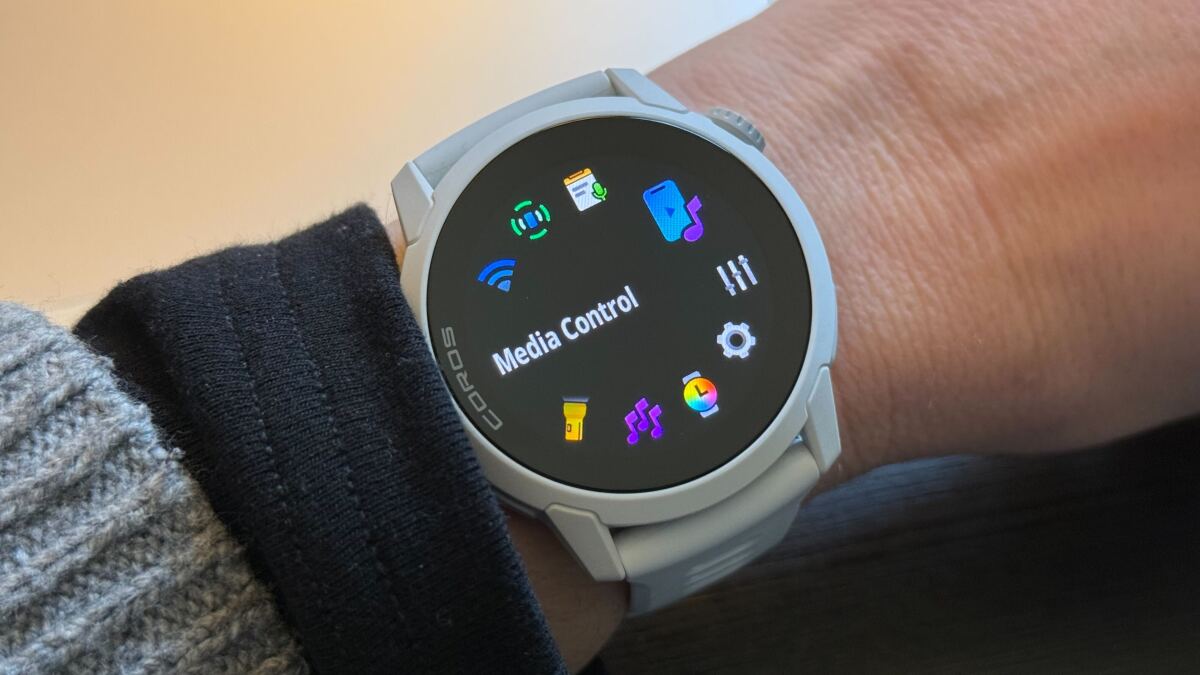
The headline feature for many runners is simple: COROS watches can now control audio playing on your phone. That means music, podcasts, audiobooks, and other supported media can be paused, played, skipped, rewound, or adjusted from the wrist. It sounds basic because it is basic. That is also why people wanted it so badly.
Previously, COROS offered onboard music support in a more old-school way: load compatible music files directly onto the watch and play from there. That is useful for phone-free runs, but many athletes do not want to manage files like it is 2009. They just want to start Spotify, Apple Music, YouTube, Apple Podcasts, Amazon Music, Overcast, or another audio app on their phone and control it without pulling that phone out of a belt, pocket, vest, or sweaty armband.
The new Media Control widget solves that. On supported watches, users can open the Toolbox by holding the Back button, then choose Media Control. On newer models with an Action Button, such as the PACE 4, APEX 4, and NOMAD, access can be even faster during workouts by switching views. The screen shows what is playing and gives you practical controls for volume, play, pause, skipping tracks, or jumping forward and backward in a podcast.
Why Media Controls Are a Bigger Deal Than They Sound
A watch does not need to be flashy to be useful. During a tempo run, a music control feature saves you from fumbling with your phone at the exact moment your lungs are negotiating with your life choices. During a long run, it lets you skip a podcast ad without breaking stride. During a treadmill workout, it makes volume changes easier when the gym speakers suddenly decide everyone needs motivational EDM at airport-runway volume.
This is the kind of feature that does not win a spec-sheet war but absolutely improves daily use. For COROS, it also removes one of the most common “but Garmin already does this” complaints. Was it late? Yes. Is it welcome? Also yes. Sometimes the best update is the one that finally stops people from yelling at their wrist.
Accidental Lap Presses Are No Longer a Workout Tragedy
Anyone who uses manual laps knows the pain. You are in the middle of an interval session. Your hand brushes the button. Suddenly your beautiful workout data is sliced in the wrong place, your splits look like modern art, and your post-run analysis becomes a detective story nobody asked for.
The update adds lap undo functionality across many supported COROS watch models and activity modes. If you accidentally press the Back/Lap button during a manual lap, you can press Back again before the lap screen times out to undo it. For structured workouts in Run, Trail Run, and Bike modes, the same idea applies when you accidentally advance to the next phase too early.
This is especially helpful for interval runners, track athletes, cyclists doing power-based blocks, and anyone following structured sessions. It does not apply everywhere; COROS notes that lap undo is not available in certain modes such as Swimming, Strength, Climbing, Skiing, or Jump Rope. Still, for the activities where lap mistakes are most common, it is a small miracle wearing a silicone or nylon strap.
The Lap Screen Is Cleaner and More Useful
The update also refreshes the lap screen itself. Instead of flashing by too quickly, the lap screen now stays visible longer in most cases. Athletes get more time to read the data without performing the classic “wrist stare while gasping” move. Automatic distance lap alerts can also be dismissed early, which keeps the watch from overstaying its welcome when you already saw what you needed.
COROS has made lap data more practical too. For automatic one-mile or one-kilometer alerts, lap heart rate can replace redundant lap pace information, giving runners a clearer real-time sense of how hard they are working. Trail Run, Mountain Climb, and Outdoor Climb modes can show lap elevation gain, which is genuinely useful for athletes who measure suffering vertically.
The key improvement is focus. Lap data is not just prettier; it is more relevant. The watch shows information that helps you adjust effort in the moment instead of simply adding another number to admire later while eating cereal after a workout.
Structured Workouts Now Continue More Naturally
One of the quietest but most important fixes is how workouts behave after a planned session ends. Previously, some COROS users disliked that a workout could effectively pause or stop progressing at the end of the structured plan. Imagine scheduling a 4.5-mile run but wanting to jog another half-mile to finish at a nice round five. If the watch pauses at the end of the planned workout, that extra distance can be missed unless you remember to resume it.
The newer behavior is much friendlier: after the structured portion is complete, the activity can roll into an open segment so you can keep moving until you manually decide to stop. This feels more natural because workouts in real life are rarely as tidy as workouts on paper. You may need a cooldown. You may need to jog home. You may realize your house is still three blocks away and, tragically, teleportation remains unsupported.
For runners who care about total mileage, weekly volume, and complete training logs, this is a practical upgrade. It reduces missing data and makes COROS feel more forgiving.
Strength Mode Gets Less Annoying and More Useful
Strength training has always been tricky for GPS watch makers. Running is fairly straightforward: pace, distance, heart rate, elevation, cadence. Lifting is messier. Exercises vary. Reps may or may not involve wrist movement. Equipment availability changes. Rest timing matters. And nobody wants to spend more time tapping a watch than lifting the weight.
The COROS update improves strength mode by removing repeated body-part prompts after each set. Instead of asking you to choose a body part over and over, the watch can carry the selected training part forward while sets accumulate. Users can still change the selected part when needed, but the flow is much smoother.
That matters because unstructured strength workouts are common. Many athletes walk into the gym with a plan, then adapt based on open benches, occupied squat racks, or the mysterious person doing curls in the only deadlift platform. With fewer interruptions, COROS becomes more useful as a rest timer and set tracker rather than a tiny administrator strapped to your arm.
Better Editing for Reps and Weight
The strength improvements also include better editing for reps and weight. During a session, users can edit recent or previous sets. In the app, completed activities can be adjusted so the final workout record better reflects what actually happened. This is important because automatic rep counting is helpful but not magical. Some movements are hard for wrist sensors to detect, especially exercises without obvious arm motion.
COROS has also refined rep-counting behavior. For exercises where detection is difficult, the watch can better assume target reps or wait briefly before advancing. That makes strength tracking more complete and less likely to jump ahead too early.
Is this going to replace a dedicated lifting log for bodybuilders tracking every warm-up set, RPE, tempo, and existential crisis? Probably not. But for runners, cyclists, triathletes, and general fitness users who want strength work included in their training picture, it is a meaningful upgrade.
Move Alerts, Temperature, and Other Quality-of-Life Extras
The update also adds Move Alerts, which remind users to get up after a long period of inactivity. This is not revolutionary, but it fits modern wearable expectations. Endurance athletes may train hard and still spend eight hours folded into a desk chair like a poorly stored camping tent. A gentle nudge to move can help.
The Temperature Widget returns or expands visibility for supported watches, letting users view current and historical temperature readings from the watch sensor. Like all wrist-based temperature readings, it should be interpreted with context because body heat, clothing, and environment can influence results. Still, it is useful for checking trends or getting a rough sense of conditions.
There are also cycling personal records, improved map detail on supported adventure models, Resume Later support for more run and walk modes, and even integrations such as DJI action camera control in certain cases. These are not necessarily headline-grabbers, but they show COROS continuing to widen the platform without forcing users to buy new hardware every time a software idea appears.
The May 2026 Update Pushes COROS Even Further
The newer May 2026 COROS feature update builds on the same theme: make the watches easier, smarter, and more flexible without turning them into distraction machines. The most attention-grabbing addition is Voice Control, available in beta on models with the right hardware, including the PACE 4, APEX 4, and NOMAD.
Voice Control lets users press and hold the Action Button to start activities, create reminders, check widgets, and perform certain commands by speaking. It is currently English-focused, with additional language support expected later. This feature makes sense for athletes because a voice command can be easier than navigating menus mid-run, especially on a treadmill, track, or cold-weather outing where gloves make buttons feel like tiny puzzles.
The May update also improves Custom Photo Sharing, allowing users to place workout stats, GPS tracks, elevation charts, and other overlays on their own images or videos. Is this essential for training? No. Is it useful for runners who like posting a mountain photo with elevation gain so friends understand why they are walking like a newborn deer the next day? Absolutely.
Auto Laps and Control Center Refinements
Auto Laps for Running are another practical improvement. Users can set laps by distance or position, separating actual laps from simple distance alerts. That is helpful for runners doing loops, hill repeats, or longer reps where they want recurring information without cluttering the workout summary.
The Control Center also gets a cleaner layout. Daily Mode, Do Not Disturb, Sleep Mode, satellite settings, flashlight options on select watches, AMOLED brightness, and other controls are easier to reach. This matters because advanced watches can become crowded quickly. A cleaner control hub makes the experience feel more premium without adding complexity.
Combined with the December update, COROS is clearly attacking the “missing polish” problem. The company already had solid training tools. Now it is smoothing the everyday interface around those tools.
Which COROS Watches Benefit Most?
Feature availability varies by model, but many updates apply across recent COROS watches such as PACE 3, PACE 4, PACE Pro, NOMAD, APEX 2, APEX 2 Pro, APEX 4, VERTIX 2, and VERTIX 2S. Newer hardware gets the richest experience because features like Voice Control, Voice Notes, Action Button shortcuts, microphones, or speaker-related options require physical components older models may not have.
The PACE 4 is a particularly interesting example. It is lightweight, uses a 1.2-inch AMOLED touchscreen, offers long GPS battery life, includes dual-frequency satellite support, and adds a built-in microphone for voice features. It is positioned as a runner-friendly watch that keeps the price lower than many premium competitors while still offering serious training tools.
The APEX 4 and NOMAD also benefit from newer hardware. The APEX 4 leans toward mountain, trail, and climbing users, while NOMAD is designed more for outdoor journaling, hiking, fishing, and off-grid adventures. The update makes these watches feel more capable outside of pure workout tracking.
How COROS Now Compares With Garmin and Suunto
Garmin remains the heavyweight in sports watches, especially for users who want deep navigation, smartwatch features, contactless payments, music services, third-party apps, and a giant product lineup. Suunto also has strong outdoor credibility and has offered phone media controls on several watches. COROS has traditionally competed by being lighter, simpler, cheaper in key categories, and excellent on battery life.
This update does not suddenly make COROS the best smartwatch for everyone. If you want app stores, NFC payments, full music streaming integrations, or the richest offline mapping experience on every model, Garmin may still have advantages. But if your priority is training, battery life, accurate workout recording, and a cleaner athlete-first experience, COROS just became more compelling.
The important difference is that COROS is fixing issues that used to be easy objections. No phone media controls? Fixed. Accidental lap button chaos? Improved. Strength workout flow? Better. Workout ending behavior? More natural. Voice interaction? Arriving on compatible models. These are the kinds of updates that make people reconsider the brand, especially when value is part of the decision.
Should You Join the COROS Beta?
COROS offers beta access periodically before features roll out broadly. On iOS, users typically install a TestFlight version of the COROS app, accept the beta invitation, and then check the watch for firmware updates. On Android, users may need to install a beta app package and accept the beta group prompt before updating firmware.
Beta software is for people who want early access and are comfortable with minor bugs. COROS notes that beta builds usually should not put user data at risk, but software in testing can have formatting issues, rough edges, or features that do not behave perfectly. If your watch is mission-critical for a race tomorrow, maybe do not update it the night before. That is not bravery; that is how tech gremlins get invited to your starting line.
For everyday training, however, the beta can be appealing. It lets users try new functions early and provide feedback before public release. Just remember that eligibility depends on model, beta capacity, and the current testing stage.
Real-World Experience: What This Update Feels Like in Daily Training
The best way to understand this COROS update is to imagine a normal training week. On Monday, you head out for an easy run with your phone tucked away and a podcast playing. Before the update, changing volume or skipping ahead meant fishing for the phone, unlocking it, swiping around, and briefly looking like you forgot how pockets work. With Media Control on the watch, the same task takes a few wrist taps. It is not glamorous, but neither are most easy runs. Practical wins count.
On Tuesday, you do intervals. The kind where the warm-up feels suspiciously fine, the second rep is exciting, and the fifth rep makes you question every snack-based decision you made that day. You accidentally hit the lap button too early. In the past, that mistake could mess up the structure of your session and leave you with awkward data afterward. Now, lap undo gives you a small escape hatch. It is not a feature you need every day, but when you need it, you need it immediately.
On Wednesday, you lift. Maybe it is squats, presses, rows, and some core work you pretend not to hate. Previously, COROS strength mode could feel too demanding during unstructured lifting because it wanted repeated body-part input. That is exactly the kind of tiny interruption that makes athletes stop using a feature altogether. With the improved flow, you can time rests, mark sets, and keep moving. The watch becomes a helper instead of a clipboard manager.
On Thursday, you follow a structured workout that ends a little before you reach home. Instead of worrying that the watch stopped recording after the plan ended, the activity can continue into an open segment. That means your cooldown, extra jog, or “I parked too far away” bonus distance remains part of the activity. For runners tracking weekly mileage, this is not a minor detail. It is the difference between accurate training history and a suspicious half-mile disappearing into the void.
On Friday, you use a rest day to check your training data, review laps, and maybe post a workout photo. The improved lap summary and photo-sharing tools make the app feel more modern. The point is not just vanity, although let us be honest, a good mountain-run photo with stats is basically endurance-athlete currency. The point is that COROS is making post-workout review easier to understand and easier to share.
By the weekend, the update’s theme becomes obvious: less friction. COROS has not changed into a lifestyle watch that wants to buzz every thirty seconds and ask how your vibes are. It still feels like a training device first. But now it behaves better in the small moments around training. That is exactly where athletes tend to form strong opinions about gear.
For example, media controls matter most when you are already annoyed. Lap undo matters most when your heart rate is high and your patience is low. Strength-mode improvements matter most when the gym is crowded and your rest timer is the only thing keeping the session organized. Auto-continue behavior matters most when your workout plan and real-world route do not match perfectly. These are not luxury features. They are “please stop making me think about the watch” features.
That is why this update feels bigger than the patch notes. It shows COROS listening to practical athlete complaints rather than only chasing flashy new metrics. More data is not always better. Better interaction is better. A watch that gets out of the way can be more valuable than a watch that offers twenty new charts but still makes you pull out your phone to skip a song.
The experience also makes COROS easier to recommend to runners moving from Garmin or Suunto. In the past, the pitch often sounded like this: “You will get great battery life and training tools, but you may miss a few everyday conveniences.” Now that sentence is shorter. The missing conveniences are being addressed, and the remaining trade-offs are more about bigger ecosystem differences than basic usability gaps.
Final Verdict: COROS Is Growing Up Without Losing Its Edge
Coros’s new beta update adds everything its watches have been missing not because it introduces one massive futuristic feature, but because it fixes the little things athletes notice constantly. Phone media controls, lap undo, better lap screens, smoother workout continuation, improved strength tracking, Move Alerts, Voice Notes, Voice Control, Custom Photo Sharing, and Auto Laps all point in the same direction: COROS is becoming more complete.
The brand still has work to do. Music streaming integration, broader smart features, full mapping on lower-end models, and richer third-party ecosystems remain areas where competitors can lead. But the practical gap is narrowing quickly. For athletes who want a lightweight, accurate, long-lasting training watch that now behaves more sensibly during everyday workouts, COROS has made a strong move.
The best compliment for this update is simple: many of its features disappear into the workout. You press fewer buttons. You fix mistakes faster. You keep running when the plan ends. You control your podcast without wrestling your phone. You lift without menu fatigue. That is what good wearable software should do. It should make the watch feel less like a gadget and more like a training partner that finally learned when to speak up and when to stay quiet.