Wondering whether someone deleted you on Skype? First, take a breath. Skype never handed out dramatic little breakup notices like, “Gary has removed you from his digital life. Please collect your emotional luggage at the exit.” In most cases, there was no official alert, no red flag, and no tiny violin. Instead, users had to look for clues: profile visibility, message behavior, contact status, and whether the person still appeared reachable.
There is also an important modern twist: Skype for consumers was retired on May 5, 2025, and Microsoft moved users toward Microsoft Teams Free. That means many “Skype problems” today are not actually signs that someone deleted you. They may be caused by account migration, old chat history, inactive accounts, missing contact sync, or people simply no longer using Skype at all. In other words, before you assume someone hit the digital trapdoor button, check whether you are dealing with classic Skype behavior or the newer Teams Free transition.
This guide explains how to know if someone deleted you on Skype in four practical steps, what the signs really mean, and why you should avoid jumping to conclusions faster than a cat jumping onto a warm laptop.
Can You Really Tell if Someone Deleted You on Skype?
The honest answer is: not always with 100% certainty. Skype did not clearly notify users when a contact removed them. Being deleted, blocked, ignored, hidden by privacy settings, signed out, migrated to Teams, or inactive for months can all look similar from your side.
However, you can look for a pattern. One clue means very little. Four clues together tell a stronger story. For example, if the person no longer appears in your contact list, their status never updates, messages do not seem to go anywhere, and you cannot access their profile the way you used to, then yes, they may have deleted or blocked you. But if only one thing looks odd, blame sync issues before blaming betrayal. Technology is messy. Sometimes Skype behaved like it was held together with nostalgia and chewing gum.
Step 1: Search for Their Name in Your Contacts
The first step is simple: check whether the person still appears in your Skype contact list or, if you migrated, in Microsoft Teams Free under your imported Skype chats and contacts.
What to Look For
Open your contact list and search for the person’s Skype name, display name, email address, or phone number. If their name still appears normally, they probably remain in your saved contact list on your side. That does not guarantee you are still in their contacts, but it means your copy of the relationship still exists.
If their name has disappeared, one of several things may have happened. You may have accidentally removed them. They may have changed their display name. You may be signed into the wrong Microsoft account. Their account may have been migrated, closed, or inactive. Or yes, they may have removed you, blocked you, or changed privacy settings.
Before you panic, check the boring possibilities first. Are you using the same account you used years ago? Did you sign in with a phone number instead of an email address? Did your contacts transfer correctly to Teams Free? These tiny account mix-ups can create huge confusion. Many people have more Microsoft accounts than they have matching socks.
What This Step Means
If the person is missing from your contacts, it is a clue, not proof. Skype contacts were often stored in ways that depended on account sync, app version, privacy settings, and later Microsoft’s transition to Teams Free. A missing contact may simply mean your data did not migrate as expected.
The best move is to search broadly. Try their full name, old Skype username, email address, and any nickname you remember. If they appear in search but not in your contacts, you may no longer have them saved. If they do not appear anywhere, their account may be hidden, inactive, renamed, deleted, or no longer accessible through Skype-related services.
Step 2: Check Their Profile and Contact Status
Next, open the person’s profile or chat, if it is still available. In older Skype, contact status was one of the biggest clues. You might see whether someone was online, away, offline, last active, or unavailable. In practice, status indicators were helpful but never perfect. They could be affected by privacy settings, devices, inactivity, app bugs, and the user simply choosing to appear offline.
Possible Profile Clues
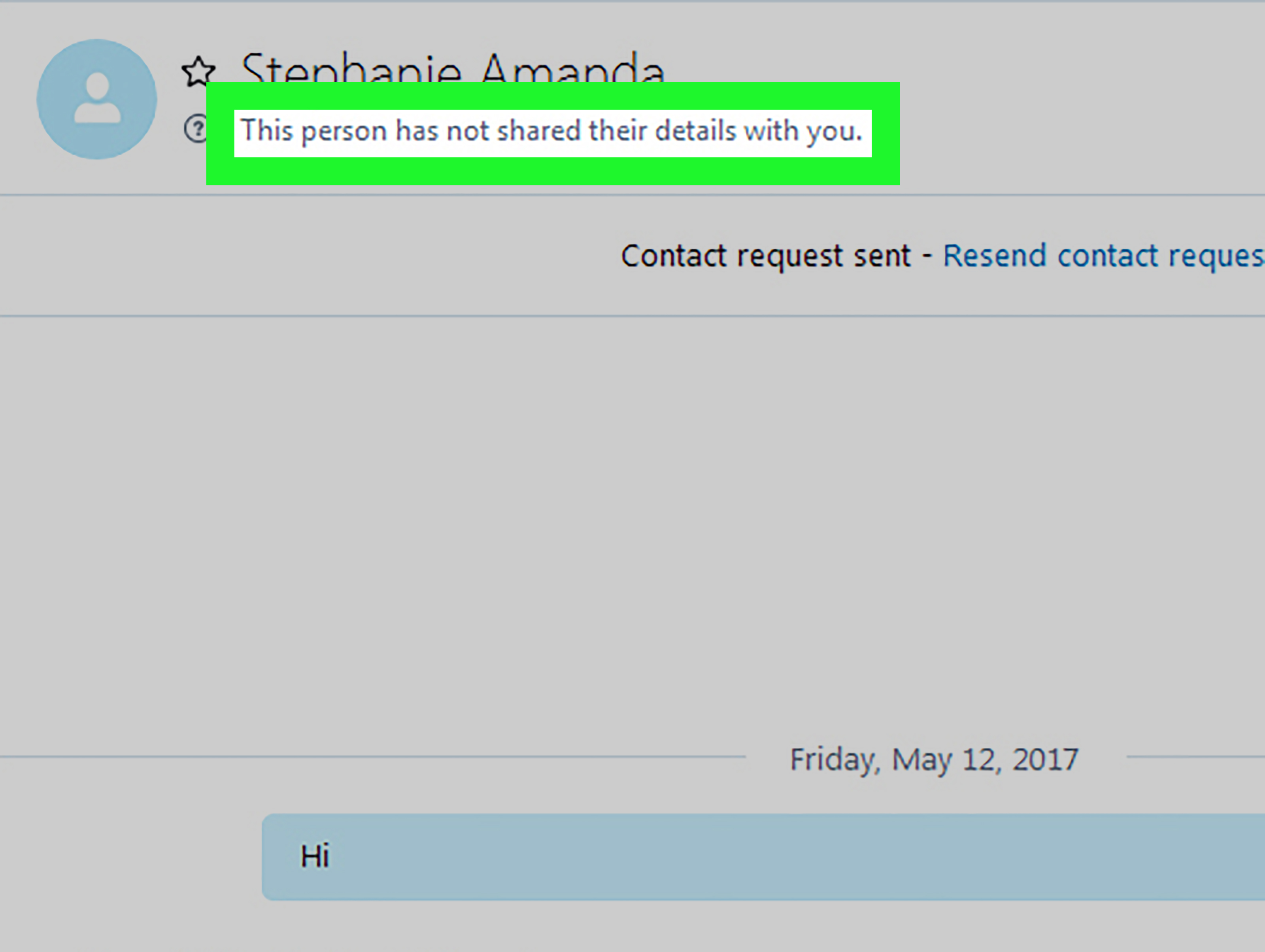
If someone deleted you from Skype, you might notice that their profile shows less information than before. Their profile picture may disappear or stop updating. Their status may no longer show as online or recently active. You may see only limited public information. In some cases, the chat remains, but the person feels like a digital cardboard cutout: visible, but not really reachable.
That said, profile changes are not courtroom evidence. People change profile photos. People hide online status. People abandon old accounts. People also go through phases where they decide every app notification is an enemy and disappear into the woods of “Do Not Disturb.”
Deleted vs. Blocked vs. Offline
It helps to separate three possibilities:
- Deleted: They removed you from their contact list, but may not have blocked communication entirely.
- Blocked: They actively prevented you from contacting them or viewing certain activity.
- Offline or inactive: They simply are not using Skype or Teams Free regularly.
Being deleted may be subtle. Being blocked usually feels more complete: messages may not go through, calls may fail, and profile details may be more restricted. Inactivity, meanwhile, looks like a ghost town: no new status, no replies, no updates, and possibly no sign the person has used the service since the age when people still said “BRB” unironically.
Step 3: Send a Simple Message and Watch the Delivery Behavior
If you still have an open chat, send a short, normal message. Keep it polite. Something like “Hi, just checking whether this is still your Skype account” works perfectly. Do not send five paragraphs, sixteen question marks, and a detective-board explanation of your suspicions. That is not a message; that is a weather event.
What Message Behavior Can Tell You
In older Skype, message behavior could provide clues. If the message appeared to remain pending, failed, or never showed normal delivery behavior, the person might not be reachable. But this still does not prove deletion. The account could be inactive. The person may not be signed in. Their app may be gone. Their device may be offline. Their account may have moved to Teams Free. Or they may simply not want to respond.
If the message sends successfully but you never receive a reply, that is not proof either. Everyone has at least one app where unread messages go to retire. Skype, for many people, became exactly that app.
Do Not Spam Them
One message is enough. Maybe two if there is a practical reason. Repeated messages will not make the system reveal secret information, and it may make the other person uncomfortable. Respecting privacy is always smarter than trying to “test” someone. If they removed you intentionally, that is their choice. If they did not, you avoid looking like you are auditioning for a cyber-detective reality show.
Step 4: Try Re-Adding or Contacting Them Through a Normal Channel
The final step is to check whether you can re-add the person or contact them through a more current channel. Since Skype has been retired for consumers, Microsoft Teams Free is the natural place to check if you previously used Skype with that account. Sign in with the same Skype credentials and look for imported chats and contacts.
When Re-Adding Helps
If you search for the person and see an option to add, invite, or start a new conversation, that may suggest they are no longer saved as an active contact on your side. If a contact request is required, it may also mean the relationship is no longer mutual. Again, this is a clue, not a final verdict.
For practical purposes, the cleanest solution is often the least dramatic: contact them somewhere else. Send a respectful email, text message, or Teams message if you have a legitimate reason. Try something simple: “Hey, I’m updating old contacts. Are you still using this account?” That gives them room to answer without making the conversation feel like a courtroom scene.
When to Stop Checking
If the person does not respond after a reasonable attempt, stop. A lack of response is still a response in everyday communication. Whether they deleted you, left Skype, changed accounts, or simply moved on, continuing to chase the answer usually creates more stress than clarity.
Common Signs Someone May Have Deleted You on Skype
Here are the most common signs people noticed in classic Skype:
- The person no longer appears in your Skype contact list.
- Their profile shows limited or outdated information.
- You no longer see their online or last active status.
- Messages do not appear to deliver normally.
- Calls fail, do not connect, or never ring as expected.
- You see an option to add them again instead of continuing as normal contacts.
- Your old chat history exists, but the person seems unreachable.
The key is to look for several signs together. One sign may be a glitch. Two signs may be a coincidence. Three or more signs may suggest they removed you, blocked you, closed the account, or stopped using Skype entirely.
Reasons It Might Look Like Someone Deleted You When They Did Not
Before you assume the worst, consider these explanations:
They Stopped Using Skype
Many users left Skype long before its official retirement. They moved to Zoom, WhatsApp, FaceTime, Google Meet, Discord, Slack, or Microsoft Teams. If someone has not touched Skype in years, their silence is not personal. It is probably just app archaeology.
Their Contacts Did Not Migrate Cleanly
With the move to Teams Free, some users may not see every old Skype contact exactly where they expect. Migration, account matching, and login credentials matter. If you used an old email address for Skype and a different Microsoft account for Teams, your contact list may look incomplete.
They Changed Their Name or Account
Display names are slippery. Someone named “Mike Work” in 2014 might now be “Michael R.” or something completely different. They may also have closed one Microsoft account and started another.
They Adjusted Privacy Settings
Privacy settings can reduce what others see. A person may hide contact details, limit profile visibility, or appear offline. That can feel like deletion even when it is just privacy control.
You Are Signed Into the Wrong Account
This is the sneaky one. If you have multiple Microsoft accounts, you may be looking at the wrong contact list. Always confirm you are using the account that originally held your Skype contacts.
What to Do if You Think Someone Deleted You
If you think someone deleted you on Skype, keep your response calm and practical. First, confirm your own account and contact list. Second, check Teams Free if your Skype data migrated. Third, send one polite message if you have a real reason to contact them. Fourth, accept the result.
Do not create new accounts to test whether you were blocked. Do not ask mutual friends to investigate. Do not keep calling repeatedly. Those actions can cross boundaries quickly. Digital respect is still respect, even when the app is old enough to remember when webcams looked like tiny alien eyeballs.
If the relationship matters, talk to the person directly through an appropriate channel. If it does not matter, let the mystery remain a mystery. Not every unanswered contact needs a full documentary series.
Experience Section: Real-Life Lessons From Trying to Tell If Someone Deleted You on Skype
Anyone who used Skype during its golden years probably remembers the strange emotional power of that little status icon. A green dot could feel like hope. A gray icon could feel like doom. A missing profile photo could launch an entire investigation before breakfast. The funny thing is that Skype often made ordinary communication feel more mysterious than it needed to be.
One common experience was the “old friend problem.” You would open Skype after months or years, search for someone you used to talk to every week, and suddenly their account looked different. Maybe their photo was gone. Maybe their last active status never changed. Maybe the chat was still there, frozen in time like a digital fossil. The first thought might be, “Did they delete me?” But in many cases, the person had simply stopped using Skype. They were not making a statement. They had just moved to another app, changed jobs, changed phones, or forgotten Skype existed.
Another familiar situation involved work contacts. Someone from a former job might disappear from your list, and it could feel personal. In reality, business accounts often changed because companies moved from Skype for Business to Teams, closed old directories, or updated employee accounts. What looked like a personal deletion was often just IT housekeeping. Not glamorous, but very common.
There was also the classic “message sent into space” experience. You typed a polite hello, pressed send, and then watched absolutely nothing happen. No reply. No activity. No sign of life. It felt like shouting into a very corporate canyon. But message silence rarely proves anything by itself. The person might not have the app installed, might be using a different account, or might have missed the notification entirely. Some people are excellent at replying. Others treat messages like museum exhibits: nice to look at someday, not urgent.
The best lesson from years of Skype confusion is this: do not build a big emotional story from a small technical clue. Apps are imperfect. Contact lists break. Status indicators lie. Migration changes things. People forget passwords. Accounts get abandoned. A missing contact does not automatically mean rejection.
A practical approach works better. Check your own account first. Search carefully. Look in Teams Free if your Skype data moved there. Send one calm message if needed. Then let it be. If the person wants to reconnect, they will. If not, you have your answer without turning yourself into the Sherlock Holmes of old messaging apps.
In the end, the healthiest way to handle Skype uncertainty is to treat it like any other communication question: be respectful, be direct, and do not overread silence. Sometimes someone deleted you. Sometimes they deleted the app. Sometimes they deleted nothing and simply forgot their password in 2017. All three can look surprisingly similar from your side.
Conclusion
Knowing if someone deleted you on Skype is not as simple as finding one obvious notification. Skype did not clearly announce when someone removed you, and today the issue is even more complicated because consumer Skype has been retired and many chats and contacts moved to Microsoft Teams Free.
The best method is to follow four steps: search your contacts, check the profile and status, send one simple message, and try re-adding or contacting them through a normal current channel. If several signs point in the same direction, they may have deleted or blocked you. But remember: inactive accounts, privacy settings, wrong logins, and migration issues can all create the same effect.
Use the clues wisely, respect boundaries, and do not let an old app turn into a new headache. Sometimes the cleanest answer is not hidden in Skype at all. It is in whether the person chooses to respond.