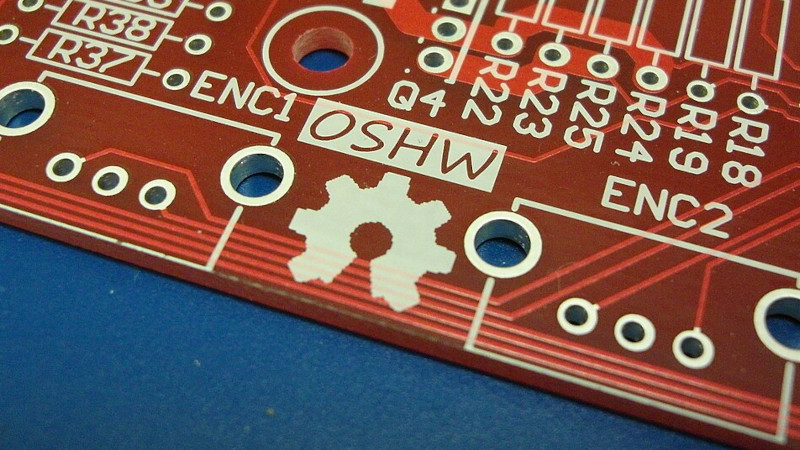
Open source hardware sounds simple until you try to define it over coffee with an engineer, a lawyer, a product manager, and someone holding a soldering iron like a tiny lightsaber. In theory, it means the design of a physical object is public enough for others to study, modify, make, distribute, and sell. In practice, the question gets delightfully messy: are you sharing only a PDF schematic, or are you sharing the full editable design files, bill of materials, firmware, test jigs, manufacturing notes, and the tiny “don’t rotate this connector unless you enjoy smoke” warning that saves everyone a ruined afternoon?
That is the real question behind open source hardware: how open do you want it to be? The answer matters because hardware is stubbornly physical. Software can be copied with a click. Hardware has supply chains, tolerances, shipping costs, component shortages, factory conversations, certification requirements, and that one capacitor that suddenly becomes unavailable the day before production. Open source hardware is not just a philosophy. It is a practical decision about how much knowledge you release, how easy you make replication, and how much control you are willing to trade for community, trust, repairability, and innovation.
What Open Source Hardware Really Means
Open source hardware is hardware whose design is made publicly available so that anyone can study, modify, distribute, make, and sell the design or hardware based on that design. That definition is important because it goes beyond showing off a finished gadget. A glamour shot of a circuit board is not open hardware. A photo of a 3D-printed enclosure with the caption “made this, enjoy” is inspiring, but it is not enough. The “source” in open source hardware means the preferred design files people need to actually modify the thing.
For electronics, that may include schematic files, PCB layout files, Gerber files, firmware, documentation, a bill of materials, enclosure files, test instructions, and assembly notes. For mechanical hardware, it may include CAD files, drawings, material specifications, tolerances, toolpaths, and assembly instructions. The point is not to bury the public under a mountain of confusing files. The point is to give people the same kind of starting point the original designer used.
This is where many projects drift into “open-ish” territory. A company may publish a schematic but not the PCB source files. A maker may upload STL files but not editable CAD. A project may release firmware but keep the production fixtures private. None of this automatically makes a project bad. It simply means openness exists on a spectrum, and users deserve clear labels instead of marketing fog served with a side of buzzwords.
The Openness Spectrum: From Peekaboo to Fully Rebuildable
Not every hardware project needs to be open in exactly the same way. A hobby project, a medical device, a teaching board, and a commercial industrial controller all face different pressures. The key is honesty. If the project is open for learning but not easy to manufacture, say so. If the design files are complete but the trademark is protected, say so. If the firmware is open but the wireless module is a black box, say so. Transparency is the polite version of a warning label.
Level 1: Viewable Hardware
At the lowest level, a project may share photos, diagrams, and general explanations. This helps people understand how something works, but it does not really let them reproduce or modify the design. It is educational, not truly open source. Think of it as letting someone look through the window of a bakery. They can admire the bread, but they cannot bake it from the window reflection.
Level 2: Documented Hardware
The next level includes schematics, parts lists, and build instructions. This is much more useful. A skilled person may be able to recreate the design, troubleshoot it, or adapt it. However, if editable source files are missing, the project still creates friction. Redrawing a PCB from a PDF is possible, but so is walking to the grocery store in ski boots. You can do it, but nobody should pretend it is convenient.
Level 3: Modifiable Hardware
This is where open source hardware becomes genuinely powerful. The project includes editable files: KiCad projects, CAD models, firmware repositories, mechanical drawings, source code, and version history. Users can fork, modify, improve, repair, and manufacture derivatives. This level supports education, community development, and real-world reuse.
Level 4: Reproducible Hardware
A reproducible open hardware project goes beyond design files. It includes manufacturing notes, test procedures, assembly guides, calibration steps, and known issues. The design is not only visible and editable; it is buildable. This is the difference between “here is my recipe” and “here is the recipe, oven temperature, ingredient substitutions, troubleshooting guide, and the reason your first loaf looked like a geological event.”
Level 5: Community-Governed Hardware
At the deepest level, open source hardware is not just published. It is maintained with community input. Issues are tracked publicly. Contributions are reviewed. Documentation evolves. The roadmap may be discussed openly. This model is harder to manage, but it can create stronger ecosystems and longer product life. It also requires emotional maturity, which, as every forum moderator knows, is sometimes the rarest component in the bill of materials.
Why Licenses Matter More Than Vibes
Good intentions are not a license. If you publish hardware files without clear licensing, users may not know whether they can copy, modify, sell, or redistribute the design. A license gives the community rules. It also protects the creator by setting expectations.
Hardware licensing is more complicated than software licensing because physical products combine multiple layers of rights. A board may include copyrighted documentation, firmware, PCB design files, trademarks, patents, and third-party components. A clean open hardware release usually separates these pieces clearly. The design may be open, the firmware may use a software license, the documentation may use a Creative Commons license, and the product name or logo may remain trademarked.
The CERN Open Hardware Licence is one of the best-known license families created specifically for hardware designs. Version 2 includes permissive and reciprocal options, allowing creators to choose whether derivatives must remain open under similar terms. This matters because some designers want maximum adoption, while others want to prevent a company from taking the design, making improvements, and closing the door behind them.
Permissive licenses encourage broad use, including commercial use, with minimal obligations. Reciprocal licenses ask people who distribute modified versions to share their changes. Neither approach is morally superior in every situation. The right choice depends on your goals. If you want your design everywhere, a permissive license may help. If you want improvements to flow back into the commons, a reciprocal license may fit better.
Open Hardware Is Not the Same as Free Hardware
One of the funniest misunderstandings in open source hardware is the idea that “open” means “free as in please ship me one.” Open source hardware can be sold. In fact, many successful open hardware companies sell boards, kits, tools, and accessories while publishing design files. The customer pays for manufacturing quality, convenience, support, tested components, documentation, and the sweet relief of not spending three weekends debugging a solder bridge under a microscope.
Arduino helped popularize this model by combining accessible boards, open designs, educational resources, and a huge community. Adafruit and SparkFun have also shown that open designs can support real businesses when paired with excellent documentation, tutorials, libraries, and customer trust. The magic is not that nobody earns money. The magic is that users are not locked out of understanding the tools they buy.
This is especially valuable in education. Students can learn from real schematics instead of mysterious sealed boxes. Repair shops can diagnose issues. Researchers can adapt tools for experiments. Small manufacturers can build on proven designs. Communities can keep products alive after the original vendor moves on.
The Benefits of Going Open
1. Trust and Transparency
When hardware is open, users can inspect how it works. This is important for security, safety, education, and long-term reliability. A closed device asks users to trust the manufacturer. An open device invites verification. That does not guarantee perfection, but it changes the relationship from “take our word for it” to “please inspect the design.”
2. Repairability and Longevity
Open design files make repair easier. If a connector breaks, a board fails, or a plastic part cracks, documentation can help users identify replacements or fabricate new parts. This reduces waste and supports the right-to-repair movement. A product with open files can outlive the company that made it, which is both inspiring and slightly awkward at bankruptcy auctions.
3. Faster Learning
Open hardware turns products into textbooks. A beginner can study a PCB layout. An intermediate maker can modify firmware. An advanced engineer can adapt the design for a new application. Instead of learning from toy examples, people learn from working designs.
4. Community Improvement
Users often find bugs, suggest improvements, port code, redesign enclosures, translate documentation, or create accessories. This community energy can make a project stronger than one team could make it alone. Of course, community help is not magic fairy dust. It requires maintainers to review contributions, answer questions, and occasionally explain that “it doesn’t work” is not a complete bug report.
5. Better Ecosystems
Open hardware encourages compatible add-ons, forks, and educational material. The Arduino ecosystem is a classic example: boards, shields, libraries, kits, and tutorials created a shared language for electronics learning. KiCad, as an open source electronics design suite, also plays a major role by giving designers a free and capable tool for creating and sharing PCB projects.
The Hard Parts Nobody Should Ignore
Open source hardware is wonderful, but it is not a golden ticket printed on FR-4. It comes with trade-offs.
Manufacturing Is Still Hard
Publishing files does not mean anyone can manufacture a reliable product. Component selection, sourcing, assembly quality, testing, packaging, and compliance all matter. A board can be open and still difficult to build well. This is why serious open hardware projects include production notes and test procedures, not just design files.
Clones Can Be Complicated
If a design is open, others may legally manufacture it depending on the license. Some clones help the ecosystem by lowering cost or reaching new markets. Others create confusion by using poor components, skipping testing, or implying official endorsement. This is why trademarks matter. A company can open the design while protecting its brand name and logo so customers know what is official.
Documentation Takes Time
Good documentation is often harder than the design itself. Engineers may happily route a six-layer PCB at midnight but develop a mysterious allergy to writing assembly steps. Yet documentation is the bridge between “files are online” and “people can use this.” A poorly documented open project is like a treasure map drawn by a raccoon.
Some Parts Cannot Be Open
Modern hardware often depends on proprietary chips, wireless modules, sensors, bootloaders, or certification processes. A project may be open at the board level while still relying on closed silicon. This is not hypocrisy; it is reality. The important thing is to describe the boundary honestly.
Open Source Hardware and the Silicon Question
Open hardware becomes even more interesting when the conversation moves from boards to chips. RISC-V is a major example of openness reshaping the hardware world. It is an open standard instruction set architecture, which means organizations can design compatible processors without the same licensing model used by many proprietary architectures. RISC-V is not automatically the same thing as an open source chip, but it gives designers a more open foundation for processor development.
This distinction matters. An open standard can define how something should behave, while an open source implementation provides the actual design files. In other words, RISC-V can be the recipe category, while a specific processor core is the recipe. Some RISC-V cores are open source, and some are proprietary. Again, openness is a spectrum.
As open silicon grows, the stakes rise. Open processor designs can support security review, education, customization, and national technology independence. But chip fabrication is expensive, specialized, and packed with proprietary tooling. The dream is open; the wafer invoice is very real.
How Open Should Your Project Be?
The best level of openness depends on your goals. Before publishing a project, ask a few practical questions.
Are You Trying to Teach?
If education is the goal, share the files that help people understand the design. Include diagrams, comments, simplified explanations, and build notes. Do not assume beginners know why a pull-up resistor is there. They may assume it is decoration. Electronics is humbling like that.
Are You Trying to Build a Community?
If you want contributors, use public version control, issue tracking, contribution guidelines, and clear licensing. Make it easy for people to know where to ask questions and how to submit improvements.
Are You Selling a Product?
If you sell open hardware, decide what protects your business. You may open the design files while protecting trademarks. You may sell tested, certified, assembled products while allowing others to build their own. Customers often pay for reliability and support even when files are available.
Are You Protecting Safety or Compliance?
For devices involving high voltage, radio transmission, medical use, vehicles, or safety-critical systems, openness must be paired with careful warnings and compliance information. Sharing files does not remove responsibility. A public design should not become a public invitation to electrocute a toaster.
A Practical Checklist for Better Open Hardware
If you want your project to be meaningfully open, publish more than the shiny final files. Include the editable source files, exported manufacturing files, firmware source, bill of materials, assembly instructions, license information, version numbers, known limitations, and contact or issue-reporting details. If possible, add test procedures, calibration steps, photos of assembled boards, and notes about substitute components.
Use common tools where possible. KiCad has become a popular choice because it is open source and cross-platform. For mechanical designs, provide editable CAD files in addition to mesh exports. STL files are useful for printing, but they are not ideal for modification. Sharing only STL files is like handing someone a cake and saying, “Good luck changing the flour.”
Finally, keep the repository organized. A folder named “final_final_REAL_final_v7” is a cry for help, not documentation. Use clear names, tags, releases, and change logs. Future you will be grateful. Present you may resist, but present you also thought one coffee was enough.
The Future of Open Source Hardware
Open source hardware is moving beyond hobby benches. It now touches education, scientific instruments, agriculture, robotics, accessibility tools, industrial automation, and silicon design. The movement is growing because the need is obvious: people want technology they can inspect, repair, adapt, and trust.
At the same time, the meaning of “open” will keep being debated. Is a project open if the board files are public but the main chip is closed? Is it open if the CAD is shared but the manufacturing fixtures are not? Is it open if the license allows copying but the documentation is too thin to use? These questions do not weaken open hardware. They make it more mature.
The healthiest approach is not purity theater. It is clarity. Tell users what is open, what is not, what license applies, what files are available, and what skills are required to reproduce the design. A half-open project honestly described is more useful than a “fully open” project wrapped in fog.
Experience-Based Reflections: What Open Hardware Feels Like in the Real World
Working with open source hardware feels a bit like joining a community workshop where every drawer is labeled, except one drawer contains resistors, one contains firmware patches, and one contains someone’s passionate 2,000-word argument about connector orientation. It is productive, chaotic, generous, and occasionally hilarious.
The first lesson is that openness rewards patience. When you download a hardware repository, you may expect instant clarity. Instead, you often find a trail of design decisions. Why was that regulator chosen? Why is the USB connector placed there? Why are there three mounting holes instead of four? Good documentation answers these questions. Weak documentation turns the project into detective work. Sometimes that detective work is fun. Sometimes it makes you whisper dramatic things to a multimeter.
The second lesson is that open hardware builds confidence. When a design is closed, a failure can feel like a wall. When a design is open, a failure becomes a puzzle. You can inspect the schematic, check the layout, compare the bill of materials, review the firmware, and ask better questions. Even if you do not solve the problem immediately, you are not helpless. That feeling matters. It changes users from consumers into participants.
The third lesson is that openness does not eliminate expertise. It reveals it. A complete repository can show how much thought goes into a reliable product: component derating, trace width, thermal relief, connector strain, enclosure tolerances, firmware recovery, test pads, labeling, and packaging. Open files are humbling because they show that good hardware is not just an idea. It is hundreds of small decisions behaving nicely together.
The fourth lesson is that community feedback can be both brilliant and exhausting. Someone may submit a clever fix for a manufacturing problem. Someone else may request support for a use case involving solar power, underwater sensors, and a goat shed. Public projects attract imagination. The challenge is to welcome creativity without letting the project become a feature buffet where every suggestion arrives with a tiny flag reading “urgent.”
The fifth lesson is that the best open hardware projects respect both makers and buyers. Some people will build from scratch because they enjoy the process. Others will buy the finished product because they need it to work on Tuesday. These groups are not enemies. They are the ecosystem. The builders test the boundaries. The buyers support production. The maintainers keep the knowledge flowing.
In the end, the most successful open hardware projects are not merely open because files are online. They are open because they invite understanding. They explain trade-offs. They make modification realistic. They let users repair, learn, adapt, and trust. That is the real answer to “how open do you want it to be?” Open enough that someone else can continue the story without needing your permission, your factory, or your lucky soldering iron.
Conclusion
Open source hardware is not a single switch labeled open or closed. It is a set of choices about design files, licenses, documentation, manufacturing knowledge, community participation, and business strategy. A truly useful open hardware project gives people the practical ability to study, modify, build, repair, and improve a physical design. That does not mean every project must reveal every internal process or abandon every commercial advantage. It means creators should be honest about the level of openness they offer.
For makers, open hardware is a learning engine. For companies, it can build trust and ecosystem strength. For educators, it turns products into lessons. For society, it supports repairability, transparency, and technological resilience. The best future for open source hardware is not one where every object is open in the same way. It is one where openness is clear, useful, and matched to real goals. Because when hardware is open enough to understand, improve, and keep alive, everyone gets a better toolbox.