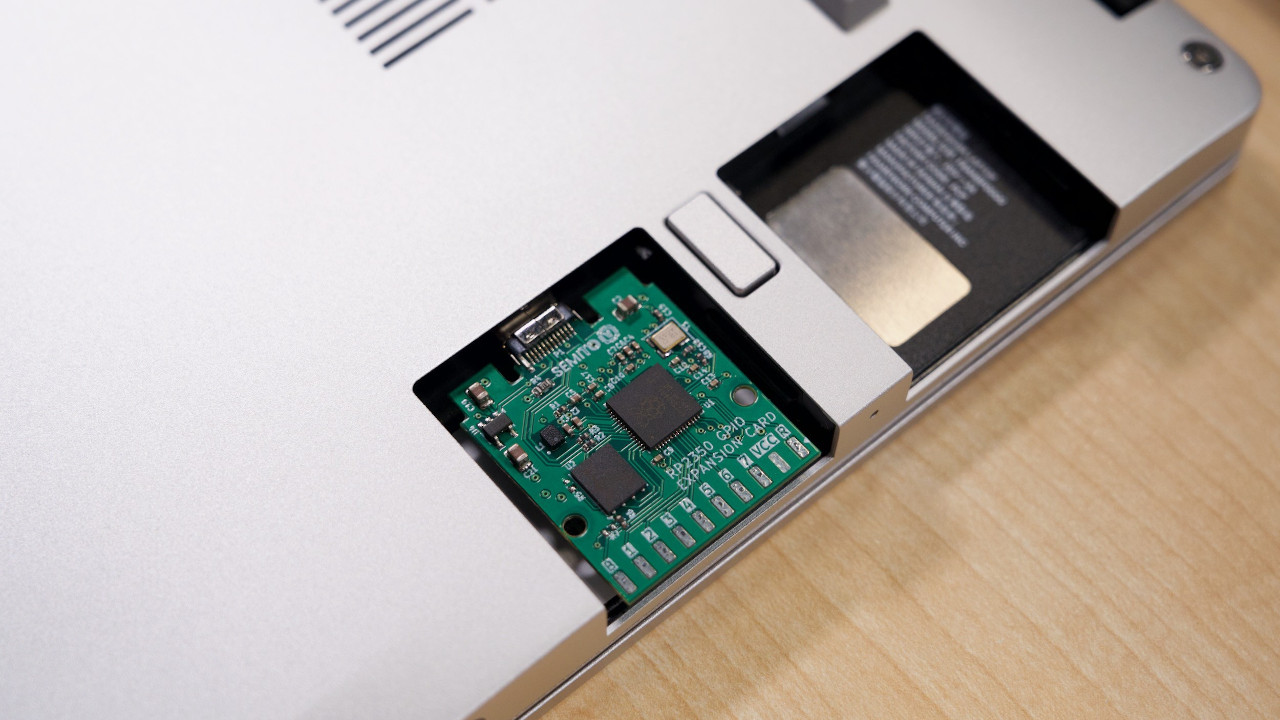
RP2350 Done Framework Style sounds like the title of a secret engineering club meeting where everyone brings a soldering iron and nobody remembers to bring snacks. In reality, it points to something much more interesting: the idea of putting Raspberry Pi’s RP2350 microcontroller into a Framework-style Expansion Card, turning a laptop port into a pocket-sized GPIO playground.
This is not just “yet another microcontroller board,” because the world already has enough tiny rectangles with blinking LEDs to form a small, confused city. The charm here is the combination: RP2350 power, USB-C convenience, open-source hardware culture, and Framework’s modular laptop philosophy. Put together, it feels like a maker project that looked at a laptop and said, “Nice computer. Needs more pins.”
What Does “RP2350 Done Framework Style” Mean?
The phrase describes a hardware design approach where the RP2350 microcontroller is built into a Framework Laptop Expansion Card-style form factor. Instead of carrying a separate dev board, USB cable, breadboard adapter, and a guilty conscience about your desk cable management, the card slides into a Framework-style slot and exposes GPIO directly from the laptop’s side.
The best-known project in this space is an RP2350-based GPIO Expansion Card designed for Framework computer mainboards and compatible USB-C devices. It follows the spirit of Framework’s modular ecosystem: small, swappable, repairable, hackable, and delightfully allergic to sealed black boxes.
In plain English, it is a microcontroller add-on for a laptop. In maker English, it is a USB-connected RP2350 board with accessible GPIO, flash memory, a compact mechanical design, and enough possibility to make a weekend disappear faster than a free pizza at a robotics club.
Why the RP2350 Is a Big Deal for Tiny Hardware
The RP2350 is Raspberry Pi’s second-generation microcontroller, following the wildly popular RP2040. The RP2040 became famous because it was cheap, capable, well-documented, and flexible enough to power everything from keyboards to robots to strange desk gadgets that blink when your build fails. The RP2350 keeps that friendly maker DNA but upgrades the engine.
More Processing Muscle
At the heart of RP2350 are dual Arm Cortex-M33 cores running at up to 150 MHz. That alone makes it a more serious option for embedded systems that need better performance than the original Pico-era hardware. Even better, RP2350 brings a rare twist: selectable Arm and Hazard3 RISC-V cores. Developers can work with Arm, experiment with RISC-V, or compare architectures without buying a drawer full of boards.
Better Memory and Better I/O
RP2350 offers more SRAM than RP2040 and expands the interfacing toolbox. For a Framework-style GPIO card, that matters because the whole point is to make a laptop speak fluent hardware. GPIO, SPI, I2C, UART, ADC, PWM, and USB connectivity become easier to reach from a machine that usually spends its time pretending the physical world begins and ends at a keyboard.
PIO Still Feels Like a Superpower
Programmable I/O, or PIO, is one of Raspberry Pi’s most beloved microcontroller features. It allows developers to create custom timing-sensitive interfaces without forcing the CPU to babysit every signal. RP2350 continues and improves that idea. For custom protocols, LED driving, display tricks, sensor timing, and hardware experiments that make normal libraries sweat nervously, PIO is the good kind of magic.
Why Framework Style Makes This Project Special
Framework laptops are known for modularity. Instead of soldering every port choice into destiny, Framework uses swappable Expansion Cards. Need USB-C today, HDMI tomorrow, and microSD after lunch? Swap the card. That physical design language invites experimentation, and the RP2350 GPIO card answers the invitation with a cheerful “I brought pins.”
The Framework-style approach matters because it changes the workflow. A normal development board sits outside the laptop. A Framework-style microcontroller card becomes part of the laptop. It is cleaner, more portable, and easier to keep with you. For developers, teachers, hardware testers, and students, that convenience is not cosmetic; it changes when and where projects can happen.
Imagine debugging an I2C sensor in a classroom, flashing firmware at a coffee shop, checking a UART log during a field test, or prototyping a small control interface while traveling. A regular laptop says, “Please attach seven things.” A laptop with an RP2350 Expansion Card says, “I already brought the hardware lab. It is on the left side.”
Inside the RP2350 GPIO Expansion Card Concept
The open-source RP2350 GPIO Expansion Card project uses an RP2350A microcontroller in a compact card-style design. The published design notes describe it as based on Framework’s Expansion Card template and Raspberry Pi’s RP2350A minimal board reference. That combination is important: one side solves the laptop form factor, while the other solves the microcontroller foundation.
Key Hardware Ideas
The design includes accessible 2.54 mm pads, making it practical for headers, jumper wires, and maker-friendly connections. That is a smart decision. A beautiful microcontroller card with no easy way to connect things would be like a sports car with no steering wheel: impressive, but mostly decorative.
The project also includes external flash memory and a USB-C interface, creating a compact board that can be programmed and used from a host computer. Because it fits the Expansion Card idea, it avoids the usual “dangling dev board” problem. Less cable spaghetti, more actual making.
Open-Source Hardware Matters
The card is certified open-source hardware through OSHWA. That matters for more than bragging rights. It means builders can inspect the design, learn from it, adapt it, manufacture their own version, or improve the layout. In hardware, transparency is not just philosophy; it is practical documentation with a pulse.
Practical Uses: What Can You Do With It?
An RP2350 Framework-style card is not meant to replace every development board. It is meant to make laptop-connected hardware experimentation faster and cleaner. That makes it useful in several real-world scenarios.
1. Portable GPIO Testing
Need to test a sensor, read a button, blink a status LED, or talk to a small display? A GPIO Expansion Card gives you pins without unpacking a full bench setup. This is especially helpful for engineers who move between lab, desk, classroom, and field environments.
2. Embedded Education
For teaching microcontrollers, the Framework-style RP2350 card is wonderfully visual. Students can see how USB, GPIO, firmware, and laptop hardware interact. It turns “embedded systems” from a phrase in a syllabus into something that plugs into a computer and immediately starts causing educational trouble.
3. Rapid Prototyping
RP2350’s flexible interfaces make it a strong candidate for quick prototypes. Developers can use C/C++ with the Pico SDK for low-level control, MicroPython or CircuitPython for fast scripting, and Arduino-Pico for a familiar Arduino-style workflow. That software flexibility lowers friction, which is very helpful when the prototype is due yesterday.
4. USB Tools and Debug Helpers
Because the card connects over USB-C, it can become a small custom USB device. Think serial bridge, macro controller, signal generator, keyboard emulator for testing, lightweight data logger, or lab helper. The exact limits depend on firmware, pin access, and electrical design, but the platform is roomy enough for many useful tools.
RP2350 vs. RP2040: Why Upgrade?
The RP2040 is still excellent. It is inexpensive, mature, and supported by a huge community. However, RP2350 offers a meaningful upgrade path. It brings more processing power, stronger security features, more memory, improved interfacing, and the unusual ability to work with Arm or RISC-V cores.
For a Framework-style GPIO card, those upgrades make sense. A laptop expansion module should feel capable enough to justify its slot. RP2350 gives the project room to grow from basic GPIO experiments into more advanced tasks like buffered data capture, display output, protocol translation, secure boot experiments, or multi-language development.
The security architecture is especially interesting for professional users. RP2350 includes features such as TrustZone support, secure boot capability, OTP storage, and hardware-assisted cryptographic support. Not every blinking LED project needs that. But for products, educational labs, and security-minded developers, it adds a serious layer beneath the maker-friendly surface.
Important Engineering Notes Before You Build
RP2350 is powerful, but it is still real silicon, not a tiny wizard. Good hardware design matters. Layout, decoupling, power stability, USB-C implementation, ESD protection, and pin accessibility all affect whether a board works beautifully or becomes a decorative coaster with firmware trauma.
Watch the RP2350 Stepping
Early RP2350 A2 silicon had a known GPIO-related erratum affecting certain high-impedance and pull-down use cases. Raspberry Pi later announced A4 stepping improvements, including a fix for Erratum 9. For new hardware designs, checking the chip revision is not boring paperwork; it is the difference between predictable GPIO behavior and an afternoon of muttering at a multimeter.
Respect USB-C Details
USB-C looks simple from the outside because the connector is elegant. Inside the design, however, it expects the right resistors, routing, power behavior, and mechanical decisions. A Framework-style card also has tight size expectations. Small hardware does not forgive sloppy placement; it simply waits until assembly day and laughs.
Use Reference Designs Wisely
The smart path is to study Framework’s Expansion Card references and Raspberry Pi’s RP2350 hardware guidance. Reference designs are not creative handcuffs. They are the map that keeps your project from wandering into the swamp labeled “why does this reset randomly?”
Software: The Friendly Side of the RP2350 Card
The RP2350 ecosystem is already broad. Developers can use Raspberry Pi’s Pico C/C++ SDK for performance and hardware control. MicroPython and CircuitPython make quick experiments more approachable, especially for education and rapid testing. Arduino-Pico adds a familiar path for people who already know the Arduino IDE.
That range matters because a Framework-style RP2350 card can serve different users. A firmware engineer may want CMake, debugging, and carefully controlled peripherals. A student may want to copy a Python script and see an LED blink. A maker may want Arduino libraries because the weekend is short and the coffee is cooling. Good hardware should welcome all three.
Who Is This Project For?
The RP2350 Done Framework Style idea is perfect for makers who love compact tools, educators who teach physical computing, embedded developers who want a portable test interface, and Framework laptop users who believe every empty module slot is a personal challenge.
It is less ideal for beginners who have never touched GPIO before and need full-size labels, wide spacing, and tutorial-friendly safety margins. For them, a standard Raspberry Pi Pico 2 or larger RP2350 board may be a gentler starting point. But once the basics are clear, a laptop-integrated GPIO card feels wonderfully efficient.
In professional settings, the card can become a portable debug assistant. In classrooms, it can make embedded systems feel less abstract. In hobby projects, it can reduce setup time. And in the grand tradition of maker hardware, it can also become something nobody predicted, such as a tiny synthesizer controller, a sensor hub, or a laptop-side robot command module that looks suspiciously pleased with itself.
Experience Notes: Living With “RP2350 Done Framework Style”
The first experience with an RP2350 Framework-style card is mostly about convenience. The best tool is often the one you actually have with you, and a microcontroller hidden in a laptop expansion slot has a strong advantage there. Instead of opening a drawer and negotiating with a knot of USB cables, you can plug in a few wires, flash firmware, and begin testing. That sounds small until you have done it ten times in a week.
The second experience is that pin access becomes the center of the design. A tiny board can be powerful, but if the pads are awkward or poorly labeled, every test becomes a miniature puzzle. The GPIO card concept gets this right by focusing on reachable pads and maker-friendly spacing. When working with sensors or quick jumper-wire tests, that decision saves time and reduces mistakes. Your future self, holding a logic analyzer at midnight, will be grateful.
The third lesson is that laptop integration changes expectations. A loose development board feels temporary. A Framework-style Expansion Card feels like a tool. That subtle shift encourages more repeat use. You start thinking, “What firmware should this card run today?” rather than “Where did I put that board?” For people who test hardware often, that mental shift is valuable.
There are also practical limits. The card is compact, so it will never feel as spacious as a full development board. You must pay attention to voltage levels, avoid stressing GPIO pins, and use proper external components when connecting real-world loads. A microcontroller card is not a magic shield between your laptop and bad wiring. Treat it with respect, and it becomes a reliable helper. Treat it like an indestructible lab intern, and it may resign dramatically.
From a software perspective, the RP2350 makes experimentation fun because you can choose your level of seriousness. Want fast results? Use CircuitPython or MicroPython. Want performance and control? Use the Pico SDK. Want familiar sketches and libraries? Use Arduino-Pico. This flexibility makes the card useful for both quick tests and deeper firmware development.
The most satisfying experience is how the design blends two modern hardware cultures: Raspberry Pi’s accessible microcontroller ecosystem and Framework’s modular laptop philosophy. Both communities care about openness, repairability, documentation, and user control. The RP2350 GPIO Expansion Card sits right at that intersection. It is small, but the idea behind it is large: your laptop should not just consume peripherals; it should become part of the prototyping bench.
In daily use, the phrase “RP2350 Done Framework Style” becomes less of a headline and more of a design philosophy. Make hardware portable. Make it inspectable. Make it useful without making the user fight the form factor. Give developers enough power to build serious things and enough convenience to actually start. That is the real win here. The blinking LED is optional, though let’s be honestit will probably blink.
Conclusion
RP2350 Done Framework Style is more than a clever microcontroller mashup. It represents a practical direction for portable embedded development: put serious GPIO and firmware capability directly into the modular laptop ecosystem. With RP2350’s stronger cores, flexible I/O, security features, open-source-friendly documentation, and growing software support, the idea has real legsand thankfully, fewer cables.
For makers, it is a compact hardware playground. For educators, it is a teachable bridge between laptop computing and embedded control. For developers, it is a portable debug and prototyping tool. And for Framework fans, it is proof that a laptop expansion slot can be more than a port adapter; it can be a tiny lab bench hiding in plain sight.