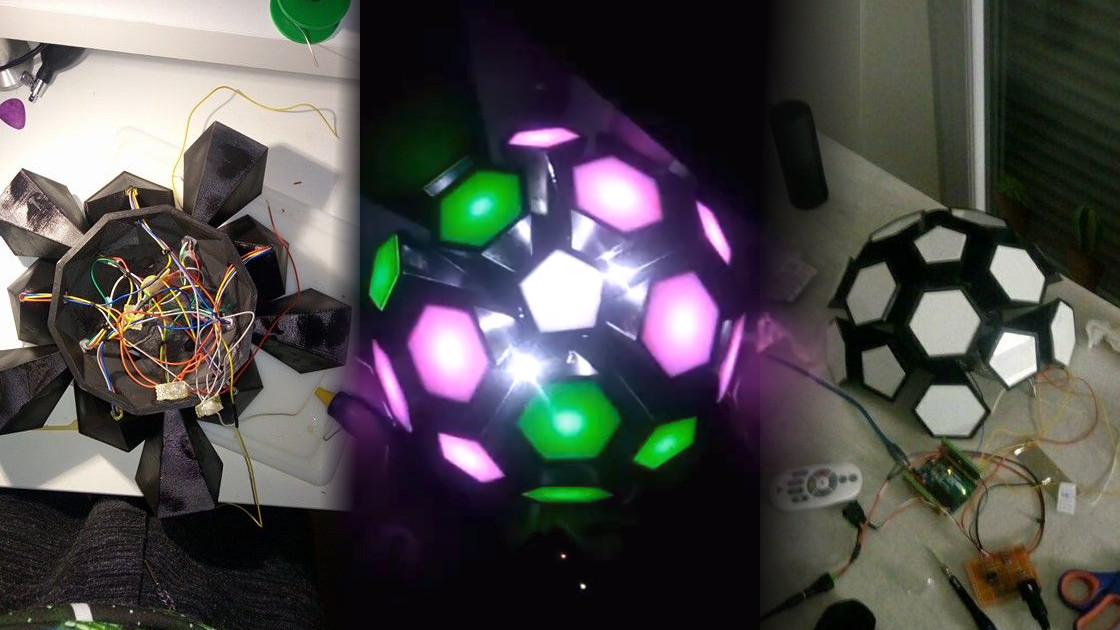
MIDI has spent decades hanging around keyboards, drum machines, synthesizers, and digital audio workstations like the quiet genius in the corner of the studio. Most people think of it as “that thing that makes electronic music gear talk.” That is true, but it is also like saying a smartphone is “that thing with a calculator.” Technically correct, emotionally underwhelming.
The fun part is this: MIDI does not actually carry sound. It carries instructions. A MIDI note can say, “Turn this on now,” “make it brighter,” “change the color,” “start cue 14,” or “stop everything before the drummer discovers another tempo.” Once you stop treating MIDI as only a music language, it becomes a control language for lights, stage effects, visual installations, sculptures, costumes, browser experiments, and DIY electronics projects.
That is why a MIDI light show feels so satisfying. It uses musical timing without being trapped inside music. Notes become colors. Velocity becomes brightness. Control changes become fades. A digital audio workstation becomes a visual timeline. A cheap keyboard can become a lighting desk. A microcontroller can become the tiny, caffeinated stage manager of your LED universe.
In other words, there is more to MIDI than music. There is motion, color, timing, drama, and just enough wiring to make your desk look like a robot sneezed on it.
What MIDI Really Does
MIDI stands for Musical Instrument Digital Interface, but the name hides its broader personality. At its core, MIDI is a protocol for sending small digital messages between devices. The classic examples are note on, note off, pitch bend, program change, clock, and control change messages. A keyboard sends a note. A synthesizer receives it. A sequencer records it. Everyone is happy, especially the bass line.
Because MIDI messages are compact and event-based, they are useful beyond audio. A message does not have to mean “play middle C on a piano.” It can mean “turn on LED number 60,” “flash the blue strip,” or “trigger the spotlight.” The meaning depends on what the receiving device is programmed to do.
MIDI Is Not Audio
This is the single most important concept for MIDI light shows. MIDI is not a sound wave. It is not an MP3, WAV, or recorded performance. It is a set of commands. If audio is a photograph of a meal, MIDI is the recipe, the cooking timer, and the chef yelling, “More paprika!”
That makes MIDI perfect for lighting because lights do not need audio; they need decisions. Should the light turn on? Which color? How bright? For how long? Should the next cue begin when the chorus hits? MIDI answers those questions cleanly.
Why MIDI Works So Well For Light Shows
A MIDI light show succeeds because it borrows the best parts of music production: timing, repeatability, editing, and synchronization. Instead of guessing when to push buttons during a performance, you can program visual events on a timeline. If the snare hits on beat two, the white LED burst can hit on beat two. If the chorus arrives at bar 33, the entire room can politely explode into magenta.
Digital audio workstations such as Ableton Live, Logic Pro, Studio One, Reaper, and similar tools already understand MIDI sequencing. That means you can compose a light show the same way you compose a track. Each MIDI note can represent a light zone, color, fixture, animation, or effect. The piano roll becomes a visual choreography editor.
Notes Become Lighting Cues
The simplest MIDI lighting system maps note numbers to lights. For example:
- C3 turns on the left LED strip.
- D3 turns on the right LED strip.
- E3 triggers a white flash.
- F3 starts a rainbow chase.
- G3 blacks out the whole setup.
Velocity can add expression. A soft MIDI note might create a dim glow, while a high-velocity note produces a bright burst. Suddenly, a “performance” can include not just what you hear, but what the room does in response.
Control Changes Handle Smooth Effects
MIDI control change messages are especially useful for lighting. A knob, fader, or automation lane can send values from low to high. A microcontroller or lighting program can translate those values into brightness, hue, saturation, strobe speed, pan, tilt, or fade duration.
This is where MIDI light shows move beyond “blink when note happens” and start feeling polished. A filter sweep in a synth track can also sweep a wall of LEDs from blue to amber. A volume automation curve can dim the room during a breakdown. A foot pedal can bring up a stage wash while the guitarist pretends the solo was spontaneous.
MIDI Show Control: The Theater-Sized Version
DIY makers often start with note messages, but professional show environments have a more formal cousin: MIDI Show Control, often shortened to MSC. MIDI Show Control was designed so MIDI systems could communicate with dedicated show equipment in theater, live performance, multimedia, and audiovisual environments.
In a stage setting, the goal is not always to play notes. Sometimes the goal is to tell a lighting console, sound system, projection server, or effects controller: “Go,” “Stop,” “Resume,” or “Fire cue 27.” That is exactly the kind of job MIDI Show Control was built to handle.
Think of MSC as MIDI wearing a headset and carrying a clipboard. It is still part of the MIDI family, but instead of asking a synthesizer for a trumpet sound, it helps coordinate a performance. The lighting designer, sound designer, projection team, and automation system can all follow a shared cue structure. When used properly, it reduces chaos, and live events usually appreciate anything that reduces chaos.
Where DMX Fits Into The Story
MIDI is excellent for cues and timing, but DMX512 is the workhorse language of stage lighting. DMX is widely used to control dimmers, moving heads, color changers, LED fixtures, fog machines, and other entertainment lighting equipment. A single DMX universe can carry up to 512 data slots, commonly called channels.
That means MIDI and DMX often work together. MIDI can trigger the event, while DMX handles the detailed lighting output. For example, a DAW sends a MIDI note to a software lighting controller. The software translates that note into DMX values. The fixtures receive DMX and respond with color, brightness, movement, or strobe effects.
MIDI-To-DMX Bridges
A MIDI-to-DMX bridge is exactly what it sounds like: a translator. On one side, it listens for MIDI messages. On the other side, it outputs DMX commands. This can be done with commercial lighting software, dedicated converter boxes, or custom microcontroller projects using RS-485 hardware.
This setup is especially useful for bands, DJs, small theaters, churches, schools, art installations, and makers who want musical timing without buying a full lighting console. It also allows one timeline to control both sound and visuals. That is powerful because synchronization is where many amateur light shows fall apart. Lights that are almost on beat are like jokes with the punchline half a second late: technically present, spiritually defeated.
Building A Basic MIDI Light Show
A simple MIDI-controlled LED project can be built with four major pieces: a MIDI source, a microcontroller, LED hardware, and code that maps messages to behavior.
1. Choose A MIDI Source
Your MIDI source can be a DAW, keyboard, pad controller, hardware sequencer, browser app, or even another microcontroller. A DAW is convenient because it gives you a piano roll, timeline, loops, tempo grid, and automation. You can write lighting cues as if they were drum hits.
2. Pick A Microcontroller
Arduino boards are popular because they are affordable, well documented, and beginner-friendly. Teensy boards are often favored for more demanding MIDI and LED work because they offer strong USB MIDI support and better performance for large LED projects. Boards with native USB support can appear directly as MIDI devices to a computer, which reduces extra hardware headaches.
3. Select The Lights
Addressable LED strips such as WS2812B, WS2811, SK6812, APA102, and similar products let you control individual pixels. That is perfect for MIDI because each note can map to a pixel, segment, or animation. APA102-style strips use separate data and clock lines, which can be helpful in timing-sensitive projects. WS2812B strips are common and inexpensive, but they require careful timing and adequate power.
4. Map MIDI Messages To Actions
The magic happens in the mapping. A note number might select a pixel group. Velocity might set brightness. MIDI channel might choose a fixture zone. Control change messages might adjust color or animation speed. Program change messages might load different scenes.
For example, a basic mapping could look like this:
- Note 36: kick drum flash on floor LEDs.
- Note 38: snare flash on rear wall LEDs.
- Note 42: hi-hat shimmer on side strips.
- Control Change 1: overall brightness.
- Control Change 74: color temperature or hue shift.
- Program Change 5: switch to chorus scene.
This approach gives you creative control without needing to analyze audio in real time. Audio-reactive lighting can be fun, but it often guesses. MIDI knows exactly what event is happening because you programmed it.
Specific Examples Of MIDI Light Show Ideas
The Keyboard-To-Color Display
One classic concept is a keyboard display where every piano key corresponds to an LED. Press C, and the C light glows. Play a chord, and a colorful cluster appears. This is useful for education, performance visualization, and pure “look, Mom, my music has become a Christmas tree” joy.
The Drum-Triggered Stage Rig
An electronic drum kit can send MIDI notes for each pad. A kick drum can trigger low floor lights. A snare can fire white strobes. Toms can chase across the back wall. Cymbals can sparkle. The drummer gets to control the light show naturally, which is dangerous because drummers already have too much power, but it looks great.
The DAW-Programmed Band Show
A band playing to a click track can run a DAW session that sends backing tracks, click audio, and MIDI lighting cues at the same time. The lighting stays locked to the arrangement. Breakdowns, drops, solos, and endings all hit with visual impact. For touring acts without a dedicated lighting operator, this can make a small rig feel much more professional.
The Art Installation
MIDI does not need a song. A gallery installation can use MIDI notes to control sculpture lighting, sensors, motors, or projections. Visitors can press buttons that send MIDI. A browser using Web MIDI can communicate with connected devices. A Max/MSP, Pure Data, or TouchDesigner patch can translate MIDI into generative light behavior.
Common Problems And How To Avoid Them
Power Is Not Optional
LED strips can draw serious current. A microcontroller pin is not a magical electricity fountain. Large LED installations need a properly rated power supply, common ground, power injection, fusing, and wiring sized for the load. If your LEDs flicker, brown out, or behave like haunted spaghetti, power is often the villain.
Latency Can Ruin The Illusion
Lighting does not need nanosecond precision, but it does need to feel tight. If the flash arrives late, the audience notices. Use reliable USB connections, avoid overloaded serial bridges, keep code efficient, and test with the actual number of LEDs you plan to use. Ten pixels on a desk and 1,000 pixels on a wall are not the same animal.
Do Not Block The MIDI Listener
Microcontroller code should keep listening for incoming MIDI messages while updating lights. Long delay functions can make your show miss notes. Use non-blocking timing patterns where possible. Think of the microcontroller as a waiter at a busy restaurant: if it stands in the kitchen admiring one soup, everyone else goes hungry.
Plan Your Mapping Before You Build
Random mappings create random shows. Decide how notes, channels, velocities, and controllers will behave. Create a simple chart. Keep it consistent. Future-you will be grateful, especially when present-you forget why note 71 triggers “purple thunderstorm mode.”
MIDI 2.0 And The Future Of Visual Control
MIDI 2.0 expands the possibilities by adding richer communication, better resolution, bidirectional discovery, property exchange, profiles, and Universal MIDI Packet architecture. For lighting and visual systems, the most exciting idea is not simply “more notes.” It is smarter devices that can describe themselves, negotiate capabilities, and exchange higher-resolution control data.
For a light show, that could eventually mean smoother fades, better parameter control, easier setup, and more intelligent integration between creative software and hardware. MIDI 1.0 is not disappearing, and that is a good thing. It remains simple, durable, and widely supported. But MIDI 2.0 points toward a future where music tools, lighting tools, and interactive media systems can communicate with less duct tape and fewer forum posts written at 2:00 a.m.
Practical Experience: What A MIDI Light Show Teaches You
Building a MIDI light show teaches you very quickly that “simple” projects have a mischievous sense of humor. On paper, the idea is elegant: send a note, light an LED. In practice, you learn about baud rates, USB devices, power distribution, library conflicts, grounding, timing, mapping, and the emotional journey of wondering why only the third LED is blinking like it knows a secret.
The first useful lesson is to start small. A single LED reacting to one MIDI note is a victory. Then eight LEDs. Then one strip. Then multiple zones. The temptation is to build a cathedral of light on day one, but a tiny working prototype teaches more than a giant silent installation. Once the basic path works from MIDI source to microcontroller to light output, scaling becomes a series of solvable problems instead of one large glowing mystery.
The second lesson is that visual design matters as much as technical success. A light show that responds to every note can become exhausting. Silence and darkness are part of the performance. A single well-timed flash can feel more powerful than a constant rainbow avalanche. MIDI makes it easy to over-program, so restraint becomes a creative tool. Let verses breathe. Save the brightest effects for transitions, choruses, drops, or dramatic accents.
The third lesson is that labels save lives, or at least weekends. Label your MIDI notes, tracks, cables, power supplies, and LED zones. In a DAW, name tracks clearly: “Kick Floor Flash,” “Chorus Wall Wash,” “Bridge Blue Fade.” In code, use readable constants instead of mystery numbers. A month later, you will not remember why note 52 activates the ceiling strip. Your code should not require archaeological training.
The fourth lesson is to test under real conditions. LEDs that look subtle in a bedroom can be invisible on stage. Effects that look beautiful at half brightness may become retina warfare at full power. A USB cable that works on your desk may fail when stretched across a venue next to power cables and enthusiastic humans. Run rehearsals. Record video. Watch the show without touching the controls. The best test is not whether the system works when you are babysitting it, but whether it works when you are busy performing, presenting, or pretending you are not nervous.
The fifth lesson is that MIDI encourages collaboration. Musicians understand bars, beats, notes, and velocity. Lighting designers understand color, focus, intensity, and cue timing. MIDI gives both sides a shared grid. A producer can write a visual cue on the same timeline as a synth stab. A lighting designer can request a cleaner trigger for the chorus. A maker can translate both into hardware behavior. That shared language is the real magic.
Most of all, a MIDI light show reminds you that old standards can still be wildly creative. MIDI has been around for decades, yet it keeps finding new rooms to illuminate. It works because it is small, clear, flexible, and stubbornly useful. Give it a note, and it can play a piano. Give it an LED strip, and it can paint the wall. Give it a whole stage, and it can turn timing into spectacle.
Conclusion: MIDI Is A Control Language With A Beat
MIDI became famous through music, but its deeper talent is communication. It sends precise, compact, timed instructions that other devices can interpret. That makes it ideal for light shows, whether you are building a small Arduino LED sculpture, syncing a band’s stage lights, experimenting with Web MIDI, or bridging into DMX for professional fixtures.
The best MIDI light show is not just a pile of blinking LEDs. It is a translation of rhythm into space. It turns timing into color, performance into motion, and a humble note message into a tiny command that says, “Now, make the room glow.” That is a pretty good trick for a protocol many people still think is just for keyboard players.