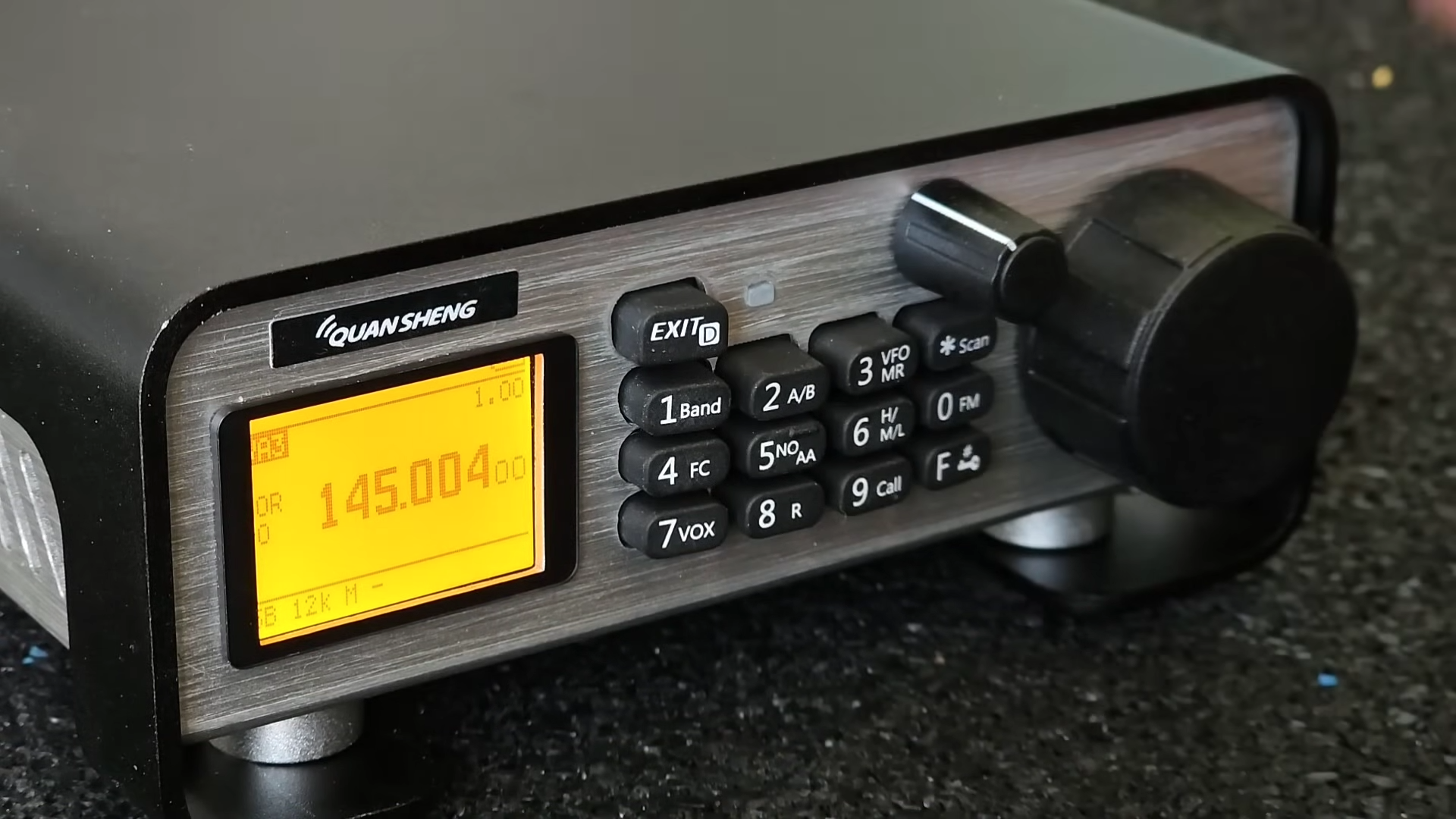
The Quansheng UV-K5 has become one of those little radios that refuses to stay in its lane. Officially, it is a budget-friendly handheld VHF/UHF transceiver. Unofficially, it is a playground for radio tinkerers, firmware experimenters, enclosure builders, and anyone who looks at a palm-sized walkie-talkie and thinks, “Nice, but what if it had a proper knob?”
That is the charm behind turning a Quansheng handheld into a neat desktop transceiver. The idea is simple: take a capable but tiny radio, give it a more comfortable home, add desktop-friendly controls, improve the speaker and power setup, and create something that feels less like a pocket gadget and more like a compact shack radio. It is not magic. It is not a $2,000 base station hiding in a plastic shell. But it is a clever transformation that shows why the Quansheng UV-K5 and similar models have become favorites in the modern ham radio and maker communities.
For operators who monitor local repeaters, experiment with firmware, listen to weather channels, or simply enjoy building useful equipment, this kind of project is deeply satisfying. It is part electronics bench project, part radio ergonomics upgrade, and part “because I can” engineering. And honestly, that last part has powered half of the best inventions in every garage since the soldering iron was invented.
Why The Quansheng UV-K5 Became A Tinkerer Favorite
The Quansheng UV-K5 is popular because it offers a lot of radio for very little money. Depending on the version and firmware, users are drawn to its VHF/UHF operation, channel memories, NOAA weather reception, FM broadcast reception, aviation band listening, dual-watch style functions, USB-C charging on some variants, and a surprisingly active custom firmware scene.
But the biggest reason it gets attention is not perfection. It is hackability. The UV-K5 is affordable enough that experimenters are willing to open it, reflash it, test it, modify it, and occasionally stare at it with the haunted expression of someone who just discovered they plugged the programming cable in upside down. Because many owners treat it as a learning platform, a large ecosystem has grown around programming tools, custom firmware, CHIRP support, firmware patchers, reverse engineering projects, and community modifications.
That community energy matters. A radio becomes more interesting when users are not limited to the factory menu structure. Custom firmware projects have explored spectrum display features, expanded receive functions, interface tweaks, scan improvements, and deeper configuration control. Programming tools also make it easier to organize channel memories, repeater offsets, tones, scan lists, and names from a computer instead of poking through menus like a raccoon trying to unlock a vending machine.
The Desktop Transceiver Idea: Same Radio, Better Experience
A handheld radio is built for portability. That means small buttons, a small display, a small speaker, a small antenna, and a user interface designed around compromises. Those compromises make sense when the radio is clipped to a belt or tossed into a go-bag. They make less sense when the radio sits on a desk every day.
A desktop transceiver conversion changes the relationship between the operator and the radio. Instead of holding the unit, squinting at the display, and tapping keypad buttons, the radio becomes part of a station layout. The controls are easier to reach. The speaker can be larger and clearer. The antenna can be moved away from the operator and placed where it actually performs. Power can come from a stable supply instead of depending entirely on a handheld battery. The radio finally gets to sit upright like it pays rent.
The most interesting versions of this project go beyond simply putting the UV-K5 in a box. Builders have added rotary encoder controls using microcontrollers such as the ESP32, giving the radio a tuning knob and menu navigation style that feels closer to a traditional desktop rig. This matters because one of the UV-K5’s biggest limitations as a desk radio is its keypad-first interface. A knob changes the whole personality of the device. It turns “tap, tap, tap, wait, tap again” into “spin, click, done.”
What A Good Desktop Conversion Should Improve
1. Ergonomics
The first goal is comfort. A handheld radio is fine for short use, but if it becomes part of a daily monitoring station, the controls should be easy to operate without picking it up. A proper desktop enclosure can angle the display toward the user, separate frequently used controls, and make the radio feel intentional instead of temporary.
A rotary encoder is the star here. It can be used for tuning, menu movement, channel selection, or other control tasks depending on the controller design and firmware support. Even when the original radio still does the actual RF work, the external controller makes the interface feel much more polished.
2. Audio Quality
Handheld radio speakers are usually tiny because physics refuses to be bribed. A desktop version can route audio to a larger speaker or an external speaker jack. This does not turn narrowband FM into a concert hall, but it can make voice monitoring less tiring. Clear audio is especially useful when listening to repeaters, weather broadcasts, local nets, or weak signals where every syllable matters.
3. Power Management
A handheld battery is convenient, but a desktop station benefits from stable power. Builders often think in terms of a charging dock, regulated DC input, or a tidy internal power path. The key is to avoid messy wiring and unstable voltage. A neat conversion should not look like a science fair volcano made of USB cables.
Good power planning also means thinking about heat. Handheld radios are not designed for long high-duty-cycle transmitting. Even in a desktop shell, the UV-K5 remains a small handheld platform. For normal monitoring and occasional licensed amateur operation, it can be useful. For long transmissions or heavy digital duty cycles, a purpose-built mobile or base radio is still the better tool.
4. Antenna Placement
The stock rubber duck antenna is acceptable for convenience, not miracles. A desktop conversion should make it easier to connect the radio to a better antenna system. That might mean an external antenna mounted higher, a proper feed line, and attention to the correct connector adapters. The improvement from better antenna placement can be far more dramatic than the improvement from changing the radio itself.
In radio, height and location are often the secret sauce. A modest handheld connected to a well-placed antenna can outperform a more expensive radio attached to a sad little antenna hiding behind a monitor.
Firmware And Programming: The Software Side Of The Shack
The UV-K5 community is famous for firmware experimentation. Custom firmware can add features, change menus, adjust display behavior, and improve the general user experience. Some firmware builds emphasize spectrum-style displays. Others focus on usability, expanded settings, or compatibility with specific programming tools.
That said, firmware flashing should be treated like surgery, not like changing a phone wallpaper. Before modifying firmware, users should understand the exact radio version, back up current settings when possible, use a known-good cable, and avoid random files from mystery corners of the internet. A cheap radio is still worth protecting. Besides, nobody wants to explain that their radio is now a decorative brick because they downloaded “super_final_real_fix_v9_last_last.bin.”
CHIRP is another important piece of the workflow. It helps users program memories, repeater settings, tones, offsets, names, and other configuration data from a computer. For a desktop-style UV-K5 station, clean memory organization matters. Local repeaters, weather channels, simplex frequencies, scan groups, and receive-only channels can be arranged logically. The result is a radio that feels less chaotic and more like a tool.
One important note: expanded receive does not mean expanded permission to transmit. In the United States, amateur radio operation requires an appropriate FCC amateur license, and transmission must stay within the operator’s privileges and legal band limits. Services such as GMRS, FRS, MURS, marine, aviation, and public safety have their own rules and equipment requirements. A modified handheld may be able to tune somewhere, but “the screen lets me type it” is not a legal operating plan.
Building The Enclosure: The Difference Between Project And Product
The enclosure is where the project becomes visually satisfying. A good desktop transceiver build should look clean, stable, and serviceable. It does not need to look like it came from a commercial factory, but it should not look like it survived a toaster explosion either.
A practical enclosure should hold the radio securely, expose or replicate the necessary controls, allow the display to be visible, provide space for audio, and keep cables under control. Builders may use 3D-printed parts, acrylic panels, metal brackets, or repurposed project boxes. Each material has trade-offs. Plastic is easy to shape and print. Metal can add durability but requires more care around RF, grounding, and accidental shorts. Acrylic looks nice until fingerprints arrive like tiny ghosts.
Ventilation is another detail worth respecting. Even if the radio is mostly used for receive, airflow helps. If the enclosure includes a power regulator, amplifier board for audio, display module, or microcontroller, those components need room to breathe. A compact project can still be neat without being sealed like a submarine.
Adding A Rotary Encoder Controller
The rotary encoder is the upgrade that makes the desktop conversion feel legitimate. A handheld radio controlled only through small buttons can be frustrating during frequent tuning or menu changes. A knob gives the operator a familiar desktop-radio interaction.
In community builds, an ESP32-based controller can interpret encoder movement and button presses, then send control actions to the radio. The exact implementation depends on the project files, firmware behavior, and communication method. From a user-experience perspective, the goal is simple: make common actions faster and more natural.
The best encoder setups do not try to turn the UV-K5 into something it is not. They make the existing radio easier to use. Channel changes, frequency steps, menu movement, and selection actions become smoother. It is like giving the radio a steering wheel instead of asking it to navigate with a doorbell.
Realistic Expectations: What This Project Can And Cannot Do
A desktop Quansheng conversion is fun, useful, and educational, but it is still based on a low-cost handheld. It will not match the receiver performance, filtering, selectivity, thermal design, or transmit durability of a dedicated base station. Strong-signal environments may expose limitations. Long transmit sessions are not its natural habitat. Advanced weak-signal work is better handled by specialized equipment.
But that is not the point. The point is to create a compact VHF/UHF desktop station that is affordable, customizable, and enjoyable. For monitoring local repeaters, learning radio programming, testing antennas, listening to weather broadcasts, experimenting with firmware, or building a tidy desk setup, the project makes sense.
It is also a fantastic learning platform. Builders touch multiple useful skills: radio operation, soldering, enclosure design, 3D printing, microcontroller programming, serial communication, firmware management, power regulation, audio routing, antenna planning, and legal radio awareness. That is a lot of education from one little handheld.
Best Use Cases For A Desktop Quansheng Station
Local Repeater Monitoring
A desktop UV-K5 setup works well for listening to local amateur repeaters. With a better speaker and external antenna, the experience becomes more comfortable than using the handheld alone. Operators can keep the radio on the desk and monitor nets, club activity, and local traffic.
Weather And Emergency Awareness
NOAA weather reception is one of the practical features that makes the UV-K5 useful around the house. A desktop enclosure with clear audio turns it into a convenient information receiver during storms or local weather events.
Learning And Experimentation
For new hams and electronics hobbyists, the project provides a low-cost way to learn how radios behave. Users can compare antennas, organize channels, test scanning behavior, explore firmware options, and understand why ergonomics matter in station design.
Compact Shack Builds
Not everyone has room for a full radio bench. A desktop Quansheng transceiver can fit into a small apartment, dorm desk, workshop shelf, or portable station box. It is a practical choice for operators who enjoy compact gear and clever design.
Common Mistakes To Avoid
The first mistake is assuming that a desktop case changes the radio’s RF limits. It does not. Better controls and a nice enclosure improve usability, not receiver architecture or transmitter duty cycle.
The second mistake is ignoring legal limits. Amateur radio is flexible, but it is not a free-for-all. A responsible operator knows where they are allowed to transmit, identifies properly, and understands that receive capability and transmit permission are two different animals.
The third mistake is overcomplicating the build. A clean enclosure, good speaker, proper power, neat cable routing, and useful controls are better than a box filled with unnecessary gadgets. When a project tries to include every possible feature, it can become less reliable and more frustrating.
The fourth mistake is poor antenna planning. A desktop conversion with a bad antenna is like buying running shoes and never leaving the couch. The antenna system is a major part of radio performance, and it deserves attention.
Experience Notes: Living With A Desktop-Style Quansheng Setup
The biggest surprise in using a desktop-style Quansheng is how much the experience changes even when the radio itself remains modest. The moment the handheld is angled toward the operator, connected to a clearer speaker, and controlled with a more natural interface, it feels less like a compromise. It becomes a small station.
In everyday use, the improvement is not about raw specifications. It is about friction. With a handheld, small annoyances add up. The radio falls over. The speaker points the wrong way. The antenna gets bumped. The keypad is cramped. The charging cable snakes across the desk like it has personal ambitions. After a proper desktop conversion, those annoyances fade. The radio stays put. The audio is easier to understand. The display is readable. The controls are where your hand expects them to be.
A rotary encoder especially changes the rhythm of operation. Scrolling through channels or adjusting settings feels more deliberate. It also makes the project more inviting for casual monitoring. When a device is pleasant to use, you use it more often. That is true for cameras, keyboards, coffee grinders, and tiny VHF/UHF radios that have been promoted to desk duty.
Another practical lesson is that cable management matters more than expected. A messy desktop radio project can become annoying fast. The best builds route power, audio, programming, and antenna connections so they do not fight each other. Strain relief is important. So is access. If the radio needs firmware changes or memory updates, the enclosure should not require a full archaeological excavation every time a cable must be plugged in.
Speaker choice also makes a big difference. A louder speaker is not automatically better. Clear voice reproduction matters more than volume. A small external communications speaker or a well-placed internal speaker can reduce listening fatigue during long monitoring sessions. The goal is not bass. The goal is understanding someone’s call sign without leaning toward the box like it is whispering state secrets.
Power is another area where experience teaches humility. Stable voltage and clean wiring are worth the effort. Cheap adapters, loose connectors, and improvised charging setups can create noise or reliability problems. A desktop project should feel dependable, not like a temporary campsite for electrons.
The most enjoyable part of the project is the sense of ownership. A stock handheld is something you bought. A desktop conversion is something you shaped. Every design decision reflects your operating style: the angle of the display, the size of the knob, the speaker location, the front-panel layout, the channel plan, the firmware choice, and the antenna setup. That personal connection is why radio projects remain fun even in an age when phones can stream video from space.
In the end, turning a Quansheng handheld into a neat desktop transceiver is not about pretending a budget radio is a premium base station. It is about making a useful device more comfortable, more accessible, and more fun. It is a reminder that good station design is not always about spending more money. Sometimes it is about solving small problems with patience, creativity, and just enough stubbornness to make a handheld radio wear a desktop suit.
Conclusion
Turning a Quansheng handheld into a neat desktop transceiver is one of those projects that captures the best parts of the radio hobby. It is practical, affordable, educational, and just a little bit ridiculous in the best possible way. The UV-K5’s popularity comes from its low cost, flexible feature set, active firmware community, and willingness to be modified by curious people with tools.
A good desktop conversion improves the parts of the handheld experience that matter most: comfort, control, audio, power stability, antenna access, and station organization. Add a rotary encoder controller, a clean enclosure, a better speaker, and a thoughtful channel plan, and the humble handheld becomes a compact desk companion for monitoring, learning, and legal amateur-radio operation.
It will not replace a serious base station, and it should not be treated as a license to transmit anywhere the firmware can tune. But as a maker project and compact VHF/UHF station, it is hard not to admire. The little Quansheng may have started life as a handheld, but with some clever work, it can sit proudly on the desk like it was born there.