Dental hardware sounds like something you’d buy at a home improvement store (“I’m here for two hinges and one
molar, please”). But in dentistry, “hardware” simply means the components and appliances used to restore,
replace, or move teethand sometimes to protect them from your midnight jaw doing its own CrossFit.
This visual guide breaks down the most common dental hardware you’ll hear about in treatment plans:
crowns, bridges, implants, dentures, orthodontic appliances (braces and aligners), and a few behind-the-scenes
helpers like posts, cores, and retainers. You’ll learn what each piece does, where it sits, what it’s usually
made from, and how to decode the vocabulary without needing a dental degree (or a secret handshake).
Friendly note: This is general education, not medical advice. Your dentist is the final boss of “what you need and why.”
1) The “Map” of Dental Hardware: Where Things Live
Before we zoom in, here’s a simple location map. Most dental hardware lives in one of four zones:
the tooth (above the gum), the root area (inside the tooth), the gumline (where restorations meet tissue),
or the jawbone (where implants anchor).
2) Quick Glossary: The Words That Keep Showing Up
If dental terms were a TV show, these would be the main characters:
- Restoration: Any prosthetic that repairs or replaces teeth (crowns, bridges, dentures, implant crowns).
- Crown: A “cap” that covers a tooth (or an implant restoration shaped like a tooth).
- Bridge: A fixed replacement for missing tooth/teeth, supported by teeth or implants.
- Abutment: A support or connectoroften the piece that connects an implant to a crown, or the supporting tooth/structure for a bridge.
- Pontic: The “fake tooth” portion of a bridge that fills the gap.
- Implant fixture/post: The part placed in the jawbone that acts like an artificial root.
- Retainer: A device that helps keep teeth from drifting after orthodontic treatment.
3) Crowns: The Protective Helmet for a Tooth
A crown is a custom cover that restores a tooth’s shape, strength, and function. Think of it like a
well-tailored suit of armoronly smaller, shinier, and much more expensive than medieval gear.
What crowns are used for
- Large cavities or fractures where a filling isn’t enough
- After root canal treatment (when a tooth may be more brittle)
- Severe wear (grinding/clenching) that shortens teeth
- Cosmetic reshaping (in select cases)
Common crown materials (and why they matter)
| Material | What it’s like | Typical strengths | Trade-offs |
|---|---|---|---|
| All-ceramic / porcelain | Natural-looking, great color | Excellent esthetics | May chip in high-bite-force situations depending on design |
| Zirconia | Super strong ceramic | Durability, good for heavy chewing areas | Can look slightly less “translucent” than porcelain in some cases |
| Porcelain-fused-to-metal (PFM) | Metal base with porcelain exterior | Strong core + esthetics | Possible dark line at gum if recession occurs; porcelain can chip |
| Gold/high noble alloys | Old-school, still loved | Wear-friendly, very durable | Not tooth-colored (unless you’re going for “pirate chic”) |
Visual: crown anatomy
4) Bridges: When a Tooth Is Missing, and the Neighbors Help Out
A dental bridge replaces one or more missing teeth by “bridging” the gap.
The support structures are called abutments, and the replacement tooth/teeth are called
pontics.
Bridge parts (in plain English)
- Abutment teeth/abutments: The supports on either side of the gap (natural teeth or implants).
- Pontic: The tooth-shaped replacement that sits over the gap.
- Connectors: The joints that link everything into one piece.
Visual: classic 3-unit bridge
Why bridges are chosen
Bridges can restore chewing and appearance and help keep neighboring teeth from drifting into the empty space.
They’re often considered when the neighboring teeth already need crowns, or when an implant isn’t ideal for
medical, anatomical, or timing reasons.
5) Dental Implants: The Three-Part System (Foundation + Connector + Tooth)
Implants are usually described as a three-part setup:
a fixture/post in the bone, an abutment connector, and a restoration
(often a crown) on top.
Implant components
- Implant fixture/post: The “root replacement” placed in the jawbone.
- Abutment: The connector that sits on the implant and supports the crown or bridge.
- Implant crown/restoration: The visible tooth-shaped part.
Visual: implant stack
Why implant parts matter
When you hear “abutment,” people are often talking about the connector stagebecause it’s the meeting point
where bite forces, gum health, and crown fit all have to play nicely together. It’s also why implant plans
can include extra steps and appointments: you’re building a tiny, engineered tower in your mouth.
6) Dentures and Partial Dentures: Removable Hardware That Still Does Serious Work
Dentures replace multiple teeth. A full denture replaces all teeth in an arch
(upper or lower). A partial denture replaces some teeth and usually anchors to remaining teeth
using clasps or other support features.
Common denture/partial parts
- Base: The pink portion that rests on the gums.
- Teeth: The tooth-colored acrylic or composite teeth set into the base.
- Clasp (partials): Metal or tooth-colored arms that hug anchor teeth for retention.
- Rests (partials): Small supports that help distribute forces onto teeth.
Visual: partial denture concept
Implant-supported dentures: “snap-in” stability
Some dentures are supported by implants (often with special attachments). This can improve retention and
reduce slippingespecially for lower dentures, which can be more challenging because the tongue and smaller
surface area try to evict them like a bouncer at closing time.
7) Orthodontic Hardware: Braces, Wires, Elastics, and Friends
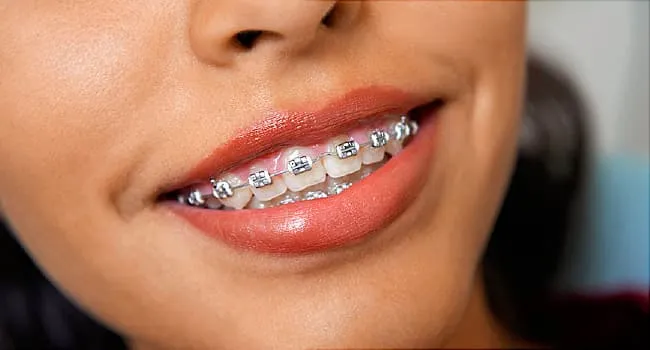
Orthodontic hardware exists to guide tooth movement. Braces are typically made of
brackets, bands, and archwires, with optional “bonus features”
like elastics and springs.
Key parts of braces
- Brackets: Small attachments bonded to teeth; they hold the wire.
- Bands: Rings that go around certain teeth (often molars) in some cases.
- Archwire: The wire that runs through brackets and applies forces to move teeth.
- Ligatures: Tiny rubber rings or wire ties that hold the archwire into brackets.
- Elastics: Rubber bands that add directional force (often to correct bite).
- Coil springs: Springs on the archwire used to open or maintain space.
Visual: simplified braces layout
Clear aligners (like Invisalign-style systems)
Aligners are removable trays that fit over teeth. Many systems use
attachments (small tooth-colored bumps) bonded to teeth so the aligner can grip and apply
more precise forces. If braces are a toolbox, aligners are a sleek multi-tool: fewer visible parts, but still
engineered.
8) Endodontic and “Inside-the-Tooth” Hardware: Posts and Cores
After a root canal, a tooth can be restored in different ways depending on how much natural tooth structure
remains. If there isn’t enough structure to hold a crown securely, a dentist may use a
post and core to help retain the buildup that supports the crown.
What “post” and “core” mean
- Post: A rod placed into the root canal space (in certain situations) to retain the core.
- Core: The buildup material that reconstructs the tooth’s shape so a crown can fit.
Visual: post + core + crown
Important nuance: posts aren’t “mandatory” after every root canal. They’re typically considered when there
isn’t enough remaining tooth structure to hold a crown or buildup securely. In other words, the post is a
supporting actor, not the star of every root canal story.
9) Periodontal and Protective Hardware: Guards, Splints, and Stabilizers
Not all dental hardware is about replacing teeth. Some devices protect existing teeth or stabilize bite forces.
Common protective appliances
- Night guard (occlusal guard): Helps protect teeth from grinding/clenching forces.
- Mouthguard (sports): Helps protect teeth and soft tissues during impact.
- Splints: Devices used in certain situations to stabilize teeth or manage jaw-related bite forces under professional guidance.
These appliances are often overlooked because they’re removable and “not fancy,” but they can be the difference
between “my teeth look the same every year” and “why do my molars suddenly look like they’ve been sanded.”
10) How to Read a Treatment Plan Like a Normal Human
Dental plans can sound like a hardware shopping list:
“Crown #19, implant #30 with abutment, pontic, and occlusal guard.” Here’s a simple decoding strategy.
Step-by-step decoding
- Identify the goal: repair a tooth, replace a tooth, move teeth, or protect teeth.
- Find the foundation: natural tooth vs. implant vs. removable base.
- Spot the connector terms: abutment, post, core, attachments.
- Ask about materials: ceramic, zirconia, metal alloys, acrylic, etc.
- Ask about maintenance: cleaning, retainer wear, guard care, recall visits.
Example translation
Plan: “Implant with abutment and crown.”
Translation: A post goes in bone, a connector gets attached, and a tooth-shaped crown goes on top.
Plan: “3-unit bridge with abutment crowns and pontic.”
Translation: Two crowned supports plus a fake tooth in between, all connected as one piece.
11) Practical Care Tips for Dental Hardware (So It Lasts)
Most dental hardware fails for boring reasons, not dramatic ones. (Real life rarely has villain monologues.
It’s usually plaque + time.)
Daily habits that matter
- Brush thoroughly: especially around crown edges and gumlines.
- Clean between teeth: floss, interdental brushes, or water flossersespecially around bridges and implants.
- Follow retainer/aligner instructions: consistency is the secret sauce.
- Protect against grinding: if recommended, wear a guard (your enamel will thank you quietly).
- Keep regular checkups: hardware is durable, not immortal.
Bridge and implant cleaning “hot spots”
Bridges need extra attention under the pontic area. Implants need careful cleaning around the gumline where
the restoration meets tissue. If you only brush the “front-facing surfaces,” you’re basically cleaning the
visible part of your car and ignoring the engine. Pretty? Sure. Functional? Not forever.
12) The Most Common “Hardware Confusions” (Cleared Up)
“Is an abutment a tooth or a part?”
Both, depending on context. In bridges, “abutment” can mean the supporting tooth/structure. In implants,
“abutment” often means the connector piece that links the implant fixture to the crown.
“Is an implant the crown?”
Not exactly. People casually say “implant” to describe the whole replacement, but technically the implant is
the fixture/post in bone. The visible tooth is the crown/restoration, often connected by an abutment.
“Do dentures always mean ‘all teeth’?”
No. Partial dentures replace some teeth. Full dentures replace all teeth in an arch.
13) A Mini “Visual Guide” Cheat Sheet
| Hardware | What it does | Where it sits | Usually fixed or removable? |
|---|---|---|---|
| Crown | Covers/protects a tooth or implant | Above gum, meets gumline at margin | Fixed |
| Bridge | Replaces missing teeth using supports | Above gum, anchored to teeth/implants | Fixed |
| Implant fixture + abutment + crown | Replaces missing tooth root + tooth | Bone + gumline + above gum | Fixed |
| Partial denture | Replaces some missing teeth | Rests on gums + anchors to teeth | Removable |
| Full denture | Replaces all teeth in an arch | Rests on gums | Removable |
| Braces (brackets + wire) | Moves teeth | Bonded to teeth | Fixed (until removed) |
| Clear aligners + attachments | Moves teeth | Trays over teeth; attachments bonded | Removable trays |
| Retainer | Holds teeth position | Over teeth (or bonded behind) | Removable or fixed |
| Night guard | Protects from grinding/clenching | Over teeth | Removable |
14) Real-World Experiences: What Dental Hardware Is Like Day-to-Day (About )
Let’s talk about the part nobody puts in the brochure: what it’s like to live with dental hardware.
Not in a scary waymore in a “why does my mouth feel like it got a software update overnight?” way.
Experiences vary widely, but there are some common patterns people report across crowns, bridges, implants,
dentures, and orthodontic appliances.
The “new bite” feeling
After a crown, bridge, or implant crown is placed, many people notice that their bite feels “high” or “off”
at first. Sometimes it’s truly a bite adjustment issue; sometimes it’s just your brain noticing a new shape.
Your mouth is extremely sensitive to tiny changeslike how one grain of rice can feel like a boulder when it’s
stuck between your teeth. The practical takeaway is that it’s normal to be aware of new hardware early on, but
persistent discomfort or trouble chewing is worth a call back to the dentist.
Temperature and pressure surprises
With crowns, especially soon after placement, some people notice sensitivity to cold or pressure.
That can settle as the tooth and surrounding tissues calm down, but ongoing sensitivity deserves evaluation.
For implants, the sensation is different: implants don’t have the same nerve feedback as natural teeth, so the
“feel” of chewing can be subtly altered. People often describe it as sturdy and stable, but a little less
“alive” than a natural toothmore like a reliable chair than a trampoline.
Orthodontics: the first week is a plot twist
With braces or aligners, the first few days are commonly described as “tight,” “pressure-y,” or “why do my
teeth suddenly have opinions?” Soft foods become popular. Brackets can rub cheeks until the mouth adapts,
and aligners can feel snug when switching to a new tray. Many patients find that discomfort follows a rhythm:
it peaks early in a cycle (like after wire adjustments or a new aligner tray) and then fades as the teeth
settle into their new position.
Dentures and partials: learning curve, then routine
New dentures or partial dentures often come with a genuine adjustment period. People report extra saliva,
mild sore spots, and speech feeling “weird” for a bitespecially with certain sounds. Chewing can require
retraining: smaller bites, even pressure on both sides, and patience. Over time, most wearers develop a routine
that feels normal. The most common “win” people mention is confidencebeing able to smile and eat comfortably
againonce fit and function are dialed in.
The maintenance mindset
A big shared experience across all dental hardware is realizing that “fixed” doesn’t mean “maintenance-free.”
Bridges need cleaning under the pontic, implants need careful gumline hygiene, retainers need consistent wear,
and guards need cleaning (because they’re not supposed to become a science fair project). People who do best
long-term often adopt a simple mindset: the hardware is an investment, and daily habits are the protection plan.
If you remember one thing, make it this: dental hardware is common, highly engineered, and designed to help you
function normally. It may feel unfamiliar at first, but most people adapt quicklyespecially when they know
what the parts are and why they’re there.
Conclusion
Dental hardware isn’t mysterious once you can “see” the system: supports (teeth or implants), connectors
(abutments, posts, attachments), and the visible restorations (crowns, pontics, dentures, aligners).
When you understand the names and how the pieces stack together, treatment plans stop sounding like a foreign
language and start sounding like what they really are: practical solutions to restore comfort, function, and
confidence.
The next time you hear “abutment,” “pontic,” or “archwire,” you can nod calmlyas if you didn’t just translate
it in your head to “connector,” “fake tooth,” and “metal noodle that moves teeth.” Progress.