There are two kinds of people in this world: people who buy a cheap IP camera to “keep an eye on the front door,” and people who buy a cheap IP camera, immediately ignore the box art, and start wondering if it can become a bird-feeder cam, a 3D-printer monitor, a time-lapse machine, a garage watchdog, and a low-budget robot eyeball all before lunch. This article is for the second group.
Customizing a $30 IP camera is fun because it sits in the sweet spot between useful gadget and harmless chaos goblin. It is inexpensive enough that you do not feel like you are performing open-heart surgery on a luxury product, but capable enough to do surprisingly clever things. The trick is to customize it in ways that make it more useful, not more annoying, more secure, not more exposed, and more local, not more dependent on some mystery cloud server living its best life far away from your house.
If you do it right, a bargain camera can become a genuinely flexible smart-home tool. If you do it wrong, it becomes a tiny plastic privacy scandal with a blinking LED. So let’s aim for the first outcome.
Why Cheap IP Cameras Are So Fun To Tinker With
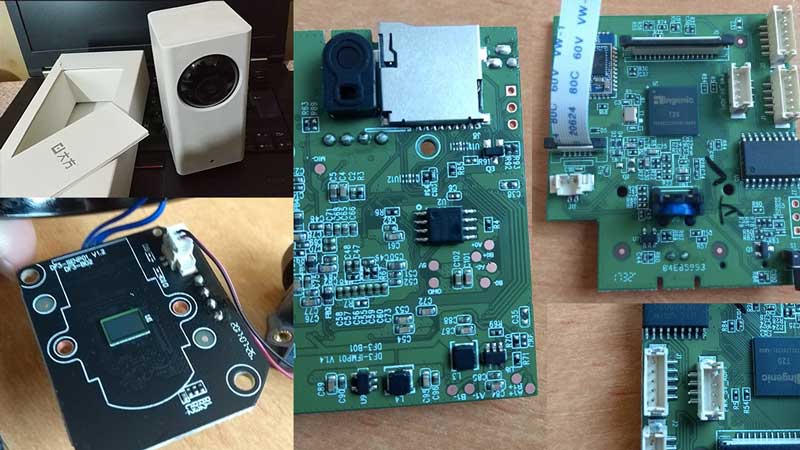
A low-cost IP camera is basically a tiny networked computer with a lens. Even bargain models often include motion detection, local storage, night vision, two-way audio, mobile app access, and sometimes support for local video streams. That means you are not just buying a camera. You are buying a starting point.
For hobbyists, that starting point is where the fun begins. A simple camera can be customized into a front-porch monitor, a pet cam, a baby-room helper, a weather cam, a workshop observer, a plant shelf time-lapse recorder, or a home-lab test device. Some users add the feed to a dashboard, route it into local recording software, tune alerts so they stop announcing every leaf that moves, or create schedules so the camera behaves differently during the day, at night, or while they are away.
The real magic is that customization does not always mean soldering irons and firmware drama. Sometimes it just means smarter setup choices. In fact, the best custom IP camera setup is often less about turning the device into a sci-fi prop and more about removing friction. Fewer false alerts. Better recording quality. More privacy. Easier playback. Less cloud dependence. That is the kind of customization that actually improves life.
Before You Get Creative, Get Serious About Security
Yes, yes, security is the broccoli of gadget projects. But in the world of connected cameras, broccoli matters. A camera sees your home, listens to your space, and sometimes stores video in the cloud, on a card, or both. If you are going to customize a cheap IP camera for fun, the very first upgrade should be boring in the best possible way: lock it down.
1. Change every default you can
If the device ships with a default username, password, or lazy setup mode, change it immediately. Use a unique password for the camera account and, if available, turn on two-factor authentication for the app or cloud account. “admin/admin” belongs in a museum, not on your home network.
2. Update firmware before you fall in love
Many bargain cameras are perfectly decent on day one but become sketchy if the manufacturer stops patching them or if you never install updates. Before you customize anything, check whether the brand still publishes firmware updates and whether the app is actively maintained. A camera with fun features and stale firmware is the digital equivalent of a trampoline with one missing spring.
3. Avoid direct internet exposure
Do not port-forward your camera to the open internet just because the words “remote viewing” sound exciting. If you want remote access, use the manufacturer’s secure options carefully, or better yet, access your local setup through a VPN or a trusted home server arrangement. The goal is “I can see my driveway from my phone,” not “the whole internet can audition for the role.”
4. Put the camera on its own network if possible
One of the smartest customizations has nothing to do with the lens. Put the camera on a guest network, IoT VLAN, or separate Wi-Fi segment if your router supports it. This reduces the blast radius if the camera, app, or account is ever compromised. Your camera does not need to become close personal friends with your laptop, NAS, and tax documents.
5. Turn off features you do not use
Unused remote management, unnecessary cloud uploads, and extra sharing permissions are not “bonus features.” They are extra surface area. Disable what you do not need. A lean camera setup is usually a safer one.
The Most Fun Ways To Customize A $30 IP Camera
Make it local-first
One of the most satisfying upgrades is moving from “app-only toy” to “camera I actually control.” If your device supports local microSD recording, enable it. If it supports a standard stream format, you may be able to route the feed to a local dashboard, recorder, or network video recorder. That opens the door to longer retention, easier search, smarter automations, and fewer monthly subscription tantrums.
This is where cheap IP camera customization gets genuinely useful. A local-first setup can let you view video without paying a recurring fee, keep footage in your own environment, and combine multiple cameras in one place. Some people use a lightweight local dashboard. Others prefer dedicated recording software. More advanced users connect cameras to a home server for motion clips, object detection, and archive management.
If your model supports common local streaming methods, that is a huge win. It gives the camera more flexibility and usually extends its lifespan beyond whatever the official mobile app decides to become in two years.
Use different streams for different jobs
Here is a trick that makes a cheap camera feel smarter than it is: use a lower-quality stream for live detection or dashboard previews and a higher-quality stream for recording. That keeps system load under control while preserving good footage when something actually matters.
This matters because a $30 camera usually has limits. Its processor is not a superhero. Its Wi-Fi may be enthusiastic but not disciplined. Its app may also have been designed by someone who believes every notification should feel like a presidential alert. Using different stream roles can make the entire setup smoother.
Create motion zones that respect reality
Out of the box, many budget cameras think moving shadows are suspicious and rain is apparently a felony. A better customization is defining motion zones and privacy masks. Ignore the road if you only care about the walkway. Ignore the tree if you are tired of your phone announcing “movement detected” every time the wind remembers it exists.
For indoor setups, privacy zones are even more useful. If a camera points toward a desk, bed, or neighboring window, block the area you do not want recorded. This is one of those rare customizations that makes a camera both more practical and less creepy.
Turn it into a specialty camera
Cheap cameras become much more entertaining when they get a job description. A few examples:
Pet cam: Aim it at the dog bed or cat tree, lower sensitivity, and keep night vision on. Suddenly you have proof that your “lazy” dog hosts a 2:14 a.m. hallway sprint league.
3D-printer cam: Mount it above your printer to monitor long jobs, check for spaghetti failures, and create nerdy time-lapse clips that make plastic look cinematic.
Garden or bird-feeder cam: Add a small hood to reduce glare, adjust exposure, and point it at something delightful. A cheap camera is surprisingly good at catching tiny daily dramas in the backyard.
Workshop cam: Use it to watch a resin printer, CNC job, or curing station from another room. It is not glamorous, but it is wildly convenient.
LEGO or craft cam: Set up a dedicated overhead shot for projects, tutorials, or stop-motion experiments. A bargain camera can do a lot when the lighting is decent and expectations are sane.
Improve the physical setup
Not every customization lives in software. Sometimes the best upgrade is a better mount, cleaner cable routing, or smarter placement. A cheap camera aimed from the wrong angle will always behave like a cheap camera. The same model placed at eye level for packages, under an eave to reduce rain glare, or behind glass with reflections controlled can perform much better.
You can also add small practical touches: a labeled power adapter, a weather shield, anti-glare positioning, a more stable stand, or a discreet indoor mount that makes the device blend in. None of this is flashy. All of it helps.
What Budget Cameras Usually Get Wrong
Let’s be honest: customizing a $30 IP camera is fun partly because you are working around its flaws. Budget models can be surprisingly good, but they are still budget models. Expect compromises.
Image quality is often “pretty good until it isn’t”
Daytime video may look crisp enough to make you feel victorious. Night footage can be another story. Cheap sensors struggle in low light, motion blur can get ugly fast, and digital sharpening sometimes turns people into haunted watercolor paintings. Good positioning and extra lighting help a lot, but no amount of optimism can make a bargain sensor behave like premium hardware.
Apps can be clingy
Some low-cost cameras lock too much functionality behind proprietary apps. Others push subscriptions, nag you with notifications, or hide useful settings behind weird menus. This is why local streaming support and local storage matter so much. They give you a way to keep using the camera even if the official app becomes irritating, limited, or abandoned.
Support can be inconsistent
Some brands do a decent job with updates and documentation. Others treat documentation like a treasure hunt designed by raccoons. Before buying a cheap camera specifically for customization, look for signs that the brand supports firmware updates, publishes setup information, and has at least some community knowledge around it.
A Smart Customization Checklist Before You Buy
If you are still shopping for your cheap camera, here is what matters most for a fun customization project:
Local storage: A microSD slot is a great sign.
Standard stream support: If the camera supports local streaming, integration gets much easier.
Reasonable update history: A cheap camera is only a bargain if it stays usable.
Adjustable motion settings: Sensitivity, zones, and schedules save your sanity.
Indoor or outdoor rating that matches reality: “Weather-resistant” should mean something more robust than “might survive a stern look from a cloud.”
No forced subscription for basic use: Optional is fine. Mandatory for basic recording is less fun.
So, Is Customising A $30 IP Camera Worth It?
Absolutely, as long as your expectations are calibrated and your security habits are better than your impulse control. A cheap IP camera is not just a surveillance gadget. It is a flexible little smart-home building block. With thoughtful customization, it can become more private, more useful, and more entertaining than the stock setup suggests.
The best part is that the project scales. Beginners can improve placement, alerts, and storage. Intermediate users can build local dashboards and smarter motion rules. Advanced tinkerers can fold the camera into a broader home-lab or automation setup. The camera stays the same little square of plastic, but its job gets much bigger.
That is the appeal. You are not trying to turn a $30 camera into a $300 camera. You are trying to turn a basic gadget into your gadget. And when it starts catching package deliveries, bird visits, printer failures, or the cat’s midnight criminal activity exactly the way you want, that feels weirdly excellent.
My Experience Customising A $30 IP Camera For Fun
The first time I customized a cheap IP camera, I told myself it would be a quick little weekend project. That was adorable. In reality, it became one of those hobbies that starts with “I just want to make this more useful” and ends with you standing on a chair at 11:30 p.m. adjusting the angle by half an inch because a porch light keeps turning every person into a glowing ghost potato.
What surprised me most was how much improvement came from tiny changes rather than dramatic ones. I did not begin by chasing advanced integrations or trying to turn the camera into a cyberpunk masterpiece. I started by changing the password, updating the firmware, adding a memory card, and moving the camera out of the exact worst spot I had originally chosen. That alone made the setup feel less like a disposable gadget and more like a real tool.
Then the fun part started. I tuned the motion zones so the camera stopped reporting every passing car and every emotionally expressive leaf. I gave it a very specific job instead of expecting it to be good at everything. For a while, it watched a 3D printer. Later, it became a package cam. Then it spent a month pointed at a bird feeder and somehow became the most entertaining device in the house. I learned that cheap cameras are happiest when you assign them one clear mission and let them do that job well.
I also learned that local storage changes the whole vibe. The moment I could review footage without feeling funneled into a subscription pitch, the camera became much more enjoyable to use. It felt less like I was renting access to my own front porch and more like I actually owned the device. That psychological difference is huge. You stop thinking like a customer and start thinking like a tinkerer.
Of course, there were frustrations. Night vision was hit-or-miss. Audio was mostly useful for confirming that yes, a strange noise did happen, but not always useful for understanding what that noise actually was. And every now and then the app would present a menu so confusing it felt like it had been translated by a washing machine. But honestly, those rough edges were part of the charm. A cheap IP camera is not fun because it is perfect. It is fun because it is surprisingly capable, slightly weird, and constantly inviting you to improve it.
My biggest takeaway is that customization works best when it serves a real habit. If you like smart-home dashboards, add the feed there. If you travel, prioritize secure remote access. If you have pets, tune alerts around their chaos. If you just want a backyard nature cam, focus on placement, lighting, and weather protection. The camera becomes more rewarding when it reflects your routine instead of someone else’s marketing fantasy.
And yes, there is a special kind of satisfaction in getting a $30 device to behave like something far more thoughtful. Not because it suddenly becomes premium hardware, but because you made intentional choices. You cut the noise, improved the workflow, and gave the gadget a job it could actually succeed at. That feels good. It is practical, a little nerdy, and honestly a lot of fun.