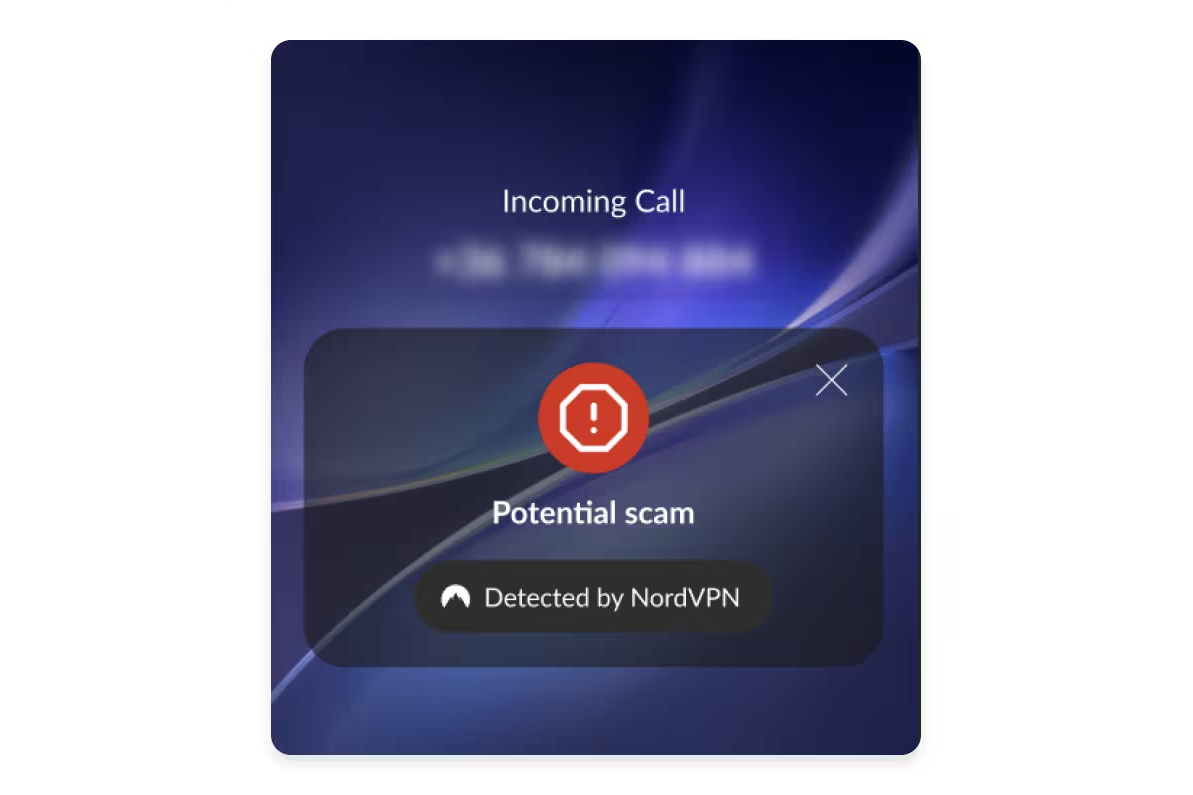
For years, NordVPN has been known as the app people open when they want a safer internet connection, a private browsing session, or a less dramatic relationship with public Wi-Fi. Now, the company is stepping into a different but very familiar danger zone: the phone call. With its new Call Protection feature, NordVPN is expanding beyond traditional VPN privacy and into real-time call security, aiming to help users spot suspicious calls before they answer.
That matters because scam calls no longer sound like the cartoon villains of the early 2000s. Today’s fraud attempts can look local, sound urgent, and arrive during the exact five minutes when you are tired enough to believe your “bank” suddenly needs your full account details. Phone-based scams have become part nuisance, part cybersecurity problem, and part emotional ambush. NordVPN’s new feature is designed to add a warning light before that trap begins.
In simple terms, Call Protection flags potentially risky incoming calls, shows warnings on the call screen, and gives users the option to ignore, decline, send the call to voicemail, or block suspicious numbers. It is currently built for Android users and works through the NordVPN mobile app. Most importantly, NordVPN says the feature does not access, listen to, record, or store the content of conversations. It focuses on caller information and number reputation rather than what people say once the call begins.
What Is NordVPN Call Protection?
NordVPN Call Protection is a mobile security feature that helps identify suspected scam calls before the user picks up. Instead of waiting until a scammer launches into a fake bank alert, fake delivery problem, fake tech support emergency, or fake “your account will be closed in 30 seconds” panic script, the feature checks the incoming number and displays a warning when it appears risky.
The idea is not to replace common sense. It is to give common sense a cup of coffee before the phone rings. A warning label can be enough to make someone pause, breathe, and think, “Do I actually know this number?” That tiny delay is powerful because many phone scams rely on speed. Scammers want the victim stressed, rushed, and emotionally cornered. A clear warning interrupts that rhythm.
How the Feature Works
NordVPN’s Call Protection uses number reputation checks and threat intelligence to screen incoming calls. When a call comes in, the system evaluates whether the number is associated with scam activity, telemarketing, or suspicious behavior. If the call looks dangerous, the user receives a warning on the incoming call screen.
Users can also configure call blocking settings. Depending on preferences, Call Protection may help block numbers flagged as scams or telemarketing calls. This matters because not every unwanted call is the same. A scam call may be trying to steal money or credentials, while a telemarketing call may simply be unwanted noise. Both can be annoying, but one is more likely to end with your bank account doing an unplanned disappearing act.
Call Protection also works independently of a VPN connection. That is a smart product decision because phone scams do not wait politely until your VPN is connected. Once enabled, the feature can run quietly in the background and provide warnings even when the user is not actively connected to a VPN server.
Why NordVPN Is Moving Beyond Traditional VPN Security
The move into call security is not random. VPN companies are increasingly positioning themselves as broader digital safety brands. A VPN protects internet traffic by encrypting data and masking IP addresses, but modern scams do not always arrive through a browser. They arrive through text messages, fake login pages, malicious QR codes, email links, social media messages, and, yes, the humble phone call that refuses to retire.
NordVPN already offers security tools beyond basic VPN tunneling, including threat protection features, dark web monitoring, and privacy-focused browsing tools. Call Protection continues that direction. It shows that the company understands a key truth about cybersecurity in 2026: people do not experience threats in neat categories. A scam may begin with a phone call, continue through a text message, move to a fake website, and end with a payment app transfer. Protecting only one layer is helpful, but incomplete.
Call security is also emotionally different from web security. When someone clicks a suspicious link, there is often time to inspect the page. When a scammer is speaking live, pressure increases. A convincing voice can make a fake emergency feel real. That is why features that warn before answering are becoming more important.
The Scam Call Problem Is Bigger Than Annoying Robocalls
Scam calls are not just background noise. They are a major fraud channel. U.S. consumer agencies and cybersecurity organizations have repeatedly warned that criminals use phone calls to impersonate banks, government agencies, delivery companies, tech support teams, health providers, relatives, and employers. The scammer’s goal is usually simple: create urgency, build fear, and push the victim into sharing money or sensitive information.
Some scams are laughably bad. Others are polished enough to make even careful people hesitate. A call may spoof a local number, use a company name on caller ID, or claim that suspicious activity has been detected on an account. In more advanced cases, fraudsters use artificial intelligence, voice cloning, and personal information gathered from data breaches or social media to make the interaction feel believable.
This is why caller ID alone is no longer enough. A number can look familiar and still be fake. A caller can sound professional and still be lying. A company name on the screen can be spoofed. The scam economy has become too efficient for users to rely only on instinct.
Privacy-First Design: The Most Important Part of the Feature
Any tool that touches phone calls immediately raises a fair question: is it listening? According to NordVPN’s official materials, Call Protection does not access or store call content. It does not record conversations, create transcripts, or analyze what people say during the call. Instead, it checks caller information and number reputation.
That distinction is essential. A call security tool should reduce risk without creating a new privacy problem. If a feature designed to protect users had to listen to every conversation, many privacy-minded customers would run in the opposite direction, possibly while turning off their phone and moving to a cabin with no signal. NordVPN’s approach keeps the focus on suspicious caller identification, not conversation monitoring.
For users who chose NordVPN because of privacy, this design choice is central to the feature’s credibility. The company is not saying, “Trust us with your calls.” It is saying, “We can help identify suspicious callers without needing the content of your calls.” That is a much better pitch.
How to Enable NordVPN Call Protection on Android
Users can enable Call Protection inside the NordVPN Android app. The general process is straightforward: open the app, go to the Products section, select Call Protection, and turn it on. Android may ask the user to choose NordVPN as the default caller ID and spam app or allow permissions needed for call management. After setup, users can adjust blocking options and decide how aggressively they want suspicious calls filtered.
For people who are not tech experts, the setup should feel familiar. It is similar to enabling other caller ID or spam protection features on Android. The important part is reviewing the permission prompts carefully. Call security needs enough access to identify and manage incoming calls, but users should still understand what they are approving.
If Call Protection stops working, one of the first things to check is whether NordVPN is still set as the default caller ID and spam app in Android settings. Phone settings can change after system updates, app reinstallations, or switching default dialer apps. In other words, if your phone suddenly forgets who is in charge, check the settings before blaming the universe.
Where NordVPN Call Protection Fits in the Security Market
NordVPN is not the only company trying to reduce scam calls. Android already offers caller ID and spam protection tools. Phone carriers provide blocking and filtering services. Third-party apps specialize in caller identification, spam detection, and robocall defense. What makes NordVPN’s entry interesting is brand context. NordVPN has a large existing user base that already associates the company with privacy and security.
That gives Call Protection a built-in audience. Instead of asking users to install a completely separate scam-blocking app, NordVPN can add call security inside a product many customers already trust. For users who prefer fewer apps and simpler settings, that convenience is valuable.
The feature also reflects a broader trend: cybersecurity tools are becoming more bundled. Consumers increasingly want one subscription that covers VPN protection, malware blocking, dark web alerts, password safety, identity monitoring, and now call protection. Whether every bundle is perfect is a different question, but the direction is clear. Security companies are trying to protect the whole digital life, not just the browser tab.
What Call Protection Can and Cannot Do
Call Protection can help warn users about suspicious callers. It can reduce exposure to known scam numbers. It can make telemarketing calls less disruptive. It can create a valuable pause before a user answers. But it is not magic, and it cannot guarantee that every scam call will be identified.
That limitation is important. Scammers constantly rotate numbers, spoof legitimate caller IDs, and test new scripts. A number that looks clean today may be abused tomorrow. A call from a real-looking local number may still be fake. No call filtering tool can perfectly understand every situation, especially when criminals deliberately manipulate caller information.
That means users should still follow basic safety habits. Do not share passwords, one-time codes, Social Security numbers, banking details, or payment information with unexpected callers. If someone claims to be from a bank, government agency, delivery company, or tech support department, hang up and contact the organization through its official app or website. If a caller pressures you to act immediately, treat that pressure as a red flag. Real companies may be annoying, but they usually do not demand gift cards in the next three minutes.
Why This Feature Matters for Everyday Users
The best security tools are not always the flashiest. Sometimes the most useful feature is the one that prevents a bad decision at the right moment. Call Protection matters because phone scams often target normal human behavior. People answer calls while cooking, driving, working, studying, or taking care of family. They may be distracted. They may be expecting a delivery, a doctor’s office call, or a message from school. Scammers exploit that uncertainty.
A warning on the call screen changes the moment. It gives users permission not to answer. It also makes voicemail useful again. If the call is legitimate, the caller can leave a message. If it is a scam, the silence is a beautiful thing.
For parents, students, older adults, freelancers, and small business owners, this feature may be especially helpful. These groups often receive calls from unknown numbers for legitimate reasons. A small business owner may not want to ignore every unfamiliar number. A parent may be waiting for a school update. A student may receive calls from delivery drivers, employers, or campus offices. A call warning tool helps separate “maybe important” from “probably trouble.”
Business Implications: NordVPN Wants to Own More of Digital Safety
From a business perspective, NordVPN’s expansion into call security is a smart defensive and offensive move. Defensively, it helps the company stay competitive as VPNs become more commoditized. Many VPNs now offer fast servers, strong encryption, and apps for every major platform. To stand out, providers need extra security layers that solve practical problems.
Offensively, Call Protection opens the door to a larger identity and scam prevention ecosystem. If NordVPN can protect browsing, warn about dangerous websites, monitor exposed credentials, and flag suspicious calls, it becomes more than a VPN. It becomes a personal security dashboard.
That matters because consumer cybersecurity is moving toward trust-based ecosystems. People do not want to manage twelve disconnected tools. They want fewer decisions, clearer alerts, and less panic. NordVPN’s challenge will be making Call Protection accurate, easy to configure, and transparent enough to satisfy privacy-focused users.
Practical Tips for Using NordVPN Call Protection Wisely
Let Unknown Calls Go to Voicemail
If Call Protection marks a number as suspicious, let it go to voicemail. Legitimate callers can explain who they are and why they called. Scammers often avoid leaving detailed messages because their script works best in live pressure mode.
Do Not Trust Urgency
Urgency is the favorite seasoning of phone scams. If someone says your account will close, your package will vanish, your computer is infected, or your benefits will stop unless you act immediately, slow down. Hang up and verify through official channels.
Never Share One-Time Codes
A real bank or service should not ask you to read a one-time passcode over the phone. Those codes are often used to reset passwords or approve transactions. Sharing one can hand control of your account to a scammer.
Review Blocking Settings
Some users want aggressive blocking. Others prefer warnings only. Review your Call Protection settings so the feature matches your life. If you receive many legitimate calls from unknown numbers, warnings may be better than automatic blocking.
Keep the App Updated
Security features improve over time. App updates may include better detection, bug fixes, and compatibility improvements. Keeping NordVPN updated helps Call Protection work as intended.
Experience Section: What Using Call Security Feels Like in Real Life
The real value of a feature like NordVPN Call Protection is not found in a spec sheet. It shows up in small, ordinary moments. Imagine sitting down to dinner after a long day. Your phone rings. The number looks local, which normally makes you curious. Maybe it is the pharmacy. Maybe it is a delivery driver. Maybe it is your dentist reminding you that time is cruel and appointments exist. But this time, the call screen shows a warning that the number may be suspicious. Suddenly, answering feels less necessary.
That is the experience call security should create: not fear, but confidence. Instead of wondering whether every unknown number is a trap, you get another signal to help you decide. It does not make the decision for you. It simply makes the decision less blind.
For someone who has dealt with repeated spam calls, this can be a relief. Scam calls have a way of turning your own phone into a tiny stress machine. You hear the ring and immediately think, “What now?” A useful call protection tool lowers that mental load. It creates a buffer between the interruption and your attention.
The feature may be especially helpful for people who use their phones for work. Freelancers, contractors, real estate agents, delivery workers, consultants, and small business owners often cannot ignore every unknown caller. Their next customer may not be saved in contacts. Their next job may start with an unfamiliar number. For them, call security is not about blocking the world. It is about sorting risk quickly enough to keep working.
There is also a family angle. Many people worry about older relatives answering scam calls. A tool like Call Protection can help, but the best results come when technology and conversation work together. Setting up the feature for a parent or grandparent is useful. Explaining what the warning means is even better. The goal is not to scare them. The goal is to give them a simple rule: if the phone warns you, do not rush; let it go to voicemail and call back using a trusted number.
From a user experience perspective, the best call security tools should be quiet most of the time and obvious when needed. Nobody wants a phone that screams “danger” at every dentist, delivery driver, or aunt with a new number. False positives can train users to ignore warnings. On the other hand, vague warnings are not helpful either. A good alert should be clear, quick, and easy to act on.
NordVPN’s biggest opportunity is to make Call Protection feel like a natural part of mobile life. If users can turn it on once, understand what the labels mean, and trust that it respects privacy, the feature could become one of those background protections people forget about until it saves them from a bad call. That is the best kind of security feature: boring on normal days, useful on dangerous ones.
The experience also reminds us that cybersecurity is becoming more personal. It is not just about hackers in hoodies attacking servers. It is about a fake bank call during lunch. A fake delivery alert before work. A fake support agent when your laptop is already misbehaving. Call Protection addresses that human layer, where scams succeed not because people are careless, but because criminals are skilled at creating pressure.
Used wisely, NordVPN Call Protection can be part of a healthier phone routine. Let unknown calls go to voicemail. Verify important claims separately. Keep your app updated. Teach family members what suspicious call labels mean. And remember that no real emergency becomes safer because a stranger on the phone demands immediate payment in gift cards. That sentence alone could probably save someone a lot of money.
Conclusion: A Small Warning With Big Security Potential
NordVPN’s move into call security is a timely expansion. The company is taking its privacy and cybersecurity brand into one of the most common fraud channels: the incoming phone call. Call Protection will not end scam calls forever, and it cannot identify every bad actor. But it can give users a crucial warning before they answer, and that warning may be enough to stop a scam before it starts.
As phone fraud becomes more convincing, tools like Call Protection are likely to become standard parts of personal cybersecurity. A VPN protects your connection. Threat protection helps guard your browsing. Password tools protect your logins. Call security protects the moment when a stranger tries to talk you into a mistake. NordVPN’s new feature fits that bigger picture.
The smartest takeaway is simple: use technology as a shield, not a substitute for judgment. Let NordVPN Call Protection flag suspicious calls, but keep your own scam radar active. If a caller asks for sensitive information, money, one-time codes, remote access, or instant action, pause and verify. The safest call is often the one you do not answer.