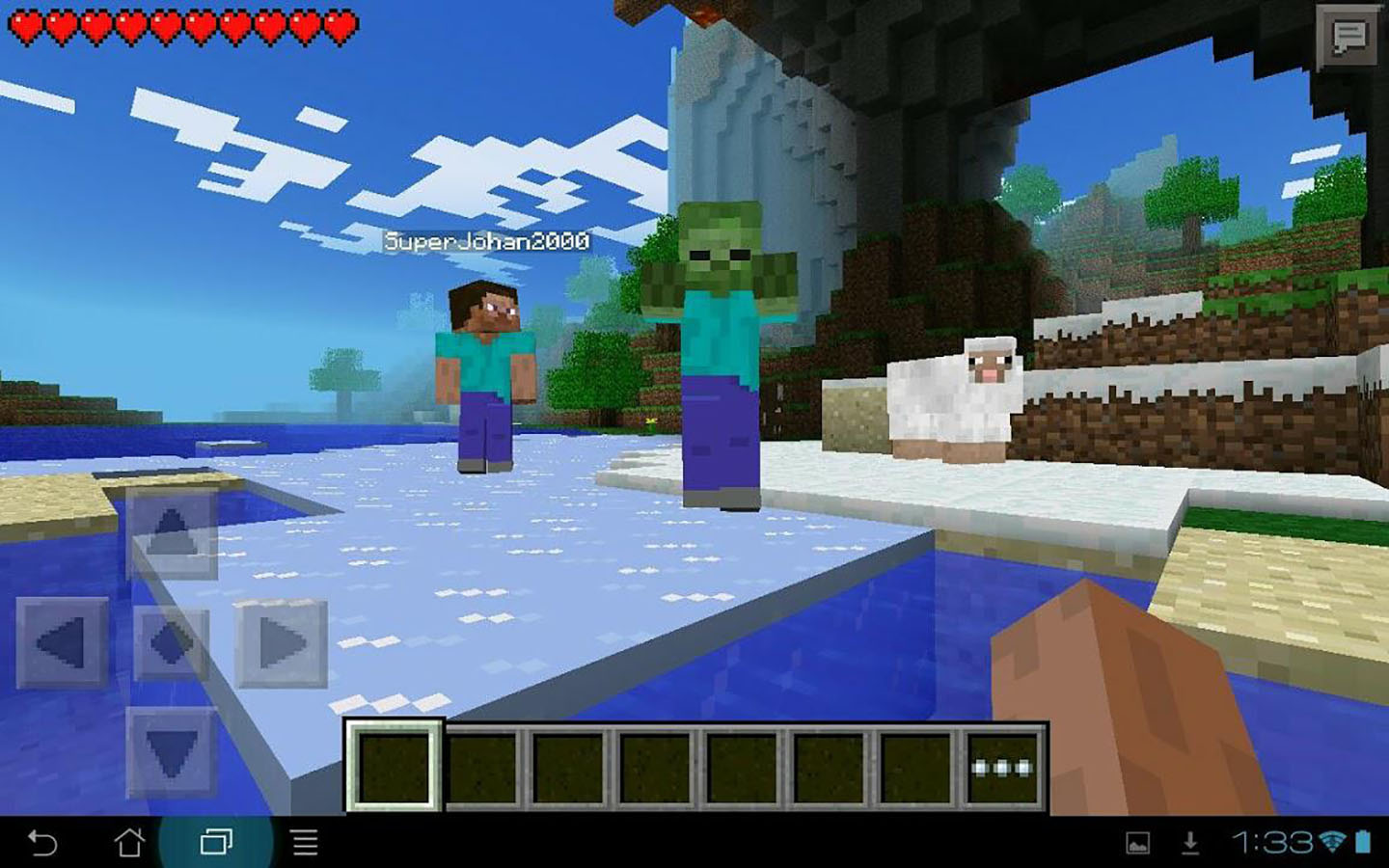
Minecraft PE, short for Minecraft Pocket Edition, is the tiny blocky universe that somehow fits inside your phone and then politely eats your entire afternoon. Technically, the mobile version is now part of Minecraft Bedrock Edition, but millions of players still call it Minecraft PE because “Pocket Edition” sounds charming, nostalgic, and slightly like something a wizard would keep next to spare cookies.
This beginner’s guide will walk you through the basics: how to start your first world, understand touch controls, survive your first night, craft tools, mine safely, build a base, play with friends, and avoid the classic rookie mistakes that turn a promising adventure into “why is there a creeper in my house?”
Whether you are playing on Android, iPhone, iPad, or another mobile device, the heart of Minecraft PE is simple: explore, gather, craft, build, survive, and occasionally question why you spent forty minutes decorating a chicken pen. That is normal. Welcome to Minecraft.
What Is Minecraft PE Today?
Minecraft PE was originally the mobile edition of Minecraft. Today, the official mobile game is simply called Minecraft and runs on the Bedrock engine, the same core version used across mobile devices, Windows, Xbox, PlayStation, Nintendo Switch, Chromebook, and other platforms. That matters because Bedrock supports cross-platform play, meaning mobile players can join friends on many other devices as long as everyone is using compatible versions and proper account settings.
In everyday conversation, “Minecraft PE,” “Minecraft Pocket Edition,” “Minecraft mobile,” and “Minecraft Bedrock on phone” often refer to the same general experience. For beginners, the most important thing is this: the mobile version is a full Minecraft experience, not a tiny demo. You can mine, craft, build, fight mobs, explore villages, enter caves, visit the Nether, use Marketplace content, join multiplayer worlds, and lose your first diamond pickaxe in lava like a true professional.
Getting Started: Install, Sign In, and Create Your First World
Step 1: Install the Official Game
Download Minecraft from the official app store for your device, such as Google Play or the Apple App Store. Avoid suspicious “free Minecraft PE” downloads from random websites. Those are less “hidden treasure” and more “digital raccoon wearing a trench coat.” The official version gives you updates, security, multiplayer access, Marketplace support, and the smoothest route into the game.
Step 2: Sign In With a Microsoft Account
You can play single-player without obsessing over account settings, but signing in with a Microsoft account is useful for multiplayer, Realms, achievements, purchased content, and cross-platform play. If multiplayer is blocked, it is often because privacy, online safety, or family settings need to be adjusted by the account owner or parent/guardian.
Step 3: Create a New World
Tap Play, choose Create New, and start a world. Beginners should keep things simple: choose Survival if you want the classic experience, or Creative if you want unlimited blocks and zero pressure. For your first Survival world, Normal or Easy difficulty is fine. Peaceful mode is also great if you want to learn crafting, building, mining, and movement without hostile mobs treating you like a buffet.
Survival vs. Creative: Which Mode Should Beginners Choose?
Survival Mode
Survival mode is the classic Minecraft adventure. You start with empty hands, collect resources, manage health and hunger, craft tools, build shelter, and deal with mobs at night. It gives every block value. A stack of wood feels like a paycheck. A bed feels like luxury. A single cooked porkchop can feel like fine dining if you have been running from skeletons since sunset.
Choose Survival if you want goals, danger, progression, and the satisfying feeling of earning your base piece by piece.
Creative Mode
Creative mode gives you unlimited blocks, flight, no hunger, and no normal survival pressure. It is perfect for learning controls, testing builds, practicing redstone, designing houses, or creating the castle of your dreams without spending three real-life evenings mining stone.
Choose Creative if you want to build freely, experiment, or learn Minecraft PE controls before jumping into Survival.
Learning Minecraft PE Controls
Mobile controls are the biggest difference between Minecraft PE and desktop Minecraft. Instead of a keyboard and mouse, you use touch controls on your screen. At first, it may feel like your thumbs are trying to pilot a refrigerator through a thunderstorm, but it becomes natural with practice.
Basic Touch Controls
Use the movement controls on the left side of the screen to walk. Swipe on the right side to look around. Tap and hold blocks to break them. Tap to place blocks or interact with objects. Use the jump button to hop over blocks, climb small obstacles, and accidentally fall into caves with confidence.
Your hotbar sits at the bottom of the screen. This is where your selected tools, blocks, food, and weapons appear. Tap an item in the hotbar to equip it. Open your inventory to manage everything else you are carrying, from logs and cobblestone to the suspicious number of flowers you picked because “they might be useful later.”
Adjust Your Control Settings
One of the best beginner tips for Minecraft PE is to customize your controls early. Open Settings and adjust button size, sensitivity, control layout, and touch options. If you keep misplacing blocks, accidentally breaking things, or spinning in circles while a zombie slowly judges you, your controls may need tuning.
Try different control schemes. Some players prefer classic touch controls, while others like joystick-style movement with a crosshair. There is no “best” setup for everyone. The best Minecraft PE controls are the ones that make your thumbs stop filing complaints.
Your First Day in Minecraft PE Survival
The first day in Survival mode is important because night brings hostile mobs such as zombies, skeletons, spiders, and creepers. You do not need a mansion by sunset. You need wood, tools, food, light, and shelter. Basically, Minecraft’s version of “get your life together before dark.”
1. Punch a Tree
Yes, really. Walk up to a tree, tap and hold the trunk, and collect logs. Wood is the starting point for almost everything. Turn logs into planks, then use planks to make a crafting table.
2. Make a Crafting Table
Your inventory has a small crafting grid, but a crafting table unlocks more recipes. Place it on the ground, tap it, and use it to craft basic tools. Start with a wooden pickaxe. Then mine stone and upgrade to stone tools as soon as possible.
3. Craft Basic Tools
Your first tool set should include a pickaxe, axe, shovel, and sword. The pickaxe mines stone and ore. The axe chops wood faster. The shovel clears dirt, sand, and gravel. The sword helps protect you from mobs. You can survive without perfect tools, but good tools make everything faster and less “why am I punching this rock for a year?”
4. Gather Food
Food matters in Survival mode because hunger affects healing and stamina. Early food sources include animals, apples, berries, crops from villages, and fish. Cook raw meat in a furnace when possible. Cooked food restores more hunger than raw food and has the added benefit of not making your character seem like a raccoon with a pickaxe.
5. Build a Simple Shelter
Before sunset, build a small shelter from dirt, wood, stone, or whatever blocks you have. It does not need windows, carpet, or dramatic balcony energy. A tiny box with a door is fine. Add torches inside if you have coal or charcoal. Light helps prevent hostile mobs from spawning nearby.
Crafting Basics Every Beginner Should Know
Crafting is the engine of Minecraft PE. You collect raw materials and turn them into useful items. Logs become planks. Planks become sticks. Sticks and cobblestone become tools. Sand becomes glass. Ore becomes metal ingots. Your entire world slowly transforms from “I have dirt” to “I have a castle, a farm, and emotional attachment to a sheep named Kevin.”
Use the Recipe Book
The recipe book is your friend. It shows items you can craft based on what you have collected. Beginners should use it often instead of trying to memorize every recipe immediately. Minecraft has many recipes, and nobody gives you a medal for remembering how to craft a composter on day one.
Make a Furnace
A furnace lets you smelt ores, cook food, make glass, and process materials. Craft one with cobblestone, place it near your crafting table, and fuel it with coal, charcoal, wood, or other burnable items. A beginner base without a furnace is like a kitchen without a stove: technically a room, but not yet civilization.
Build Chests Early
Your inventory fills up quickly. Craft chests and organize your items. Keep wood, stone, food, tools, ores, plants, and random treasures in separate storage areas if possible. You will thank yourself later when you are not digging through seven stacks of dirt to find one iron ingot.
Mining Safely on Mobile
Mining is where Minecraft gets exciting, rewarding, and occasionally rude. Underground, you can find coal, iron, copper, redstone, gold, diamonds, caves, lava, and mobs. The deeper you go, the more careful you should be.
Bring the Right Supplies
Before mining, bring torches, food, a pickaxe, a sword, blocks for building, and extra wood if possible. Torches help you see and reduce mob spawning. Blocks help you bridge gaps, block lava, climb out of holes, or panic-build a wall when a skeleton starts auditioning for an action movie.
Never Dig Straight Down
This is one of the oldest Minecraft rules for a reason. Digging straight down can drop you into lava, caves, deep holes, or danger. Instead, dig stairs downward or explore natural caves carefully. Also avoid digging directly above your head without caution, because falling gravel, sand, or lava can ruin your mining trip very quickly.
Mark Your Path
Mobile players can get turned around easily in caves. Place torches consistently on one side of the wall, use signs, block off dead ends, or create simple markers. Getting lost underground is a Minecraft tradition, but so is learning not to do it twice. Well, maybe three times.
Building Your First Real Base
Once you survive the first night, upgrade from “emergency dirt cube” to a proper starter base. A good beginner base should include a bed, crafting table, furnace, chests, torches, doors, and enough space to move around without opening a chest with your forehead.
Choose a Smart Location
Build near useful resources: trees, water, animals, caves, and flat land. Villages are excellent for beginners because they may provide beds, crops, shelter, and trading opportunities. Just be respectful. By “respectful,” we mean do not immediately steal every villager’s bed unless you are prepared to live with the guilt.
Light Up the Area
Place torches around your base, farm, paths, and entrances. Lighting keeps the area safer and makes your home easier to find at night. A well-lit base feels cozy. A dark base feels like it was designed by creepers.
Start a Farm
Farming gives you reliable food. Use a hoe to till dirt near water, plant seeds, and wait for crops to grow. Wheat, carrots, potatoes, and beetroot are beginner-friendly. You can also raise animals such as cows, sheep, chickens, and pigs. A farm turns Survival mode from daily snack panic into a calmer routine.
Playing Minecraft PE With Friends
Minecraft PE is more fun with friends, especially when one person builds a beautiful house and another person adds a dirt tower “for navigation.” Mobile players can join local worlds, online multiplayer sessions, servers, and Realms depending on account settings and platform compatibility.
Local and Online Multiplayer
If you and a friend are on the same network, local multiplayer may be available. For online play, sign in with a Microsoft account, add friends, and check multiplayer permissions. If a friend’s world does not appear, confirm that both games are updated, multiplayer is enabled, and account privacy settings allow online play.
Realms
Minecraft Realms are private, always-online worlds hosted for you. They are useful when friends want to play in the same world even when the original host is offline. Realms for Bedrock can support cross-play across compatible Bedrock platforms, including mobile, Windows, consoles, and more.
Servers and Marketplace Content
Bedrock Edition also includes access to featured servers and the Minecraft Marketplace. The Marketplace offers skins, worlds, texture packs, mash-up packs, and add-ons created by approved partners. Beginners should start with the base game first, then explore Marketplace content once they understand how worlds, resources, and settings work.
Common Beginner Mistakes in Minecraft PE
Ignoring the Settings Menu
Many new players struggle because they never adjust sensitivity, button size, or control layout. Spend five minutes customizing settings. It can save you hours of accidental block breaking and dramatic cliff incidents.
Wandering Too Far Without a Bed
A bed lets you sleep through the night and set your spawn point. Without one, dying far from home can send you back to your original spawn, where you may begin the ancient ritual of asking, “Where was my base again?”
Carrying Everything Important
Do not carry all your diamonds, rare items, and best tools while exploring dangerous places. Store valuables in chests. Minecraft is more enjoyable when a single lava accident does not become a full emotional documentary.
Building With Flammable Blocks Near Fire
Wooden houses are beautiful. Fire is also enthusiastic. Keep campfires, lava, lightning risks, and open flames away from flammable builds unless you want your starter home to become a brief but memorable barbecue.
Beginner Progression: What to Do After the First Few Days
After you have shelter, food, tools, and basic storage, Minecraft PE opens up. There is no single correct path, but beginners can follow a simple progression plan.
Upgrade to Iron
Mine iron ore, smelt it into ingots, and craft iron tools, armor, a shield, buckets, shears, and other useful items. Iron gear makes exploration much safer and faster.
Explore Villages
Villages can offer crops, beds, workstations, cats, and villagers who trade useful items. Protect villages from mobs if you plan to use them long-term. A safe village can become a great early-game hub.
Build Better Projects
Once survival is stable, start building with intention. Make a storage room, animal farm, crop field, mine entrance, bridge, dock, tower, or starter house with a real roof. A roof is optional in Minecraft, but so is dignity.
Prepare for Bigger Adventures
Eventually, you can explore deeper caves, find diamonds, enchant gear, visit the Nether, create maps, build automated farms, and chase long-term goals. Minecraft PE is not a game you “finish” quickly. It is a game that keeps handing you new ideas until your simple base becomes a kingdom with suspiciously advanced chicken infrastructure.
Best Practical Tips for Minecraft PE Beginners
Keep a stack of blocks in your hotbar. Blocks can help you climb, escape, block enemies, cross gaps, or protect yourself quickly. Always carry food once you have it. Place torches generously. Craft more tools than you think you need. Keep your base coordinates written down if coordinates are enabled. Sleep when possible. Build paths between important places. Make backups of valuable worlds when your device allows it.
Most importantly, do not rush. Minecraft rewards curiosity. If you see a mountain, climb it. If you find a cave, prepare first, then explore. If you want to build a giant duck statue beside your starter house, congratulations, you understand the spirit of the game.
Personal Experience: What Playing Minecraft PE Feels Like as a Beginner
Starting Minecraft PE for the first time can feel surprisingly confusing, even though the game looks simple. You spawn into a bright world, the music is calm, the trees are square, and everything seems peaceful. Then the sun starts moving, your inventory is full of random flowers, and you realize you have no house, no food, and no idea why the green creature is walking toward you with such personal confidence.
The first lesson most beginners learn is that Minecraft PE is easier when you slow down. On mobile, rushing usually leads to mis-taps. You try to place a block, open a chest instead, turn around too fast, fall off a hill, and suddenly your heroic adventure has become slapstick comedy. Practicing controls in Creative mode for ten or fifteen minutes can make Survival mode much more enjoyable. Fly around, place blocks, break blocks, open your inventory, switch hotbar items, and adjust your sensitivity until movement feels comfortable.
The second lesson is that small goals are better than giant plans. Many beginners start by imagining a castle, a farm, a mine, a village trading hall, and a secret underground base. That ambition is wonderful, but on day one, your best goal is much smaller: collect wood, make tools, get food, and survive the night. Once you have a bed and a safe shelter, your confidence grows quickly. Suddenly, building a real house feels possible. Then adding windows feels possible. Then a farm. Then a mine. Then, somehow, you are building a decorative bridge for cows.
Minecraft PE is also a great game for learning through mistakes. Your first base may be ugly. Your first mine may be messy. Your first farm may look like a vegetable crime scene. That is fine. The game does not demand perfection. In fact, the most memorable worlds often come from funny accidents: a cave discovered under your house, a sheep that refuses to leave your roof, a creeper explosion that accidentally creates a basement, or a village you “borrowed” from until it became your home.
Playing on a phone also changes how you approach the game. Short sessions work well. You can gather resources for ten minutes, decorate a room during a break, or explore a nearby hill without committing to a long play session. Minecraft PE is excellent for cozy, bite-sized progress. Over time, those little sessions add up. One day you open your world and realize your tiny dirt hut has become a proper base with storage, farms, paths, animals, and a view you are weirdly proud of.
The best experience tip is simple: play your way. Some players love mining. Some love building. Some want multiplayer chaos. Some enjoy peaceful farming and decorating. Minecraft PE gives you room to be practical, creative, silly, brave, cautious, or all of those within the same hour. If you are having fun, you are playing correctly.
Conclusion
Learning how to play Minecraft PE is less about memorizing every recipe and more about understanding the rhythm of the game. Gather wood, craft tools, build shelter, find food, light your base, mine carefully, and improve one step at a time. Once the basics feel comfortable, the world becomes your playground. You can build a cottage, explore caves, join friends, raise animals, trade with villagers, test Creative builds, or create a mobile masterpiece block by block.
Minecraft Pocket Edition may now live under the Bedrock name, but the magic remains the same: a huge world in your pocket, ready for adventure whenever you tap Play. Start small, stay curious, and remember the golden rule of Minecraft: never dig straight down unless you enjoy learning lessons the spicy way.
Note: This article was written from current, real Minecraft Bedrock/mobile gameplay knowledge and synthesized from official Minecraft, Microsoft/Xbox, Minecraft Education, and reputable Minecraft community reference materials. Source links are intentionally not displayed in the article body.